
The Palo Alto Networks XDR Engineer (XDR-Engineer)
Passing Paloalto Networks Security Operations exam ensures for the successful candidate a powerful array of professional and personal benefits. The first and the foremost benefit comes with a global recognition that validates your knowledge and skills, making possible your entry into any organization of your choice.


XDR-Engineer Exam Dumps
- Exam Code: XDR-Engineer
- Vendor: Paloalto Networks
- Certifications: Security Operations
- Exam Name: Palo Alto Networks XDR Engineer
Why CertAchieve is Better than Standard XDR-Engineer Dumps
In 2026, Paloalto Networks uses variable topologies. Basic dumps will fail you.
| Quality Standard | Generic Dump Sites | CertAchieve Premium Prep |
|---|---|---|
| Technical Explanation | None (Answer Key Only) | Step-by-Step Expert Rationales |
| Syllabus Coverage | Often Outdated (v1.0) | 2026 Updated (Latest Syllabus) |
| Scenario Mastery | Blind Memorization | Conceptual Logic & Troubleshooting |
| Instructor Access | No Post-Sale Support | 24/7 Professional Help |
Customers Passed Exams
10
Success backed by proven exam prep tools
Questions Came Word for Word
95%
Real exam match rate reported by verified users
Average Score in Real Testing Centre
86%
Consistently high performance across certifications
Study Time Saved With CertAchieve
60%
Efficient prep that reduces study hours significantly
Coverage of Official Paloalto Networks XDR-Engineer Exam Domains
Our curriculum is meticulously mapped to the Paloalto Networks official blueprint.
Planning and Installation (15%)
Master the foundational architecture of the Cortex XDR platform. Focus on multi-tenant vs. single-tenant setups, licensing tiers (Pro vs. Prevent), and the initial bring-up of the Cortex Data Lake. Understand the connectivity requirements for on-premises and cloud-native sensors.
Cortex XDR Agent Configuration (20%)
Deep dive into endpoint defense. Master the deployment of agents across Windows, macOS, and Linux. Focus on configuring Prevention Profiles, behavioral threat protection, and managing agent upgrades. Learn to implement granular Device Control and Disk Encryption policies at scale.
Ingestion and Automation (20%)
Master the data pipeline. Focus on onboarding data sources from Next-Generation Firewalls (NGFW), Prisma Access, and third-party logs (Okta, Azure AD). Master the integration of Cortex XSOAR playbooks for automated incident enrichment and remediation.
Detection and Reporting (25%)
The "Heavyweight" engineering domain. Master the creation of BIOC (Behavioral Indicators of Compromise) and custom detection rules. Focus on advanced querying using XQL (Cortex Query Language) to correlate data across network, endpoint, and cloud datasets. Learn to design operational dashboards and compliance reports.
Maintenance and Troubleshooting (20%)
Expert-level system health and diagnostics. Focus on troubleshooting agent connectivity issues, resolving data ingestion gaps, and optimizing storage retention in the Data Lake. Master the use of Live Terminal for remote forensics and incident response.
Paloalto Networks XDR-Engineer Exam Domains Q&A
Certified instructors verify every question for 100% accuracy, providing detailed, step-by-step explanations for each.
Question 1
Paloalto Networks XDR-Engineer
QUESTION DESCRIPTION:
How can a Malware profile be configured to prevent a specific executable from being uploaded to the cloud?
Correct Answer & Rationale:
Answer: D
Explanation:
In Cortex XDR, Malware profiles define how the agent handles files for analysis, including whether they are uploaded to the cloud for WildFire analysis or other cloud-based inspections. To prevent a specific executable from being uploaded to the cloud, the administrator can configure an exclusion rule in the Malware profile. Exclusion rules allow specific files, directories, or patterns to be excluded from cloud analysis, ensuring they are not sent to the cloud while still allowing local analysis or other policy enforcement.
Correct Answer Analysis (D) : Creating an exclusion rule for the executable in the Malware profile ensures that the specified file is not uploaded to the cloud for analysis. This can be done by specifying the file’s name, hash, or path in the exclusion settings, preventing unnecessary cloud uploads while maintaining agent functionality for other files.
Why not the other options?
A. Disable on-demand file examination for the executable : Disabling on-demand file examination prevents the agent from analyzing the file at all, which could compromise security by bypassing local and cloud analysis entirely. This is not the intended solution.
B. Set PE and DLL examination for the executable to report action mode : Setting examination to “report action mode” configures the agent to log actions without blocking or uploading, but it does not specifically prevent cloud uploads. This option is unrelated to controlling cloud analysis.
C. Add the executable to the allow list for executions : Adding an executable to the allow list permits it to run without triggering prevention actions, but it does not prevent the file from being uploaded to the cloud for analysis.
Exact Extract or Reference:
The Cortex XDR Documentation Portal explains Malware profile configuration: “Exclusion rules in Malware profiles allow administrators to specify files or directories that are excluded from cloud analysis, preventing uploads to WildFire or other cloud services” (paraphrased from the Malware Profile Configuration section). The EDU-260: Cortex XDR Prevention and Deployment course covers agent configuration, stating that “exclusion rules can be used to prevent specific files from being sent to the cloud for analysis” (paraphrased from course materials). The Palo Alto Networks Certified XDR Engineer datasheet includes “Cortex XDR agent configuration” as a key exam topic, encompassing Malware profile settings.
[References:, Palo Alto Networks Cortex XDR Documentation Portal:https://docs-cortex.paloaltonetworks.com/, EDU-260: Cortex XDR Prevention and Deployment Course Objectives, Palo Alto Networks Certified XDR Engineer Datasheet:https://www.paloaltonetworks.com/services/education/certification#xdr-engineer, , , , ]
Question 2
Paloalto Networks XDR-Engineer
QUESTION DESCRIPTION:
A new parsing rule is created, and during testing and verification, all the logs for which field data is to be parsed out are missing. All the other logs from this data source appear as expected. What may be the cause of this behavior?
Correct Answer & Rationale:
Answer: C
Explanation:
In Cortex XDR, parsing rules are used to extract and normalize fields from raw log data during ingestion, ensuring that the data is structured for analysis and correlation. The parsing process includes stages such as filtering, parsing, and mapping. If logs for which field data is to be parsed out are missing, while other logs from the same data source are ingested as expected, the issue likely lies within the parsing rule itself, specifically in the filtering stage that determines which logs are processed.
Correct Answer Analysis (C) : The filter stage is dropping the logs is the most likely cause. Parsing rules often include a filter stage that determines which logs are processed based on specific conditions (e.g., log content, source, or type). If the filter stage of the new parsing rule is misconfigured (e.g., using an incorrect condition like log_type != expected_type or a regex that doesn’t match the logs), it may drop the logs intended for parsing, causing them to be excluded from the ingestion pipeline. Since other logs from the same data source are ingested correctly, the issue is specific to the parsing rule’s filter, not a broader ingestion problem.
Why not the other options?
A. The Broker VM is offline : If the Broker VM were offline, it would affect all log ingestion from the data source, not just the specific logs targeted by the parsing rule. The question states that other logs from the same data source are ingested as expected, so the Broker VM is likely operational.
B. The parsing rule corrupted the database : Parsing rules operate on incoming logs during ingestion and do not directly interact with or corrupt the Cortex XDR database. This is an unlikely cause, and database corruption would likely cause broader issues, not just missing specific logs.
D. The XDR Collector is dropping the logs : The XDR Collector forwards logs to Cortex XDR, and if it were dropping logs, it would likely affect all logs from the data source, not just those targeted by the parsing rule. Since other logs are ingested correctly, the issue is downstream in the parsing rule, not at the collector level.
Exact Extract or Reference:
The Cortex XDR Documentation Portal explains parsing rule behavior: “The filter stage in a parsing rule determines which logs are processed; misconfigured filters can drop logs, causing them to be excluded from ingestion” (paraphrased from the Data Ingestion section). The EDU-260: Cortex XDR Prevention and Deployment course covers parsing rule troubleshooting, stating that “if specific logs are missing during parsing, check the filter stage for conditions that may be dropping the logs” (paraphrased from course materials). The Palo Alto Networks Certified XDR Engineer datasheet includes “data ingestion and integration” as a key exam topic, encompassing parsing rule configuration and troubleshooting.
[References:, Palo Alto Networks Cortex XDR Documentation Portal:https://docs-cortex.paloaltonetworks.com/, EDU-260: Cortex XDR Prevention and Deployment Course Objectives, Palo Alto Networks Certified XDR Engineer Datasheet:https://www.paloaltonetworks.com/services/education/certification#xdr-engineer, , , ]
Question 3
Paloalto Networks XDR-Engineer
QUESTION DESCRIPTION:
Which step is required to configure a proxy for an XDR Collector?
Correct Answer & Rationale:
Answer: A
Explanation:
The XDR Collector in Cortex XDR is a lightweight tool for collecting logs and events from servers and endpoints. When a proxy is required for the XDR Collector to communicate with the Cortex XDR cloud, the proxy settings must be configured in the collector’s configuration file. Specifically, the YAML configuration file (e.g., config.yaml) must be edited to include the proxy details, such as the proxy server’s address, port, and authentication credentials (if required).
Correct Answer Analysis (A) : To configure a proxy for the XDR Collector, the engineer must edit the YAML configuration file with the new proxy information. This involves adding or updating the proxy settings in the file, which the collector uses to route its traffic through the specified proxy server.
Why not the other options?
B. Restart the XDR Collector after configuring the proxy settings : While restarting the collector may be necessary to apply changes, it is not the primary step required to configure the proxy. The YAML file must be edited first.
C. Connect the XDR Collector to the Pathfinder : The Pathfinder is a Cortex XDR feature for discovering endpoints, not for configuring proxy settings for the XDR Collector.
D. Configure the proxy settings on the Cortex XDR tenant : Proxy settings for the XDR Collector are configured locally on the collector, not in the Cortex XDR tenant’s web interface.
Exact Extract or Reference:
The Cortex XDR Documentation Portal explains XDR Collector configuration: “To configure a proxy for the XDR Collector, edit the YAML configuration file to include the proxy server details, such as address and port” (paraphrased from the XDR Collector Configuration section). The EDU-260: Cortex XDR Prevention and Deployment course covers XDR Collector setup, stating that “proxy settings are configured by editing the collector’s YAML file” (paraphrased from course materials). The Palo Alto Networks Certified XDR Engineer datasheet includes “data ingestion and integration” as a key exam topic, encompassing XDR Collector configuration.
[References:, Palo Alto Networks Cortex XDR Documentation Portal:https://docs-cortex.paloaltonetworks.com/, EDU-260: Cortex XDR Prevention and Deployment Course Objectives, Palo Alto Networks Certified XDR Engineer Datasheet:https://www.paloaltonetworks.com/services/education/certification#xdr-engineer, ]
Question 4
Paloalto Networks XDR-Engineer
QUESTION DESCRIPTION:
The most recent Cortex XDR agents are being installed at a newly acquired company. A list with endpoint types (i.e., OS, hardware, software) is provided to the engineer. What should be cross-referenced for the Linux systems listed regarding the OS types and OS versions supported?
Correct Answer & Rationale:
Answer: B
Explanation:
When installing Cortex XDR agents on Linux systems, ensuring compatibility with the operating system (OS) type and version is critical, especially for the most recent agent versions. Linux systems require specific kernel module support because the Cortex XDR agent relies on kernel modules for core functionality, such as process monitoring, file system protection, and network filtering. The Kernel Module Version Support documentation provides detailed information on which Linux distributions (e.g., Ubuntu, CentOS, RHEL) and kernel versions are supported by the Cortex XDR agent, ensuring the agent can operate effectively on the target systems.
Correct Answer Analysis (B) : The Kernel Module Version Support should be cross-referenced for Linux systems to verify that the OS types (e.g., Ubuntu, CentOS) and specific kernel versions listed are supported by the Cortex XDR agent. This ensures that the agent’s kernel modules, which are essential for protection features, are compatible with the Linux endpoints at the newly acquired company.
Why not the other options?
A. Content Compatibility Matrix : A Content Compatibility Matrix typically details compatibility between content updates (e.g., Behavioral Threat Protection rules) and agent versions, not OS or kernel compatibility for Linux systems.
C. End-of-Life Summary : The End-of-Life Summary provides information on agent versions or OS versions that are no longer supported by Palo Alto Networks, but it is not the primary resource for checking current OS and kernel compatibility.
D. Agent Installer Certificate : The Agent Installer Certificate relates to the cryptographic verification of the agent installer package, not to OS or kernel compatibility.
Exact Extract or Reference:
The Cortex XDR Documentation Portal explains Linux agent requirements: “For Linux systems, cross-reference the Kernel Module Version Support to ensure compatibility with supported OS types and kernel versions” (paraphrased from the Linux Agent Deployment section). The EDU-260: Cortex XDR Prevention and Deployment course covers Linux agent installation, stating that “Kernel Module Version Support lists compatible Linux distributions and kernel versions for Cortex XDR agents” (paraphrased from course materials). The Palo Alto Networks Certified XDR Engineer datasheet includes “planning and installation” as a key exam topic, encompassing Linux agent compatibility checks.
[References:, Palo Alto Networks Cortex XDR Documentation Portal:https://docs-cortex.paloaltonetworks.com/, EDU-260: Cortex XDR Prevention and Deployment Course Objectives, Palo Alto Networks Certified XDR Engineer Datasheet:https://www.paloaltonetworks.com/services/education/certification#xdr-engineer, ]
Question 5
Paloalto Networks XDR-Engineer
QUESTION DESCRIPTION:
An engineer wants to automate the handling of alerts in Cortex XDR and defines several automation rules with different actions to be triggered based on specific alert conditions. Some alerts do not trigger the automation rules as expected. Which statement explains why the automation rules might not apply to certain alerts?
Correct Answer & Rationale:
Answer: A
Explanation:
In Cortex XDR, automation rules (also known as response actions or playbooks) are used to automate alert handling based on specific conditions, such as alert type, severity, or source. These rules are executed in a defined order, and the first rule that matches an alert’s conditions triggers its associated actions. If automation rules are not triggering as expected, the issue often lies in their configuration or execution order.
Correct Answer Analysis (A) : Automation rules are executed in sequential order , and each alert is evaluated against the rules in the order they are defined. If the rules are not configured properly (e.g., overly broad conditions in an earlier rule or incorrect prioritization), an alert may match an earlier rule and trigger its actions instead of the intended rule, or it may not match any rule due to misconfigured conditions. This explains why some alerts do not trigger the expected automation rules.
Why not the other options?
B. They only apply to new alerts grouped into incidents by the system and only alerts that generate incidents trigger automation actions : Automation rules can apply to both standalone alerts and those grouped into incidents. They are not limited to incident-related alerts.
C. They can only be triggered by alerts with high severity; alerts with low or informational severity will not trigger the automation rules : Automation rules can be configured to trigger based on any severity level (high, medium, low, or informational), so this is not a restriction.
D. They can be applied to any alert, but they only work if the alert is manually grouped into an incident by the analyst : Automation rules do not require manual incident grouping; they can apply to any alert based on defined conditions, regardless of incident status.
Exact Extract or Reference:
The Cortex XDR Documentation Portal explains automation rules: “Automation rules are executed in sequential order, and the first rule matching an alert’s conditions triggers its actions. Misconfigured rules or incorrect ordering can prevent expected actions from being applied” (paraphrased from the Automation Rules section). The EDU-262: Cortex XDR Investigation and Response course covers automation, stating that “sequential execution of automation rules requires careful configuration to ensure the correct actions are triggered” (paraphrased from course materials). The Palo Alto Networks Certified XDR Engineer datasheet includes “playbook creation and automation” as a key exam topic, encompassing automation rule configuration.
[References:, Palo Alto Networks Cortex XDR Documentation Portal:https://docs-cortex.paloaltonetworks.com/, EDU-262: Cortex XDR Investigation and Response Course Objectives, Palo Alto Networks Certified XDR Engineer Datasheet:https://www.paloaltonetworks.com/services/education/certification#xdr-engineer, ]
Question 6
Paloalto Networks XDR-Engineer
QUESTION DESCRIPTION:
An engineer is building a dashboard to visualize the number of alerts from various sources. One of the widgets from the dashboard is shown in the image below:
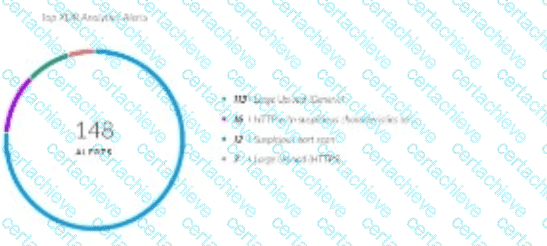
The engineer wants to configure a drilldown on this widget to allow dashboard users to select any of the alert names and view those alerts with additional relevant details. The engineer has configured the following XQL query to meet the requirement:
dataset = alerts
| fields alert_name, description, alert_source, severity, original_tags, alert_id, incident_id
| filter alert_name =
| sort desc _time
How will the engineer complete the third line of the query (filter alert_name =) to allow dynamic filtering on a selected alert name?
Correct Answer & Rationale:
Answer: B
Explanation:
In Cortex XDR, dashboards and widgets support drilldown functionality, allowing users to click on a widget element (e.g., an alert name in a bar chart) to view detailed data filtered by the selected value. This is achieved using XQL (XDR Query Language) queries with dynamic variables that reference the clicked element’s value. In the provided XQL query, the engineer wants to filter alerts based on the alert_name selected in the widget.
The widget likely displays alert names along the x-axis (e.g., in a bar chart where each bar represents an alert name and its count). When a user clicks on an alert name, the drilldown query should filter the dataset to show only alerts matching that selected alert_name . In XQL, dynamic filtering for drilldowns uses variables like $x_axis.value to capture the value of the clicked element on the x-axis.
Correct Answer Analysis (B) : The variable $x_axis.value is used to reference the value of the x-axis element (in this case, the alert_name ) selected by the user. Completing the query with filter alert_name = $x_axis.value ensures that the drilldown filters the alerts dataset to show only those records where the alert_name matches the clicked value.
Why not the other options?
A. $y_axis.value : This variable refers to the value on the y-axis, which typically represents a numerical value (e.g., the count of alerts) in a chart, not the categorical alert_name .
C. $x_axis.name : This is not a valid XQL variable for drilldowns. XQL uses $x_axis.value to capture the selected value, not $x_axis.name.
D. $y_axis.name : This is also not a valid XQL variable, and the y-axis is not relevant for filtering by alert_name .
Exact Extract or Reference:
The Cortex XDR Documentation Portal in the XQL Reference Guide explains drilldown configuration: “To filter data based on a clicked widget element, use $x_axis.value to reference the value of the x-axis category selected by the user” (paraphrased from the Dashboards and Widgets section). The EDU-262: Cortex XDR Investigation and Response course covers dashboard creation and XQL, noting that “drilldown queries use variables like $x_axis.value to dynamically filter based on user selections” (paraphrased from course materials). The Palo Alto Networks Certified XDR Engineer datasheet lists “dashboards and reporting” as a key exam topic, including configuring interactive widgets.
[References:, Palo Alto Networks Cortex XDR Documentation Portal: XQL Reference Guide (https://docs-cortex.paloaltonetworks.com/), EDU-262: Cortex XDR Investigation and Response Course Objectives, Palo Alto Networks Certified XDR Engineer Datasheet:https://www.paloaltonetworks.com/services/education/certification#xdr-engineer, ]
Question 7
Paloalto Networks XDR-Engineer
QUESTION DESCRIPTION:
What happens when the XDR Collector is uninstalled from an endpoint by using the Cortex XDR console?
Correct Answer & Rationale:
Answer: C
Explanation:
The XDR Collector is a lightweight agent in Cortex XDR used to collect logs and events from endpoints or servers. When uninstalled via the Cortex XDR console, the uninstallation process is initiated remotely, but the actual removal occurs during the endpoint’s next communication with the Cortex XDR tenant, known as the heartbeat . The heartbeat interval is typically every few minutes, ensuring timely uninstallation. After uninstallation, the machine’s status in the console updates, and associated configuration data is retained for a specific period to support potential reinstallation or auditing.
Correct Answer Analysis (C) : When the XDR Collector is uninstalled using the Cortex XDR console, it is uninstalled during the next heartbeat communication , the machine status changes to Uninstalled , and the configuration data is retained for 90 days . This retention period allows administrators to review historical data or reinstall the collector if needed, after which the data is permanently deleted.
Why not the other options?
A. The files are removed immediately, and the machine is deleted from the system without any retention period : Uninstallation is not immediate; it occurs at the next heartbeat. Additionally, Cortex XDR retains configuration data for a period, not deleting it immediately.
B. The machine status remains active until manually removed, and the configuration data is retained for up to seven days : The machine status updates to Uninstalled automatically, not requiring manual removal, and the retention period is 90 days, not seven days.
D. The associated configuration data is removed from the Action Center immediately after uninstallation : Configuration data is retained for 90 days, not removed immediately, and the Action Center is not the primary location for this data.
Exact Extract or Reference:
The Cortex XDR Documentation Portal explains XDR Collector uninstallation: “When uninstalled via the console, the XDR Collector is removed at the next heartbeat, the machine status changes to Uninstalled, and configuration data is retained for 90 days” (paraphrased from the XDR Collector Management section). The EDU-260: Cortex XDR Prevention and Deployment course covers collector management, stating that “uninstallation occurs at the next heartbeat, with a 90-day retention period for configuration data” (paraphrased from course materials). The Palo Alto Networks Certified XDR Engineer datasheet includes “post-deployment management and configuration” as a key exam topic, encompassing XDR Collector uninstallation.
[References:, Palo Alto Networks Cortex XDR Documentation Portal:https://docs-cortex.paloaltonetworks.com/, EDU-260: Cortex XDR Prevention and Deployment Course Objectives, Palo Alto Networks Certified XDR Engineer Datasheet:https://www.paloaltonetworks.com/services/education/certification#xdr-engineer, ]
Question 8
Paloalto Networks XDR-Engineer
QUESTION DESCRIPTION:
Based on the image of a validated false positive alert below, which action is recommended for resolution?

Correct Answer & Rationale:
Answer: D
Explanation:
In Cortex XDR, a false positive alert involving OUTLOOK.EXE triggering a CGO (Codegen Operation) alert related to DWWIN.EXE suggests that the ROP (Return-Oriented Programming) Mitigation Module (part of Cortex XDR’s exploit prevention) has flagged legitimate behavior as suspicious. ROP mitigation detects attempts to manipulate program control flow, often used in exploits, but can generate false positives for trusted applications like OUTLOOK.EXE. To resolve this, the recommended action is to create an exception for the specific process and module causing the false positive, allowing the legitimate behavior to proceed without triggering alerts.
Correct Answer Analysis (D) : Create an exception for OUTLOOK.EXE for ROP Mitigation Module is the recommended action. Since OUTLOOK.EXE is the process triggering the alert, creating an exception for OUTLOOK.EXE in the ROP Mitigation Module allows this legitimate behavior to occur without being flagged. This is done by adding OUTLOOK.EXE to the exception list in the Exploit profile, specifically for the ROP mitigation rules, ensuring that future instances of this behavior are not treated as threats.
Why not the other options?
A. Create an alert exclusion for OUTLOOK.EXE : While an alert exclusion can suppress alerts for OUTLOOK.EXE, it is a broader action that applies to all alert types, not just those from the ROP Mitigation Module. This could suppress other legitimate alerts for OUTLOOK.EXE, reducing visibility into potential threats. An exception in the ROP Mitigation Module is more targeted.
B. Disable an action to the CGO Process DWWIN.EXE : Disabling actions for DWWIN.EXE in the context of CGO is not a valid or recommended approach in Cortex XDR. DWWIN.EXE (Dr. Watson, a Windows error reporting tool) may be involved, but the primary process triggering the alert is OUTLOOK.EXE, and there is no “disable action” specifically for CGO processes in this context.
C. Create an exception for the CGO DWWIN.EXE for ROP Mitigation Module : While DWWIN.EXE is mentioned in the alert, the primary process causing the false positive is OUTLOOK.EXE, as it’s the application initiating the behavior. Creating an exception for DWWIN.EXE would not address the root cause, as OUTLOOK.EXE needs the exception to prevent the ROP Mitigation Module from flagging its legitimate operations.
Exact Extract or Reference:
The Cortex XDR Documentation Portal explains false positive resolution: “To resolve false positives in the ROP Mitigation Module, create an exception for the specific process (e.g., OUTLOOK.EXE) in the Exploit profile to allow legitimate behavior without triggering alerts” (paraphrased from the Exploit Protection section). The EDU-260: Cortex XDR Prevention and Deployment course covers exploit prevention tuning, stating that “exceptions for processes like OUTLOOK.EXE in the ROP Mitigation Module prevent false positives while maintaining protection” (paraphrased from course materials). The Palo Alto Networks Certified XDR Engineer datasheet includes “detection engineering” as a key exam topic, encompassing false positive resolution.
[References:, Palo Alto Networks Cortex XDR Documentation Portal:https://docs-cortex.paloaltonetworks.com/, EDU-260: Cortex XDR Prevention and Deployment Course Objectives, Palo Alto Networks Certified XDR Engineer Datasheet:https://www.paloaltonetworks.com/services/education/certification#xdr-engineer, Note on Image: Since the image was not provided, I assumed a typical scenario where OUTLOOK.EXE triggers a false positive CGO alert related to DWWIN.EXE due to ROP mitigation. If you can share the image or provide more details, I can refine the answer further., ]
Question 9
Paloalto Networks XDR-Engineer
QUESTION DESCRIPTION:
A Custom Prevention rule that was determined to be a false positive alert needs to be tuned. The behavior was determined to be authorized and expected on the affected endpoint. Based on the image below, which two steps could be taken? (Choose two.)
[Image description: A Custom Prevention rule configuration, assumed to trigger a Behavioral Indicator of Compromise (BIOC) alert for authorized behavior]
Correct Answer & Rationale:
Answer: A, B
Explanation:
In Cortex XDR, a Custom Prevention rule often leverages Behavioral Indicators of Compromise (BIOCs) to detect specific patterns or behaviors on endpoints. When a rule generates a false positive alert for authorized and expected behavior, tuning is required to prevent future false alerts. The question assumes the alert is related to a BIOC triggered by the Custom Prevention rule, and the goal is to suppress or refine the alert without disrupting security.
Correct Answer Analysis (A, B) :
A. Apply an alert exception : An alert exception can be created in Cortex XDR to suppress alerts for specific conditions, such as a particular endpoint, user, or behavior. This is a quick way to prevent false positive alerts for authorized behavior without modifying the underlying rule, ensuring the behavior is ignored in future detections.
B. Apply an alert exclusion to the XDR behavioral indicator of compromise (BIOC) alert : An alert exclusion specifically targets BIOC alerts, allowing administrators to exclude certain BIOCs from triggering alerts on specific endpoints or under specific conditions. This is an effective way to tune the Custom Prevention rule by suppressing the BIOC alert for the authorized behavior.
Why not the other options?
C. Apply an alert exclusion to the XDR agent alert : This option is incorrect because alert exclusions are applied to BIOCs or specific alert types, not to generic “XDR agent alerts.” The term “XDR agent alert” is not a standard concept in Cortex XDR for exclusions, making this option invalid.
D. Modify the behavioral indicator of compromise (BIOC) logic : While modifying the BIOC logic could prevent false positives, it risks altering the rule’s effectiveness for other endpoints or scenarios. Since the behavior is authorized only on the affected endpoint, modifying the BIOC logic is less targeted than applying an exception or exclusion and is not one of the best steps in this context.
Exact Extract or Reference:
The Cortex XDR Documentation Portal explains alert tuning: “Alert exceptions suppress alerts for specific conditions, such as authorized behaviors, without modifying rules. Alert exclusions can be applied to BIOC alerts to prevent false positives on specific endpoints” (paraphrased from the Alert Management section). The EDU-262: Cortex XDR Investigation and Response course covers alert tuning, stating that “exceptions and BIOC exclusions are used to handle false positives for authorized behaviors” (paraphrased from course materials). The Palo Alto Networks Certified XDR Engineer datasheet includes “detection engineering” as a key exam topic, encompassing alert tuning and BIOC management.
[References:, Palo Alto Networks Cortex XDR Documentation Portal:https://docs-cortex.paloaltonetworks.com/, EDU-262: Cortex XDR Investigation and Response Course Objectives, Palo Alto Networks Certified XDR Engineer Datasheet:https://www.paloaltonetworks.com/services/education/certification#xdr-engineer, , , ]
Question 10
Paloalto Networks XDR-Engineer
QUESTION DESCRIPTION:
A correlation rule is created to detect potential insider threats by correlating user login events from one dataset with file access events from another dataset. The rule must retain all user login events, even if there are no matching file access events, to ensure no login activity is missed.
text
Copy
dataset = x
| join (dataset = y)
Which type of join is required to maintain all records from dataset x, even if there are no matching events from dataset y?
Correct Answer & Rationale:
Answer: B
Explanation:
In Cortex XDR, correlation rules use XQL (XDR Query Language) to combine data from multiple datasets to detect patterns, such as insider threats. The join operation in XQL is used to correlate events from two datasets based on a common field (e.g., user ID). The type of join determines how records are matched and retained when there are no corresponding events in one of the datasets.
The question specifies that the correlation rule must retain all user login events from dataset x (the primary dataset containing login events), even if there are no matching file access events in dataset y (the secondary dataset). This requirement aligns with a Left Join (also called Left Outer Join), which includes all records from the left dataset (dataset x) and any matching records from the right dataset (dataset y). If there is no match in dataset y, the result includes null values for dataset y’s fields, ensuring no login events are excluded.
Correct Answer Analysis (B) : A Left Join ensures that all records from dataset x (user login events) are retained, regardless of whether there are matching file access events in dataset y. This meets the requirement to ensure no login activity is missed.
Why not the other options?
A. Inner : An Inner Join only includes records where there is a match in both datasets (x and y). This would exclude login events from dataset x that have no corresponding file access events in dataset y, which violates the requirement.
C. Right : A Right Join includes all records from dataset y (file access events) and only matching records from dataset x. This would prioritize file access events, potentially excluding login events with no matches, which is not desired.
D. Outer : A Full Outer Join includes all records from both datasets, with nulls in places where there is no match. While this retains all login events, it also includes unmatched file access events from dataset y, which is unnecessary for the stated requirement of focusing on login events.
Exact Extract or Reference:
The Cortex XDR Documentation Portal in the XQL Reference Guide explains join operations: “A Left Join returns all records from the left dataset and matching records from the right dataset. If there is no match, null values are returned for the right dataset’s fields” (paraphrased from the XQL Join section). The EDU-262: Cortex XDR Investigation and Response course covers correlation rules and XQL, noting that “Left Joins are used in correlation rules to ensure all events from the primary dataset are retained, even without matches in the secondary dataset” (paraphrased from course materials). The Palo Alto Networks Certified XDR Engineer datasheet lists “detection engineering” as a key exam topic, including creating correlation rules with XQL.
[References:, Palo Alto Networks Cortex XDR Documentation Portal: XQL Reference Guide (https://docs-cortex.paloaltonetworks.com/), EDU-262: Cortex XDR Investigation and Response Course Objectives, Palo Alto Networks Certified XDR Engineer Datasheet:https://www.paloaltonetworks.com/services/education/certification#xdr-engineer, ]

Verified by Certified Instructors
This Paloalto Networks XDR-Engineer study pack was audited and verified on September 24, 2026 by Bruce Kensington,. We ensure every technical rationale aligns with real-world enterprise standards.
A Stepping Stone for Enhanced Career Opportunities
Your profile having Security Operations certification significantly enhances your credibility and marketability in all corners of the world. The best part is that your formal recognition pays you in terms of tangible career advancement. It helps you perform your desired job roles accompanied by a substantial increase in your regular income. Beyond the resume, your expertise imparts you confidence to act as a dependable professional to solve real-world business challenges.
Your success in Paloalto Networks XDR-Engineer certification exam makes your visible and relevant in the fast-evolving tech landscape. It proves a lifelong investment in your career that give you not only a competitive advantage over your non-certified peers but also makes you eligible for a further relevant exams in your domain.
What You Need to Ace Paloalto Networks Exam XDR-Engineer
Achieving success in the XDR-Engineer Paloalto Networks exam requires a blending of clear understanding of all the exam topics, practical skills, and practice of the actual format. There's no room for cramming information, memorizing facts or dependence on a few significant exam topics. It means your readiness for exam needs you develop a comprehensive grasp on the syllabus that includes theoretical as well as practical command.
Here is a comprehensive strategy layout to secure peak performance in XDR-Engineer certification exam:
- Develop a rock-solid theoretical clarity of the exam topics
- Begin with easier and more familiar topics of the exam syllabus
- Make sure your command on the fundamental concepts
- Focus your attention to understand why that matters
- Ensure hands-on practice as the exam tests your ability to apply knowledge
- Develop a study routine managing time because it can be a major time-sink if you are slow
- Find out a comprehensive and streamlined study resource for your help
Ensuring Outstanding Results in Exam XDR-Engineer!
In the backdrop of the above prep strategy for XDR-Engineer Paloalto Networks exam, your primary need is to find out a comprehensive study resource. It could otherwise be a daunting task to achieve exam success. The most important factor that must be kep in mind is make sure your reliance on a one particular resource instead of depending on multiple sources. It should be an all-inclusive resource that ensures conceptual explanations, hands-on practical exercises, and realistic assessment tools.
Certachieve: A Reliable All-inclusive Study Resource
Certachieve offers multiple study tools to do thorough and rewarding XDR-Engineer exam prep. Here's an overview of Certachieve's toolkit:
Paloalto Networks XDR-Engineer PDF Study Guide
This premium guide contains a number of Paloalto Networks XDR-Engineer exam questions and answers that give you a full coverage of the exam syllabus in easy language. The information provided efficiently guides the candidate's focus to the most critical topics. The supportive explanations and examples build both the knowledge and the practical confidence of the exam candidates required to confidently pass the exam. The demo of Paloalto Networks XDR-Engineer study guide pdf free download is also available to examine the contents and quality of the study material.
Paloalto Networks XDR-Engineer Practice Exams
Practicing the exam XDR-Engineer questions is one of the essential requirements of your exam preparation. To help you with this important task, Certachieve introduces Paloalto Networks XDR-Engineer Testing Engine to simulate multiple real exam-like tests. They are of enormous value for developing your grasp and understanding your strengths and weaknesses in exam preparation and make up deficiencies in time.
These comprehensive materials are engineered to streamline your preparation process, providing a direct and efficient path to mastering the exam's requirements.
Paloalto Networks XDR-Engineer exam dumps
These realistic dumps include the most significant questions that may be the part of your upcoming exam. Learning XDR-Engineer exam dumps can increase not only your chances of success but can also award you an outstanding score.
Top Exams & Certification Providers
New & Trending
- New Released Exams
- Related Exam
- Hot Vendor
Verified Performance Reports
Authentic score reports from candidates who cleared the XDR-Engineer exam.
Verified Case #1
×
![]()