
The Linux Essentials Certificate Exam - version 1.6 (010-160)
Passing LPI LPI Linux Essentials exam ensures for the successful candidate a powerful array of professional and personal benefits. The first and the foremost benefit comes with a global recognition that validates your knowledge and skills, making possible your entry into any organization of your choice.


010-160 Exam Dumps
- Exam Code: 010-160
- Vendor: LPI
- Certifications: LPI Linux Essentials
- Exam Name: Linux Essentials Certificate Exam - version 1.6
Why CertAchieve is Better than Standard 010-160 Dumps
In 2026, LPI uses variable topologies. Basic dumps will fail you.
| Quality Standard | Generic Dump Sites | CertAchieve Premium Prep |
|---|---|---|
| Technical Explanation | None (Answer Key Only) | Step-by-Step Expert Rationales |
| Syllabus Coverage | Often Outdated (v1.0) | 2026 Updated (Latest Syllabus) |
| Scenario Mastery | Blind Memorization | Conceptual Logic & Troubleshooting |
| Instructor Access | No Post-Sale Support | 24/7 Professional Help |
Customers Passed Exams
10
Success backed by proven exam prep tools
Questions Came Word for Word
95%
Real exam match rate reported by verified users
Average Score in Real Testing Centre
93%
Consistently high performance across certifications
Study Time Saved With CertAchieve
60%
Efficient prep that reduces study hours significantly
Coverage of Official LPI 010-160 Exam Domains
Our curriculum is meticulously mapped to the LPI official blueprint.
Finding Your Way on a Linux System (15%)
Mastering navigation and help systems. Focus on using command-line help (man, info, --help), navigating the Linux filesystem hierarchy (FHS), and efficiently locating files using find, locate, and which.
The Power of the Command Line (23%)
The technical core of the exam. Master the Bash shell basics, including command-line syntax, globbing (wildcards), and quoting. Focus on creating basic shell scripts, utilizing environment variables, and mastering I/O redirection and pipes to chain commands.
The Linux Operating System (23%)
Focus on system components and software management. Master hardware identification, managing processes (ps, top, kill), and software installation using package managers like dpkg, apt, rpm, and yum. Includes basic network configuration and viewing log files.
Security and File Permissions (27%)
The highest-weighted domain. Master the Linux security model, including user and group management. Deep dive into file permissions (rwx), ownership (chown, chgrp), and the use of the root user versus standard users with sudo privileges.
LPI 010-160 Exam Domains Q&A
Certified instructors verify every question for 100% accuracy, providing detailed, step-by-step explanations for each.
Question 1
LPI 010-160
QUESTION DESCRIPTION:
Which of the following tasks can the command passwd accomplish? (Choose two.)
Correct Answer & Rationale:
Answer: B, E
Explanation:
The passwd command in Linux is used to change the password of a user account. A normal user can run passwd to change their own password, and a system administrator (the superuser) can use passwd to change another user’s password, or define how that account’s password can be used or changed 1 . The passwd command can also be used to lock or unlock a user account. Locking a user account means disabling the user’s ability to log in to the system, while unlocking a user account means restoring the user’s ability to log in. To lock a user account, the passwd command can be used with the -l option, followed by the username. To unlock a user account, the passwd command can be used with the -u option, followed by the username 1 2 . The passwd command cannot be used to change a user’s username, create a new user account, or create a new user group. These tasks require different commands, such as usermod, useradd, or groupadd 3 4 5 . References: 1 : Linux Passwd Command Help and Examples 2 : Passwd command in Linux: 8 Practical Examples 3 : usermod(8) - Linux man page 4 : useradd(8) - Linux man page 5 : groupadd(8) - Linux man page
Question 2
LPI 010-160
QUESTION DESCRIPTION:
The current directory contains the following file:
-rw-r—r— 1 root exec 24551 Apr 2 12:36 test.sh
The file contains a valid shell script, but executing this file using ./test.sh leads to this error:
bash: ./test.sh: Permission denied
What should be done in order to successfully execute the script?
Correct Answer & Rationale:
Answer: B
Explanation:
The execute bit in Linux is a permission bit that allows the user to run an executable file or enter a directory. For regular files, such as scripts or binaries, the execute bit must be set for the user to run them. For directories, the execute bit allows the user to access the files and subdirectories inside. Therefore, to successfully execute the script test.sh, the execute bit should be set in the file’s permissions. This can be done by using the chmod command with the +x option, for example: chmod +x test.sh. The other options are e i ther irrelevant or incorrect. The file’s extension does not affect its executability, only its association with a program. The user executing the script does not need to be in the e x ec group, as long as the user has the execute permission on the file. The SetUID bit is a special permission bit that allows the user to run the file as the file’s owner, regardless of the user’s identity. This is not necessary for executing the script, and may pose a security risk. The #!./test.sh syntax is invalid, as the #! is used to specify the interpreter for the script, not the script itself. References:
Linux Essentials Version 1.6 Objectives 1 , Topic 1.4: Command Line Basics, Subto p ic: Basic Shell Commands
Linux Essentials Version 1.6 Exam Preparation Guide 2 , Section 1.4: Command Line Basics, Page 16
Execute vs Read bit. How do directory permissions in Linux work? 3
Question 3
LPI 010-160
QUESTION DESCRIPTION:
Which of the following values could be a process ID on Linux?
Correct Answer & Rationale:
Answer: E
Explanation:
A process ID on Linux is a unique integer value that identifies a running process. The process ID can range from 0 to a maximum limit, which is usually 32768 or higher, d e pending on the system configuration. The process ID of 0 is reserved for the kernel’s idle task, and the process ID of 1 is reserved for the init system, which is the first process launched by the kernel. The process IDs are assigned sequentially to new processes, and are recycled when a process terminates. Therefore, the only valid value for a process ID among the given options is 21398, which is an integer within the possible range. The other values are not valid process IDs because they are either strings, hexadecimal nu m bers, or file paths, which do not match the format of a process ID on Linux. References :
Linux Essentials - Linux Professional Institute (LPI)
How Are Linux PIDs Generated? | Baeldung on Linux
Question 4
LPI 010-160
QUESTION DESCRIPTION:
Which command displays file names only and no additional information?
Correct Answer & Rationale:
Answer: A
Explanation:
The ls command is used to list the files and directories in a given path. By default, the ls command displays only the file names, without any additional information. However, the ls command can also take various options to modify its output. For example, the -l o p tion tells ls to display the long format, which includes the file permissions, owner, group, size, date, and name. The -h option tells ls to display the file sizes in a human-readable format, such as KB, MB, GB, etc. The -a option tells ls to display all files, including the hidden ones that start with a dot (.). The -n option tells ls to display the numeric user ID and group ID instead of the user name and group name. Therefore, the only option that does not add any additional information to the file names is the -a option. The co m mand ls -a will display all the file names in the current directory, including the hidden ones, but nothing else. References :
Linux Essentials - Linux Professional Institute (LPI) , section 2.1.1
2.1 Lesson 1 - Linux Professional Institute Certification Programs , slide 6.
Question 5
LPI 010-160
QUESTION DESCRIPTION:
Which of the following statements are true regarding a typical shell script? (Choose two.)
Correct Answer & Rationale:
Answer: A, B
Explanation:
A typical shell script is a text file that contains a series of commands or instructions that can be executed by a shell interpreter. A shell script usually has the executable permi s sion bit set, which means that it can be run as a program by the user or another pr o gram. A shell script also starts with the two character sequence #!, which is called a sh e bang or a hashbang. This sequence tells the operating system which shell interpreter to use to run the script. For example, #!/bin/bash indicates that the script should be run by the bash shell. References :
Linux Essentials - Linux Professional Institute (LPI) 1
Linux Essentials - Linux Professional Institute Certification Programs 2
Question 6
LPI 010-160
QUESTION DESCRIPTION:
Which of the following commands are used to get information on the proper use of ls? (Choose two correct
answers.)
Correct Answer & Rationale:
Answer: D, E
Explanation:
The commands man ls and info ls are used to get information on the proper use of ls. The man command displays the manual page for a given command, which contains a description, synopsis, options, examples, and other details. The info command displays the info page for a given command, which is similar to the manual page but may have more information and hyperlinks. The option ls, usage ls, and manual ls commands are not valid commands in Linux and will result in an error message. References:
Linux Essentials Exam Objectives , Version 1.6, Topic 103.1, Weight 2
Linux Essentials Certification Guide , Chapter 3, Page 51-52
Ls Command in Linux (List Files and Directories) | Linuxize
Question 7
LPI 010-160
QUESTION DESCRIPTION:
Which command copies the contents of the directory /etc/, including all sub-directories, to /root/?
Correct Answer & Rationale:
Answer: B
Explanation:
The correct command to copy the contents of the directory /etc/, including all sub-directories, to /root/ is cp -r /etc/* /root . This command uses the cp command, which stands for copy, and is used to copy files and directories on Linux and Unix sy s tems. The command also uses the following options and arguments 1 2 3 :
The -r option, which stands for recursive, and tells cp to copy all files and sub-directories of the source directory. Alternatively, the -R option can be used, which has the same effect as -r.
The /etc/* argument, which specifies the source directory and all its contents. The asterisk (*) is a wildcard character that matches any file or directory name. This arg u ment tells cp to copy everything inside the /etc/ directory, but not the directory itself.
The /root argument, which specifies the destination directory. This argument tells cp to copy the source files and sub-directories to the /root/ directory.
The other options are incorrect because they use different commands or syntax that do not copy the contents of the directory /etc/, including all sub-directories, to /root/. For example:
Option A uses the copy command, which is not a valid Linux command. The co r rect command is cp.
Option C uses the -v option, which stands for verbose, and tells cp to print ve r bose output. This option does not affect the copying process, but only the output. It a l so does not include the -r or -R option, which is necessary to copy the sub-directories.
Option D uses the rcp command, which stands for remote copy, and is used to copy files between different hosts on a network. This command is not relevant for cop y ing files on the same host.
Option E uses the -R option, which is correct, but also uses the . argument, which is incorrect. The dot (.) is a special character that matches any single character. This a r gument tells cp to copy only the files and directories that have a dot in their name, which may exclude some files and directories that do not have a dot.
[References: 1: Cp Command in Linux (Copy Files) | Linuxize 2: cp command in Linux with examples - GeeksforGeeks 3: How to Copy Files and Directories in the Linux Terminal, ]
Question 8
LPI 010-160
QUESTION DESCRIPTION:
Which of the following programs is a graphical editor for vector graphics?
Correct Answer & Rationale:
Answer: D
Explanation:
A vector graphics editor is a software program that allows users to create and edit ve c tor graphics, which are images composed of mathematical curves and shapes. Vector graphics are scalable, meaning they can be resized without losing quality or clarity. P y thon, NGINX, Samba, and MySQL are not vector graphics editors, but rather other types of software. Python is a programming language, NGINX is a web server, Samba is a file and print server, and MySQL is a database management system. Inkscape is a free and open source vector graphics editor that supports the SVG (Scalable Vector Graphics) format, as well as other formats. Inkscape can be used to create logos, icons, diagrams, illustrations, and other graphics. Inkscape is one of the applications covered in the Linux Essentials certification program from the Linux Professional Institute (LPI). References :
Linux Essentials - Linux Professional Institute (LPI)
Draw Freely | Inkscape
Question 9
LPI 010-160
QUESTION DESCRIPTION:
What are the differences between a private web browser window and a regular web browser window? (Choose three.)
Correct Answer & Rationale:
Answer: B, D, E
Explanation:
A private web browser window is a mode of browsing that prevents the browser from saving your browsing history, cookies, and other site data, or information entered in forms. However, it does not prevent websites, your employer or school, or your internet service provider from tracking your online activity. The main differences between a private web browser window and a regular web browser window are:
Private web browser windows do not store cookies persistently. Cookies are small files that websites use to store information on your device, such as your preferences, login status, or tracking data. In a regular web browser window, cookies are stored until they expire or you delete them. In a private web browser window, cookies are deleted when you close all private windows.
Private web browser windows do not keep records in the browser history. The browser history is a list of web pages that you have visited in the past. In a regular web browser window, the browser history is saved and can be accessed by anyone who uses the same device or profile. In a private web browser window, the browser history is not saved and cannot be viewed by anyone.
Private web browser windows do not send regular stored cookies. When you visit a website in a regular web browser window, the browser sends any cookies that are stored for that website. This allows the website to recognize you and provide personalized content or services. When you visit a website in a private web browser window, the browser does not send any cookies that are stored in regular windows. This prevents the website from identifying you or linking your activity across different sessions.
[References: Browse in private - Computer - Google Chrome Help, Browse InPrivate in Microsoft Edge - Microsoft Support, Private Browsing: What Is It and How to Use It | Edge Learning Center, , , , ]
Question 10
LPI 010-160
QUESTION DESCRIPTION:
How is a new Linux computing instance provisioned in an laaS cloud?
Correct Answer & Rationale:
Answer: D
Explanation:
In an Infrastructure as a Service (IaaS) cloud, the provider offers virtualized computing resources such as servers, storage, and network over the internet. The user can provision and manage these resources according to their needs. One of the common ways to provision a new Linux computing instance in an IaaS cloud is to use a pre-prepared image of a Linux distribution provided by the cloud hosting organization. An image is a snapshot of a virtual machine that contains the operating system and other software components. The user can choose from a variety of images that suit their requirements and launch a new instance from the image. This way, the user does not have to install and configure the Linux operating system from scratch, which saves time and effort. Some examples of cloud hosting organizations that provide pre-prepared images of popular Linux distributions are Amazon Web Services (AWS), Microsoft Azure, Google Cloud Platform (GCP), and DigitalOcean. References: Linux Essentials - Topic 108: Cloud Computing and Linux Essentials - Topic 108: Cloud Computing - Exam Objectives

Verified by Certified Instructors
This LPI 010-160 study pack was audited and verified on September 23, 2026 by Radia Davenport,. We ensure every technical rationale aligns with real-world enterprise standards.
A Stepping Stone for Enhanced Career Opportunities
Your profile having LPI Linux Essentials certification significantly enhances your credibility and marketability in all corners of the world. The best part is that your formal recognition pays you in terms of tangible career advancement. It helps you perform your desired job roles accompanied by a substantial increase in your regular income. Beyond the resume, your expertise imparts you confidence to act as a dependable professional to solve real-world business challenges.
Your success in LPI 010-160 certification exam makes your visible and relevant in the fast-evolving tech landscape. It proves a lifelong investment in your career that give you not only a competitive advantage over your non-certified peers but also makes you eligible for a further relevant exams in your domain.
What You Need to Ace LPI Exam 010-160
Achieving success in the 010-160 LPI exam requires a blending of clear understanding of all the exam topics, practical skills, and practice of the actual format. There's no room for cramming information, memorizing facts or dependence on a few significant exam topics. It means your readiness for exam needs you develop a comprehensive grasp on the syllabus that includes theoretical as well as practical command.
Here is a comprehensive strategy layout to secure peak performance in 010-160 certification exam:
- Develop a rock-solid theoretical clarity of the exam topics
- Begin with easier and more familiar topics of the exam syllabus
- Make sure your command on the fundamental concepts
- Focus your attention to understand why that matters
- Ensure hands-on practice as the exam tests your ability to apply knowledge
- Develop a study routine managing time because it can be a major time-sink if you are slow
- Find out a comprehensive and streamlined study resource for your help
Ensuring Outstanding Results in Exam 010-160!
In the backdrop of the above prep strategy for 010-160 LPI exam, your primary need is to find out a comprehensive study resource. It could otherwise be a daunting task to achieve exam success. The most important factor that must be kep in mind is make sure your reliance on a one particular resource instead of depending on multiple sources. It should be an all-inclusive resource that ensures conceptual explanations, hands-on practical exercises, and realistic assessment tools.
Certachieve: A Reliable All-inclusive Study Resource
Certachieve offers multiple study tools to do thorough and rewarding 010-160 exam prep. Here's an overview of Certachieve's toolkit:
LPI 010-160 PDF Study Guide
This premium guide contains a number of LPI 010-160 exam questions and answers that give you a full coverage of the exam syllabus in easy language. The information provided efficiently guides the candidate's focus to the most critical topics. The supportive explanations and examples build both the knowledge and the practical confidence of the exam candidates required to confidently pass the exam. The demo of LPI 010-160 study guide pdf free download is also available to examine the contents and quality of the study material.
LPI 010-160 Practice Exams
Practicing the exam 010-160 questions is one of the essential requirements of your exam preparation. To help you with this important task, Certachieve introduces LPI 010-160 Testing Engine to simulate multiple real exam-like tests. They are of enormous value for developing your grasp and understanding your strengths and weaknesses in exam preparation and make up deficiencies in time.
These comprehensive materials are engineered to streamline your preparation process, providing a direct and efficient path to mastering the exam's requirements.
LPI 010-160 exam dumps
These realistic dumps include the most significant questions that may be the part of your upcoming exam. Learning 010-160 exam dumps can increase not only your chances of success but can also award you an outstanding score.
Top Exams & Certification Providers
New & Trending
- New Released Exams
- Related Exam
- Hot Vendor
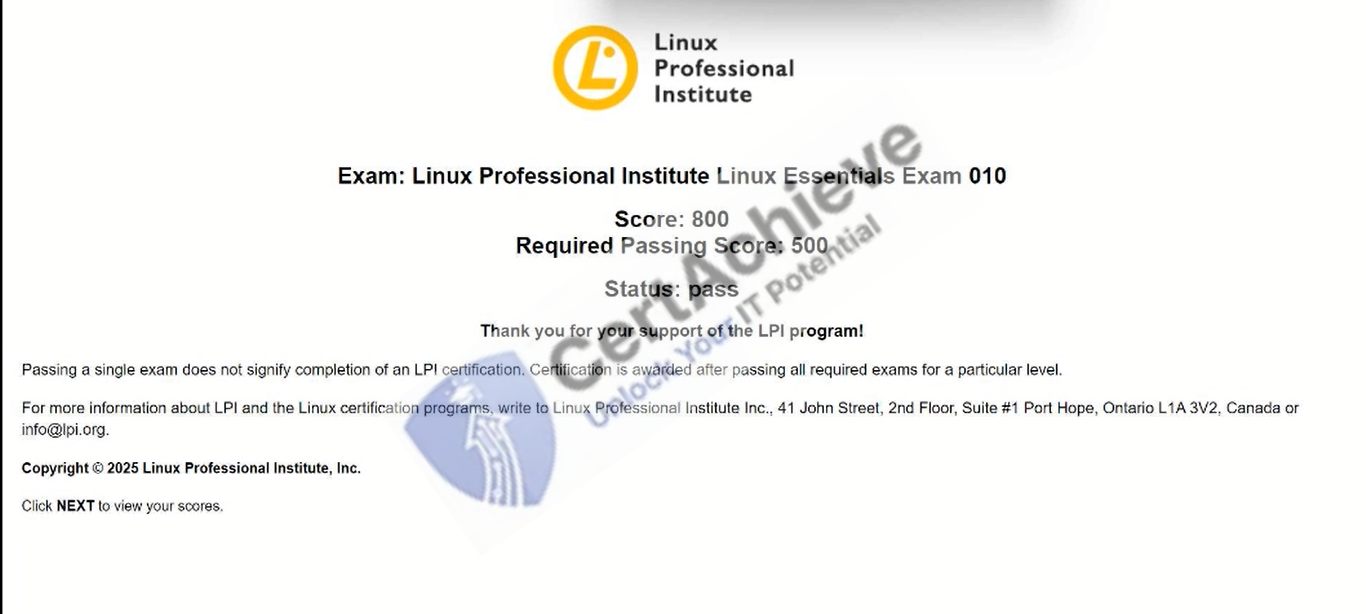
Verified Performance Reports
Authentic score reports from candidates who cleared the 010-160 exam.
Verified Case #1
×
![]()