
The Fortinet NSE 4 - FortiOS 7.6 Administrator (NSE4_FGT_AD-7.6)
Passing Fortinet Fortinet Network Security Expert exam ensures for the successful candidate a powerful array of professional and personal benefits. The first and the foremost benefit comes with a global recognition that validates your knowledge and skills, making possible your entry into any organization of your choice.


NSE4_FGT_AD-7.6 Exam Dumps
- Exam Code: NSE4_FGT_AD-7.6
- Vendor: Fortinet
- Certifications: Fortinet Network Security Expert
- Exam Name: Fortinet NSE 4 - FortiOS 7.6 Administrator
Why CertAchieve is Better than Standard NSE4_FGT_AD-7.6 Dumps
In 2026, Fortinet uses variable topologies. Basic dumps will fail you.
| Quality Standard | Generic Dump Sites | CertAchieve Premium Prep |
|---|---|---|
| Technical Explanation | None (Answer Key Only) | Step-by-Step Expert Rationales |
| Syllabus Coverage | Often Outdated (v1.0) | 2026 Updated (Latest Syllabus) |
| Scenario Mastery | Blind Memorization | Conceptual Logic & Troubleshooting |
| Instructor Access | No Post-Sale Support | 24/7 Professional Help |
Customers Passed Exams
10
Success backed by proven exam prep tools
Questions Came Word for Word
89%
Real exam match rate reported by verified users
Average Score in Real Testing Centre
85%
Consistently high performance across certifications
Study Time Saved With CertAchieve
60%
Efficient prep that reduces study hours significantly
Coverage of Official Fortinet NSE4_FGT_AD-7.6 Exam Domains
Our curriculum is meticulously mapped to the Fortinet official blueprint.
Deployment and System Configuration (22%)
Mastering initial setup, log configuration, and diagnosing resource/connectivity problems. Includes FGCP HA clusters and FortiGate VM deployments in public clouds.
Firewall Policies and Authentication (20%)
Expertise in configuring firewall policies, SNAT/DNAT options, and implementing multiple authentication methods including FSSO.
Content Inspection (26%)
The largest domain - covers encrypted traffic inspection, web filtering modes, application control, antivirus scanning, and IPS threat protection.
Routing (18%)
Configuring static routes and implementing SD-WAN to effectively load balance traffic across multiple WAN links for network resilience.
VPN Implementation (14%)
Mastering the deployment of meshed and partially redundant IPsec VPNs to ensure secure and continuous remote communication.
Fortinet NSE4_FGT_AD-7.6 Exam Domains Q&A
Certified instructors verify every question for 100% accuracy, providing detailed, step-by-step explanations for each.
Question 1
Fortinet NSE4_FGT_AD-7.6
QUESTION DESCRIPTION:
Refer to the exhibit.
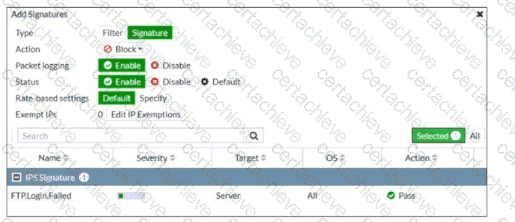
An intrusion prevention system (IPS) profile signature setting is shown.
What can you conclude about the signature when adding the FTP.Login.Failed signature to the IPS Sensor profile?
Correct Answer & Rationale:
Answer: C
Explanation:
“When you create a new entry to add signatures or filters, you can select the action by clicking Action.”
“When you enable Packet logging , FortiGate stores a local copy of the packet that matches the signature . This enhances the view of erroneous or suspicious packets.”
“You can configure IP exemptions on individual signatures only .”
Technical Deep Dive:
The correct answer is C .
The exhibit shows an IPS entry being added with:
Type = Signature
Action = Block
Packet logging = Enable
Rate-based settings = Default
The most certain conclusion from that configuration is that packet logging is enabled , and the study guide explicitly states that this causes FortiGate to store a local copy of the matching packet .
Why the others are wrong:
A is wrong because the exhibit shows Rate-based settings = Default , not a custom threshold.
B is wrong because the configured action is Block , not allow/monitor.
D is wrong because the entry type is Signature , meaning an individual signature is being added, not a signature group.
A useful operational note: packet logging is powerful for IPS investigation and false-positive analysis, but it consumes more storage and processing resources. It should be enabled selectively on signatures where deeper forensic visibility is needed.
Question 2
Fortinet NSE4_FGT_AD-7.6
QUESTION DESCRIPTION:
Refer to the exhibits.
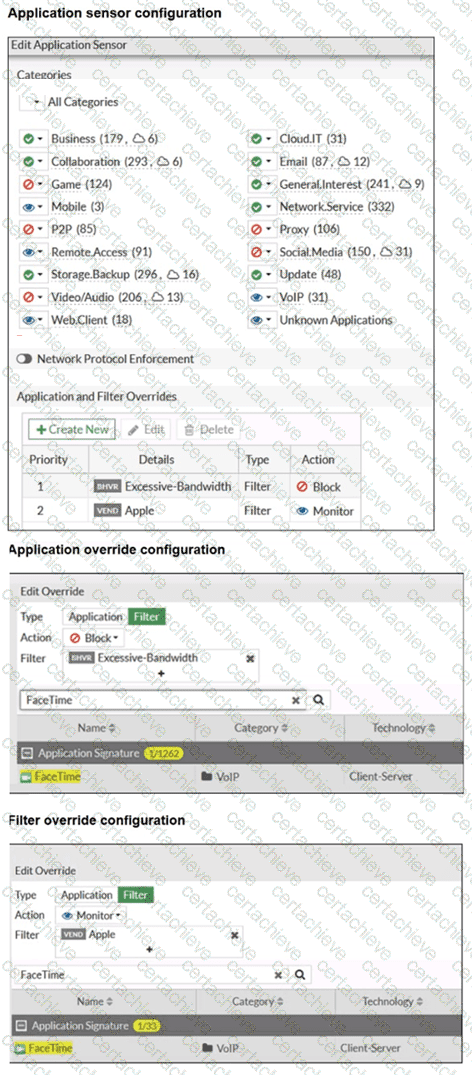
The exhibits show the application sensor configuration and the Excessive-Bandwidth and Apple filter details. Based on the configuration, what will happen to Apple FaceTime if there are only a few calls originating or incoming? (Choose one answer)
Correct Answer & Rationale:
Answer: B
Explanation:
According to the FortiOS 7.6 Administrator Study Guide, the Application Control engine processes traffic by evaluating the Application and Filter Overrides section first, using a top-down matching logic similar to firewall policies. In the provided exhibit, there are two override entries:
Priority 1 : A behavior-based filter for Excessive-Bandwidth with the action set to Block .
Priority 2 : A vendor-based filter for Apple with the action set to Monitor .
The exhibit titled " Application override configuration " explicitly shows that Apple FaceTime is one of the signatures included within the Excessive-Bandwidth behavior filter. When the FortiGate inspects FaceTime traffic, it matches the first entry (Priority 1) because the signature belongs to the " Excessive-Bandwidth " group. Since the action for this priority is Block , the traffic is dropped immediately.
The phrase " only a few calls " is a common exam distractor; in this context, the " Excessive-Bandwidth " filter refers to the classification of the application (as one that typically consumes high bandwidth) rather than a real-time measurement of the specific session ' s throughput. Because the engine stops searching once a match is found in the overrides, it never reaches the Priority 2 " Monitor " rule or the general Category settings.
Question 3
Fortinet NSE4_FGT_AD-7.6
QUESTION DESCRIPTION:
Refer to the exhibit.
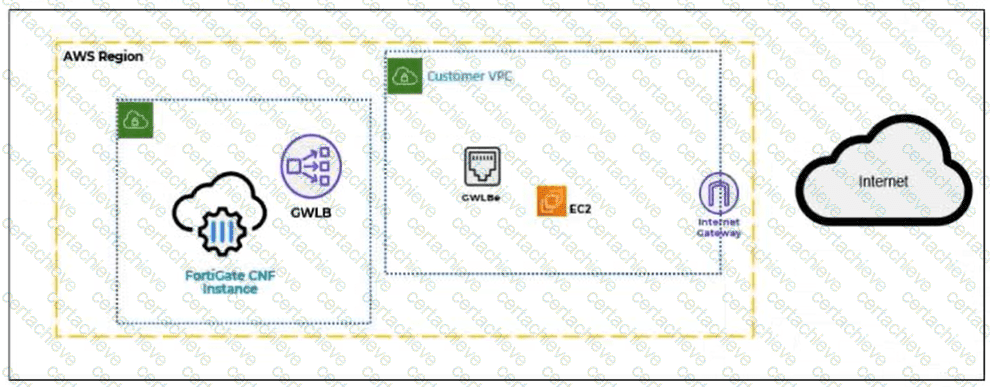
A partial cloud topology is shown.
You deployed a FortiGate Cloud-Native Firewall (CNF) in AWS for FortiGate CNF policy enforcement for EC2 instance traffic. Which path does the EC2 traffic take from the EC2 instance to the internet?
Correct Answer & Rationale:
Answer: A
Explanation:
FortiGate CNF in AWS uses a Gateway Load Balancer endpoint (GWLBe) in the protected VPC to steer workload traffic toward the FortiGate CNF service for inspection. The EC2 instance does not send traffic directly to the internet gateway first, and the CNF is not placed inline as a normal VM firewall inside the EC2 subnet. Instead, AWS routing sends the EC2 traffic to the relevant GWLBe. The traffic is then forwarded to FortiGate CNF, where security policies are evaluated and enforced. If the traffic is allowed, it is returned to the same GWLBe and then continues toward the internet gateway. Therefore, the correct traffic path is EC2 instance → GWLBe → FortiGate CNF → GWLBe → IGW → internet.
Question 4
Fortinet NSE4_FGT_AD-7.6
QUESTION DESCRIPTION:
Refer to the exhibit.
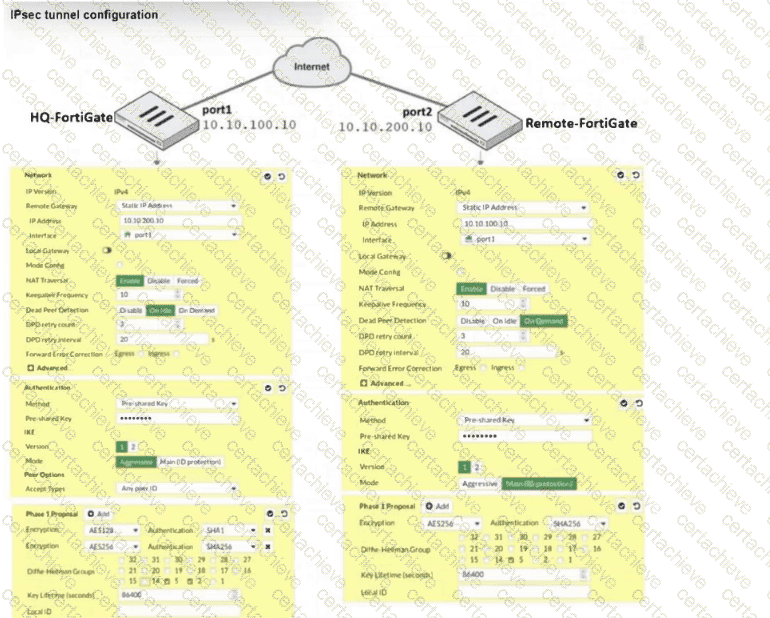
A network administrator is troubleshooting an IPsec tunnel between two FortiGate devices. The administrator has determined that phase 1 failed to come up. The administrator has also re-entered the pre-shared key on both FortiGate devices to make sure they match.
Based on the phase 1 configuration and the diagram shown in the exhibit, which two configuration changes can the administrator make to bring phase 1 up? (Choose two.)
Correct Answer & Rationale:
Answer: B, C
Explanation:
Exact Extract:
“In IKEv1, there are two possible modes in which the IKE SA negotiation can take place: main, and aggressive mode. Settings on both ends must agree; otherwise, phase 1 negotiation fails and both IPsec peers are not able to establish a secure channel.”
“When both peers know each other ' s IP address or FQDN, you may want to use main mode to take advantage of its more secure negotiation. In this case, FortiGate can identify the remote peer by its IP address and, as a result, associate it with the correct IPsec tunnel.”
“FortiGate supports three DPD modes... The default DPD mode is On Demand .”
“ Diffie-Hellman (DH) ... is used during IKE SA negotiation. The use of DH in phase 1 is mandatory and can’t be disabled . You must select at least one DH group.”
Technical Deep Dive:
The correct answers are B and C .
B is correct because phase 1 fails when IKE mode settings do not match between peers. The study guide explicitly says phase 1 settings on both ends must agree. Since this is a static site-to-site tunnel and both peers know each other’s IP addresses, Main (ID protection) is the appropriate mode.
C is correct based on the exhibit: BR1-FGT appears bound to the wrong physical interface. The screenshot shows Interface = port1 , while the diagram/answer choice indicates the tunnel should be using port2 . If the phase 1 is bound to the wrong WAN interface, FortiGate sends IKE packets out the wrong path and phase 1 will not come up.
Why the others are not the fix:
A is not correct because DH is mandatory in phase 1. The issue is not “disable DH group 2” by itself; the real requirement is that the peers negotiate a compatible proposal. The option as written is not the proper corrective action from the guide.
D is not correct because DPD does not determine whether phase 1 can initially establish. It is a tunnel health/failure-detection feature after negotiation behavior, and On Demand is already the default mode.
Question 5
Fortinet NSE4_FGT_AD-7.6
QUESTION DESCRIPTION:
Refer to the exhibit, which shows a partial configuration from the remote authentication server.

Why does the FortiGate administrator need this configuration? (Choose one answer)
Correct Answer & Rationale:
Answer: A
Explanation:
“With this method, you must create a user group and add the preconfigured remote server to the group. This setup allows you to select one or more pre-existing groups from the Radius server, enabling any user within those groups to be authenticated.”
“The response from the server reports success, failure, and group membership details.”
“Note that Fortinet has a vendor-specific attributes (VSA) dictionary to identify the Fortinet-proprietary RADIUS attributes. This capability allows you to extend the basic functionality of RADIUS.”
Technical Deep Dive:
The attribute shown in the exhibit is Fortinet-Group-Name = Training. This is a Fortinet RADIUS Vendor-Specific Attribute (VSA) used to return group membership information to FortiGate. FortiGate uses that returned value to match the authenticated user to the corresponding FortiGate user group, in this case Training.
That is why A is correct: the administrator needs this so FortiGate can authenticate users and place or match them into the Training group for identity-based policy control.
Why the others are wrong:
* B is wrong because the RADIUS secret is configured separately as the shared secret between FortiGate and the RADIUS server, not as a Fortinet-Group-Name attribute.
* C is wrong because OU matching is an LDAP concept, not standard RADIUS group matching.
* D is wrong because this attribute is not for “any” group; it is explicitly returning the specific group name Training.
In practice, this lets FortiGate apply firewall policies such as:
```bash
config user group
edit " Training "
set member " RADIUS_Server "
next
end
```
Then the RADIUS server returns Fortinet-Group-Name=Training, and FortiGate matches the user into that group for policy enforcement.
Question 6
Fortinet NSE4_FGT_AD-7.6
QUESTION DESCRIPTION:
A network administrator is configuring an IPsec VPN tunnel for a sales employee travelling abroad.
Which VPN Wizard template must the administrator apply?
Correct Answer & Rationale:
Answer: A
Explanation:
Exact Extract:
“If you want the wizard to configure the VPN for you, then select the template type Site to Site, Hub-and-Spoke, or Remote Access that best matches your VPN.”
“Use remote access VPNs when remote internet users need to securely connect to the office to access corporate resources. The remote user connects to a VPN server located on the corporate premises, such as FortiGate, to establish a secure tunnel.”
“A common use of the IPsec wizard is for configuring a remote access VPN for FortiClient users.”
Technical Deep Dive:
The correct answer is A. Remote Access .
A sales employee travelling abroad is a remote user , not another branch office or headquarters firewall. That means the tunnel type is a remote access VPN , where the user connects from an internet location back to the corporate FortiGate. In this design, the remote client typically uses FortiClient , and FortiGate acts as the VPN server.
Why the other options are incorrect:
Hub-and-Spoke is for multi-site branch connectivity through a central hub.
Site-to-Site is for connecting two fixed networks, such as branch office to headquarters.
Dial-up User describes the remote-user behavior conceptually, but it is not the IPsec Wizard template choice shown in the study guide. The wizard template to select is Remote Access .
So for a travelling sales employee, the administrator must choose the Remote Access VPN Wizard template.
Question 7
Fortinet NSE4_FGT_AD-7.6
QUESTION DESCRIPTION:
Which three statements about SD-WAN performance SLAs are true? (Choose three.)
Correct Answer & Rationale:
Answer: C, D, E
Explanation:
In FortiOS 7.6, SD-WAN Performance SLAs are used to measure link quality and influence SD-WAN rule decisions. The following three statements are true.
C. All the SLA targets can be configured.
True
SD-WAN Performance SLAs allow administrators to configure:
Latency
Jitter
Packet loss
Mean Opinion Score (MOS) (for voice)
Threshold values for these metrics are fully configurable per SLA.
This is explicitly documented in the SD-WAN Performance SLA configuration section.
D. They are applied in an SD-WAN rule lowest cost strategy.
True
Performance SLAs are commonly used with the Lowest Cost (SLA-based) strategy.
In this strategy:
FortiGate selects the lowest-cost link that meets the SLA requirements.
If a link violates the SLA, it is excluded from selection.
E. They can be measured actively or passively.
True
FortiOS supports:
Active probing (synthetic probes such as ping/HTTP)
Passive measurement (based on real traffic statistics)
Administrators can choose how SLAs are measured depending on the deployment and requirements.
Why the other options are incorrect
A. They rely on session loss and jitter.
Incorrect
SLAs measure packet loss, latency, and jitter.
Session loss is not an SLA metric in FortiOS.
B. They monitor the state of the FortiGate device.
Incorrect
Performance SLAs monitor link quality, not FortiGate system health or device state.
Question 8
Fortinet NSE4_FGT_AD-7.6
QUESTION DESCRIPTION:
Which two statements about the Security Fabric rating are true? (Choose two answers)
Correct Answer & Rationale:
Answer: B, C
Explanation:
“The Security Rating page is separated into three major scorecards: Security Posture, Fabric Coverage, and Optimization, which provide an executive summary of the three largest areas of security focus in the Security Fabric .” ( Fortinet Document Library )
“On the root FortiGate , go to Security Fabric > Security Rating.” ( Fortinet Document Library )
“The Info and Compliance tab includes the security controls used for the test and links to specific FSBP, PCI, or CIS compliance policies .” ( Fortinet Document Library )
“A new Security Rating Insights feature provides immediate access to crucial security information. Hover over any tested object to reveal a tooltip...” and “Objects, such as firewall policies, with security rating recommendations are highlighted... click Security Rating Insights to display relevant issues.” ( Fortinet Document Library )
Technical Deep Dive:
The correct answers are B and C .
B is correct because Security Rating is viewed from the root FortiGate and its scorecards provide an executive summary for the Security Fabric, not just an isolated downstream unit. The root device is the point from which the Security Fabric summary is presented. ( Fortinet Document Library )
C is correct because the Security Rating results include an Info and Compliance view with references to PCI compliance policies. That means PCI-related compliance results are part of the Security Rating reporting associated with the security categories, including Security Posture. ( Fortinet Document Library )
Why the others are incorrect:
A is incorrect because Fortinet documents state there is a base set of free checks and a separate licensed set of checks. A license is not required just to obtain the executive summary view itself. ( Fortinet Document Library )
D is incorrect because Security Rating Insights are not limited to the Security Rating page. Fortinet documents show they also appear as tooltips and buttons on other GUI objects and pages . ( Fortinet Document Library )
Question 9
Fortinet NSE4_FGT_AD-7.6
QUESTION DESCRIPTION:
Refer to the exhibit.
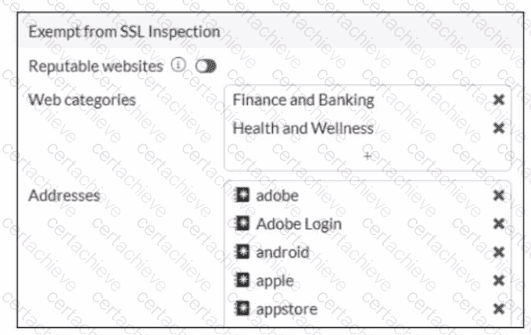
The predefined deep-inspection and custom-deep-inspection profiles exclude some web categories from SSL inspection, as shown in the exhibit For which two reasons are these web categories exempted? (Choose two.)
Correct Answer & Rationale:
Answer: B, D
Explanation:
“You may need to exempt traffic from SSL inspection if it is causing problems with traffic, or for legal reasons.”
“Performing SSL inspection on a site that is enabled with HTTP Strict Transport Security (HSTS), for example, can cause problems with traffic. Remember, the only way for FortiGate to inspect encrypted traffic is to intercept the certificate coming from the server and generate a temporary one. After FortiGate presents the temporary SSL certificate, browsers that use HSTS refuse to proceed.”
“Laws protecting privacy might be another reason to bypass SSL inspection. For example, in some countries, it is illegal to inspect SSL bank-related traffic. Configuring an exemption for sites is simpler than setting up firewall policies for each individual bank. You can exempt sites based on their web category, such as Finance and Banking...”
“The predefined deep-inspection and custom-deep-inspection profiles exclude some web categories—Finance and Banking, and Health and Wellness—and some FQDN addresses...”
Technical Deep Dive:
The correct answers are B and D .
B is correct because the study guide explicitly says SSL inspection may be bypassed for legal reasons , especially where privacy laws restrict inspection of sensitive categories such as Finance and Banking . The same privacy rationale also explains why Health and Wellness is commonly exempted.
D is correct because some sites break under deep inspection due to HSTS . FortiGate must generate and present a temporary certificate during full SSL inspection, and browsers enforcing HSTS can reject that interception flow. That is why some sites are exempted from deep inspection.
Why the others are wrong:
A is not stated in the guide.
C refers to the separate Reputable websites option, which is a FortiGuard-maintained allowlist feature, not the reason the predefined categories shown in the exhibit are excluded.
From an operational standpoint, this is a classic balance between security visibility and application/legal compatibility . Deep inspection gives FortiGate payload visibility, but it can interfere with pinned-certificate/HSTS behavior and can violate privacy policy for regulated content.
Question 10
Fortinet NSE4_FGT_AD-7.6
QUESTION DESCRIPTION:
Refer to the exhibit.
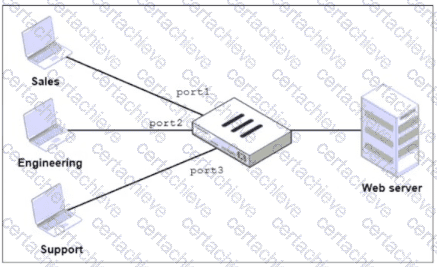
FortiGate has two separate firewall policies for Sales and Engineering to access the same web server with the same security profiles.
Which action must the administrator perform to consolidate the two policies into one?
Correct Answer & Rationale:
Answer: D
Explanation:
“By default, you can select only a single interface as the incoming interface and a single interface as the outgoing interface. This is because the option to select multiple interfaces, or any interface in a firewall policy, is disabled on the GUI. However, you can enable the Multiple Interface Policies option on the Feature Visibility page to disable the single interface restriction.”
“You can also specify multiple interfaces, or use the any option, if you configure a firewall policy on the CLI, regardless of the default GUI setting.”
Technical Deep Dive:
The correct answer is D .
The policies are identical except for the incoming interface : one is for Sales and one is for Engineering . FortiGate GUI policy creation normally restricts you to one incoming interface per policy. To consolidate both into a single GUI policy, the administrator must enable Multiple Interface Policies so both port1 and port2 can be selected in the same rule.
Why the others are wrong:
A is not enough, because policy matching also includes the incoming interface , not just the source subnets.
B changes the network design and is unnecessary.
C would work too broadly by matching traffic from any interface, which is not the intended controlled consolidation.
A matching CLI-style concept would be:
config firewall policy
edit < id >
set srcintf " port1 " " port2 "
set dstintf " < server-interface > "
set srcaddr " Sales_Subnet " " Engineering_Subnet "
set dstaddr " < web-server > "
set service " HTTP " " HTTPS "
set action accept
next
end
That preserves a single policy while still being specific about which interfaces are allowed.

Verified by Certified Instructors
This Fortinet NSE4_FGT_AD-7.6 study pack was audited and verified on September 23, 2026 by Bruce Kensington,. We ensure every technical rationale aligns with real-world enterprise standards.
A Stepping Stone for Enhanced Career Opportunities
Your profile having Fortinet Network Security Expert certification significantly enhances your credibility and marketability in all corners of the world. The best part is that your formal recognition pays you in terms of tangible career advancement. It helps you perform your desired job roles accompanied by a substantial increase in your regular income. Beyond the resume, your expertise imparts you confidence to act as a dependable professional to solve real-world business challenges.
Your success in Fortinet NSE4_FGT_AD-7.6 certification exam makes your visible and relevant in the fast-evolving tech landscape. It proves a lifelong investment in your career that give you not only a competitive advantage over your non-certified peers but also makes you eligible for a further relevant exams in your domain.
What You Need to Ace Fortinet Exam NSE4_FGT_AD-7.6
Achieving success in the NSE4_FGT_AD-7.6 Fortinet exam requires a blending of clear understanding of all the exam topics, practical skills, and practice of the actual format. There's no room for cramming information, memorizing facts or dependence on a few significant exam topics. It means your readiness for exam needs you develop a comprehensive grasp on the syllabus that includes theoretical as well as practical command.
Here is a comprehensive strategy layout to secure peak performance in NSE4_FGT_AD-7.6 certification exam:
- Develop a rock-solid theoretical clarity of the exam topics
- Begin with easier and more familiar topics of the exam syllabus
- Make sure your command on the fundamental concepts
- Focus your attention to understand why that matters
- Ensure hands-on practice as the exam tests your ability to apply knowledge
- Develop a study routine managing time because it can be a major time-sink if you are slow
- Find out a comprehensive and streamlined study resource for your help
Ensuring Outstanding Results in Exam NSE4_FGT_AD-7.6!
In the backdrop of the above prep strategy for NSE4_FGT_AD-7.6 Fortinet exam, your primary need is to find out a comprehensive study resource. It could otherwise be a daunting task to achieve exam success. The most important factor that must be kep in mind is make sure your reliance on a one particular resource instead of depending on multiple sources. It should be an all-inclusive resource that ensures conceptual explanations, hands-on practical exercises, and realistic assessment tools.
Certachieve: A Reliable All-inclusive Study Resource
Certachieve offers multiple study tools to do thorough and rewarding NSE4_FGT_AD-7.6 exam prep. Here's an overview of Certachieve's toolkit:
Fortinet NSE4_FGT_AD-7.6 PDF Study Guide
This premium guide contains a number of Fortinet NSE4_FGT_AD-7.6 exam questions and answers that give you a full coverage of the exam syllabus in easy language. The information provided efficiently guides the candidate's focus to the most critical topics. The supportive explanations and examples build both the knowledge and the practical confidence of the exam candidates required to confidently pass the exam. The demo of Fortinet NSE4_FGT_AD-7.6 study guide pdf free download is also available to examine the contents and quality of the study material.
Fortinet NSE4_FGT_AD-7.6 Practice Exams
Practicing the exam NSE4_FGT_AD-7.6 questions is one of the essential requirements of your exam preparation. To help you with this important task, Certachieve introduces Fortinet NSE4_FGT_AD-7.6 Testing Engine to simulate multiple real exam-like tests. They are of enormous value for developing your grasp and understanding your strengths and weaknesses in exam preparation and make up deficiencies in time.
These comprehensive materials are engineered to streamline your preparation process, providing a direct and efficient path to mastering the exam's requirements.
Fortinet NSE4_FGT_AD-7.6 exam dumps
These realistic dumps include the most significant questions that may be the part of your upcoming exam. Learning NSE4_FGT_AD-7.6 exam dumps can increase not only your chances of success but can also award you an outstanding score.
The NSE4_FGT_AD-7.6 Exam Dumps contained practical firewall administration scenarios and troubleshooting questions that matched the actual exam style. The explanations helped me understand FortiGate configurations deeply.
Henry Watson
May 28, 2026
Top Exams & Certification Providers
New & Trending
- New Released Exams
- Related Exam
- Hot Vendor