
The Fortinet NSE 7 - Public Cloud Security 7.6.4 Architect (NSE7_CDS_AR-7.6)
Passing Fortinet Fortinet Network Security Expert exam ensures for the successful candidate a powerful array of professional and personal benefits. The first and the foremost benefit comes with a global recognition that validates your knowledge and skills, making possible your entry into any organization of your choice.


NSE7_CDS_AR-7.6 Exam Dumps
- Exam Code: NSE7_CDS_AR-7.6
- Vendor: Fortinet
- Certifications: Fortinet Network Security Expert
- Exam Name: Fortinet NSE 7 - Public Cloud Security 7.6.4 Architect
Why CertAchieve is Better than Standard NSE7_CDS_AR-7.6 Dumps
In 2026, Fortinet uses variable topologies. Basic dumps will fail you.
| Quality Standard | Generic Dump Sites | CertAchieve Premium Prep |
|---|---|---|
| Technical Explanation | None (Answer Key Only) | Step-by-Step Expert Rationales |
| Syllabus Coverage | Often Outdated (v1.0) | 2026 Updated (Latest Syllabus) |
| Scenario Mastery | Blind Memorization | Conceptual Logic & Troubleshooting |
| Instructor Access | No Post-Sale Support | 24/7 Professional Help |
Customers Passed Exams
10
Success backed by proven exam prep tools
Questions Came Word for Word
91%
Real exam match rate reported by verified users
Average Score in Real Testing Centre
91%
Consistently high performance across certifications
Study Time Saved With CertAchieve
60%
Efficient prep that reduces study hours significantly
Fortinet NSE7_CDS_AR-7.6 Exam Domains Q&A
Certified instructors verify every question for 100% accuracy, providing detailed, step-by-step explanations for each.
Question 1
Fortinet NSE7_CDS_AR-7.6
QUESTION DESCRIPTION:
An Azure administrator is trying to optimize the Azure Bicep files currently used for cloud deployments.
Which technique can Azure administrators use to improve the code in Azure Bicep files?
Correct Answer & Rationale:
Answer: C
Explanation:
The study guide identifies decorators as an important Bicep optimization technique because they enforce constraints and improve parameter validation. For example, the @allowed decorator can restrict a parameter to a predefined set of acceptable values, preventing administrators from supplying unsupported deployment values. Option A contradicts the study guide, which recommends nesting related resources when appropriate to improve readability and maintain a logical code structure. Option B is incorrect because Bicep supports both conventional .json parameter files and the newer .bicepparam format; JSON is not mandatory. The what-if operation in option D is useful for previewing additions, modifications, and deletions before deployment, but its primary purpose is deployment-impact validation rather than improving the design of the Bicep source itself. Therefore, using decorators to constrain parameters is the correct optimization technique.
Question 2
Fortinet NSE7_CDS_AR-7.6
QUESTION DESCRIPTION:
Refer to the exhibit.
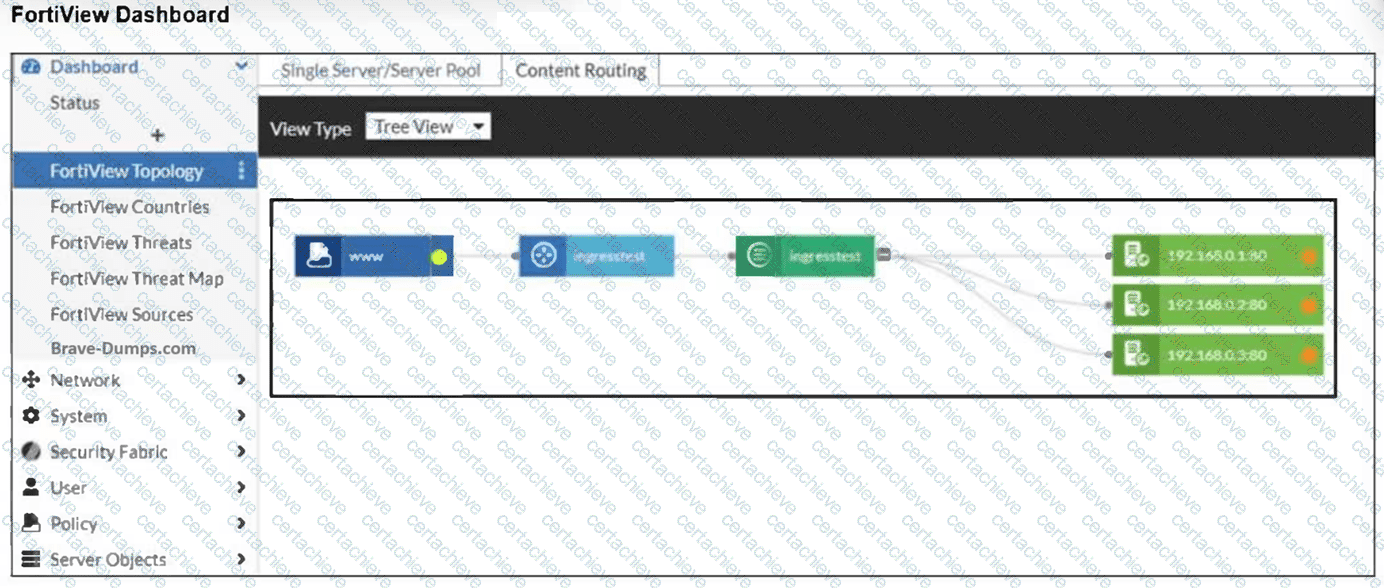
An administrator installed a FortiWeb ingress controller to protect a containerized web application. What is the reason for the status shown in FortiView? (Choose one answer)
Correct Answer & Rationale:
Answer: B
Explanation:
Comprehensive and Detailed Explanation From FortiOS 7.6, FortiWeb 7.4 Exact Extract study guide:
According to the FortiWeb 7.4 Administration Guide and the FortiWeb Ingress Controller Installation Guide , the status of backend servers in the FortiView Topology dashboard is a direct reflection of the health check results.
Interpreting the Status Icon (Orange): In the FortiView Topology view, a green circle indicates that the server is up and responding to health checks, while an orange circle indicates that the server is not running or is unreachable.
Connectivity and Routing (Option B): For the FortiWeb ingress controller to accurately monitor and protect a containerized application, it must have a valid network path to the Kubernetes (K8s) worker nodes. If the FortiWeb VM is missing a route to the specific subnet where the K8s nodes reside, the health check packets will fail to reach their destination. As a result, FortiWeb identifies the backend servers (192.168.0.1, 192.168.0.2, and 192.168.0.3) as " Down, " leading to the orange status shown in the exhibit.
Health Check Failures: When the status is orange, it implies that the Server Health Check (configured in the server pool) is detecting that the web servers are not responsive to connections. While this could be caused by an application-level failure, in a fresh cloud deployment of an ingress controller, the most common underlying cause is a network routing misconfiguration preventing the FortiWeb appliance from reaching the node IPs. 12
Why other options are incorrect: 34
Option A: If the SDN connector were not authenticated correctly, FortiWeb would likely fail to discover the containerized resources entirely, rather than discovering them and repor 5 ting them as " Down " . 6
Option C: While wron 7 g IP addresses would cause a failure, the Ingress Controller ' s job is to dynamically sync these addresses from the K8s API; a manual configuration error in a manifest file regarding IP addresses is less likely in an automated ingress environment.
Option D: The load balancing algorithm (Round Robin, Least Connections, etc.) affects how traffic is distributed, but it does not influence the up/down health status of the individual backend servers.
Question 3
Fortinet NSE7_CDS_AR-7.6
QUESTION DESCRIPTION:
Refer to the exhibit.
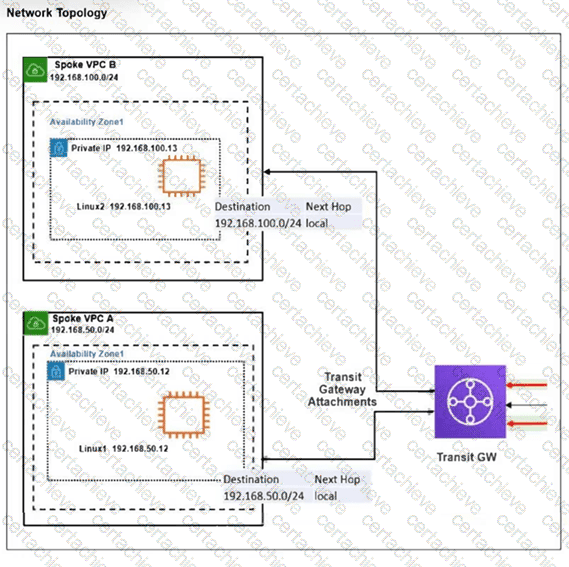
The exhibit shows a customer deployment of two Linux instances and their main routing table in Amazon Web Services (AWS). The customer also created a Transit Gateway (TGW) and two attachments. Which two steps are required to route traffic from Linux instances to the TGW? (Choose two answers)
Correct Answer & Rationale:
Answer: A, B
Explanation:
Comprehensive and Detailed Explanation From FortiOS 7.6, FortiWeb 7.4 Exact Extract study guide:
Based on the FortiOS 7.6 Cloud Security Study Guide regarding AWS Transit Gateway (TGW) integration and VPC routing, the following steps are mandatory to establish connectivity between Spoke VPCs via a TGW:
VPC Route Table Configuration (Option A): For traffic to leave a VPC and reach the Transit Gateway, the VPC ' s subnet route table must have a specific entry. While the exhibit shows local routes for internal VPC traffic (192.168.50.0/24 and 192.168.100.0/24), any traffic destined for " outside " the local VPC (such as the other Spoke VPC) must be directed to the TGW. Adding a default route ( 0.0.0.0/0 ) with the TGW ID as the next hop ensures that all non-local traffic is forwarded to the Transit Gateway for processing.
TGW Association (Option B): Within the Transit Gateway itself, connectivity is managed through Associations and Propagations . An " Association " links a specific VPC attachment to a TGW route table. Without associating the two attachments (for Spoke VPC A and Spoke VPC B) to a TGW route table, the TGW will not know which route table to use to make forwarding decisions for packets arriving from those VPCs.
Why Option C is incorrect: Route propagation is used to automatically populate the TGW route table with the CIDR blocks of the attached VPCs. While propagation is a valid step for dynamic routing, Option C specifically mentions propagating a static summary range (192.168.0.0/16) which is not the standard automated mechanism; usually, you propagate the specific VPC CIDRs. Furthermore, without the Association (Option B), propagation alone does not allow the TGW to process incoming traffic from the attachment.
Why Option D is incorrect: Directing traffic to an Internet Gateway (IGW) would send the traffic to the public internet. This would not facilitate internal routing between the two Spoke VPCs via the Transit Gateway.
Question 4
Fortinet NSE7_CDS_AR-7.6
QUESTION DESCRIPTION:
Refer to the exhibit.
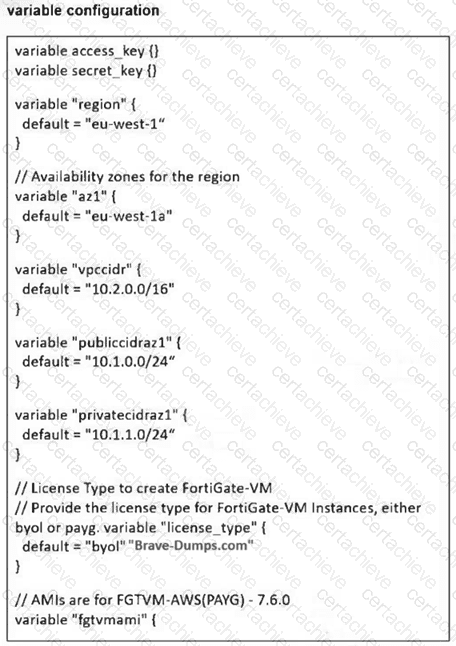
You are tasked to deploy a FortiGate VM with private and public subnets in Amazon Web Services (AWS). You examined the variables.tf file. Assume that all the other terraform files are in place. What will be the final result after running the terraform init and terraform apply commands? (Choose one answer)
Correct Answer & Rationale:
Answer: A
Explanation:
Comprehensive and Detailed Explanation From FortiOS 7.6, FortiWeb 7.4 Exact Extract study guide:
Based on the FortiOS 7.6 AWS Administration Guide and the Fortinet 7.4 Public Cloud Security documentation regarding Terraform deployments:
Variable Validation and Logic (Option A): The variables.tf file contains a logic error that prevents a successful deployment.
Specifically, the variable license_type has a default value defined as " byol " " Brave-Dumps.com " .
In Terraform HCL (HashiCorp Configuration Language), a variable ' s default attribute can only hold a single value string (e.g., " byol " ). The inclusion of the secondary string " Brave-Dumps.com " within the same default assignment is a syntax error.
Impact on Execution: When terraform apply is executed, the Terraform engine performs a validation check on all loaded files. Because of this syntax error in the variable definition, the validation will fail, and Terraform will stop execution with an error message before any resources—including the FortiGate VM—are created in AWS.
Network Mismatch: Additionally, the variable vpccidr is set to 10.2.0.0/16, while the public (10.1.0.0/24) and private (10.1.1.0/24) subnets are defined within a completely different address space (10.1.x.x). Even if the syntax error were fixed, the deployment would likely fail at the infrastructure level because subnets must reside within the CIDR block of their parent VPC.
Why other options are incorrect:
Option B, C, & D: None of these successful deployment outcomes can occur because the Terraform parser will identify the invalid syntax in the variables.tf file and abort the process entirely.
Question 5
Fortinet NSE7_CDS_AR-7.6
QUESTION DESCRIPTION:
How does an administrator secure container environments in Amazon AWS from newly emerged security threats? (Choose one answer)
Correct Answer & Rationale:
Answer: A
Explanation:
Comprehensive and Detailed Explanation From FortiOS 7.6, FortiWeb 7.4 Exact Extract study guide:
According to the FortiOS 7.6 Docker Administration Guide and the Public Cloud Security study materials, container security is addressed through granular visibility into container-specific protocols.
Application Control for Containers (Option A): FortiOS includes a dedicated set of application control signatures specifically for Docker traffic . These signatures allow the FortiGate-VM to identify and control specific actions within a container environment, such as:
Docker_Pull.Blob / Docker_Pull.Manifest: Identifying when a container image is being pulled from a registry.
Docker_Push.Blob / Docker_Push.Manifest: Monitoring when images are uploaded to a registry.
Enforcing Security Policies: By using these Docker-related signatures, an administrator can create firewall policies that only allow container pulls from known clean, private registries while blocking traffic from unauthorized or public registries that may contain vulnerable or malicious images. 5
Defense-in-Depth: While traditional network-related signatures (Option C) or AWS-specific infrastructure signatures (Option B) protect the underlying network and cloud services, they do not provide the necessary visibility into the Docker API calls and manifest transfers required to secure the container lifecycle itself. FortiGate further enhances this by scanning the actual payload of these transfers using the Intrusion Prevention Service (IPS) and Advanced Malware Protection (AMP) .
Question 6
Fortinet NSE7_CDS_AR-7.6
QUESTION DESCRIPTION:
You are automating configuration changes on one of the FortiGate VMs using Red Hat Ansible.
How does Red Hat Ansible connect to FortiGate to make the configuration change?
Correct Answer & Rationale:
Answer: B
Explanation:
The Public Cloud Security Architect study guide explains that Ansible uses the APIs provided by Fortinet products when performing configuration tasks. Specifically, the httpapi plugin allows Ansible to interact with FortiGate through API calls. The inventory file identifies the FortiGate managed node and connection information, while the YAML playbook defines the configuration tasks that Ansible must execute. YAML is therefore the playbook format rather than the network connection mechanism. The guide also distinguishes FortiGate management from many traditional servers and devices, for which Ansible commonly uses SSH. In the FortiOS workflow demonstrated in the course, HTTPAPI is used to connect to the FortiGate. A FortiGate VIP is a virtual IP/NAT configuration object and is unrelated to Ansible management connectivity. Therefore, the correct answer is API.
Question 7
Fortinet NSE7_CDS_AR-7.6
QUESTION DESCRIPTION:
Refer to the exhibit.
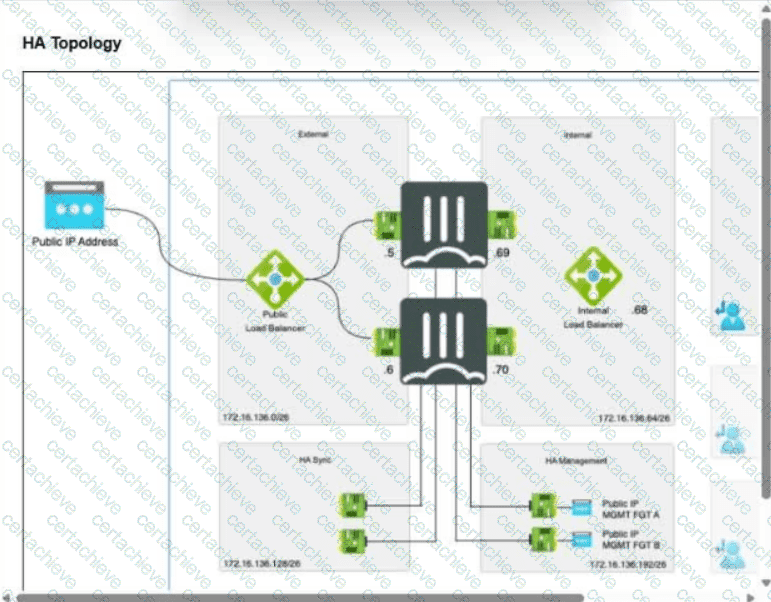
Consider the active-active load balance sandwich scenario in Microsoft Azure.
What are two important facts in the active-active load balance sandwich scenario? (Choose two.)
Correct Answer & Rationale:
Answer: A, D
Explanation:
Asymmetric routing is an important consideration in an Azure active-active load balance sandwich because request and response packets can traverse different FortiGate VMs. The study guide identifies NAT as one method to prevent this condition. Enabling NAT on north-south FortiGate policies SNATs packets to the FortiGate internal-interface address, forcing return traffic through the same FortiGate. Where preserving the original source address is required, FGSP can instead synchronize sessions among the FortiGate members and permit asymmetric return traffic. FGCP does not provide the default session-synchronization model for these independent FortiGate VMs in the load balance sandwich. The vdom-exception command is also not the mechanism described for this deployment. Consequently, enabling NAT and supporting synchronized sessions for asymmetric traffic are the two correct characteristics.
Question 8
Fortinet NSE7_CDS_AR-7.6
QUESTION DESCRIPTION:
You have deployed a FortiGate HA cluster in Azure using a gateway load balancer for traffic inspection. However, traffic is not being routed correctly through the firewalls.
What can be the cause of the issue?
Correct Answer & Rationale:
Answer: A
Explanation:
According to the FortiOS 7.6 Azure Administration Guide and the Cloud Security 7.4 Public Cloud Study Guide , the integration of FortiGate-VMs with an Azure Gateway Load Balancer (GWLB) requires specific network configurations to ensure packet transit:
IP Forwarding Requirement (Option A): By default, Azure Network Interfaces (NICs) drop any traffic that does not originate from or is not destined for the IP address assigned to that NIC. For a FortiGate to act as a " bump-in-the-wire " or transparent inspector, it must receive traffic destined for other IPs and forward it. This requires the IP Forwarding setting to be explicitly enabled on the FortiGate ' s network interfaces within the Azure portal. If this is disabled, the Azure fabric will discard the traffic being steered through the FortiGate HA cluster by the GWLB.
VXLAN Encapsulation: The Azure GWLB uses VXLAN to encapsulate traffic (adding a VXLAN header with a specific VNI) before sending it to the FortiGate. The FortiGate must terminate this VXLAN tunnel. While the VXLAN configuration is crucial, the underlying infrastructure check for IP Forwarding is the most common cause of traffic being blocked at the NIC level before the FortiOS stack can process the packet.
Why other options are incorrect:
Option B: If health probes fail, the GWLB will typically stop sending traffic to that specific instance. While this affects the HA cluster ' s availability, the question states traffic is not being routed correctly through the firewalls (implying an active flow issue), and the primary mechanism for allowing a VM to process third-party traffic in Azure is IP Forwarding.
Option C: NSGs are typically applied to the NIC or Subnet. While incorrect NSG rules can block traffic, " IP Forwarding " is a specific requirement for the FortiGate to function as a network appliance (NVA) regardless of the NSG state.
Option D: Azure GWLB supports cross-subscription and cross-tenant chaining. The consumer (protected VMs) and the provider (FortiGate HA cluster) do not need to be in the same subscription, provided the GWLB endpoint is correctly mapped.
Question 9
Fortinet NSE7_CDS_AR-7.6
QUESTION DESCRIPTION:
Refer to the exhibit.

An administrator has deployed a FortiGate VM in Amazon Web Services (AWS) and is trying to access it using its public IP address from their local computer. However, the connection is not successful, and at the same time FortiGate is not receiving any HTTPS or SSH traffic on its external interface.
What should the administrator check for a possible issue?
Correct Answer & Rationale:
Answer: D
Explanation:
Because the FortiGate packet sniffer shows that HTTPS or SSH traffic is not reaching the external interface, troubleshooting should begin with AWS controls that process traffic before it reaches FortiOS. The study guide identifies security-group rules as a primary checkpoint for EC2 connectivity problems and provides an example in which inbound rules control the allowed source addresses for HTTPS and SSH. A FortiGate firewall policy cannot explain traffic that never arrives at the FortiGate interface. NACLs should also be checked in appropriate cases, particularly when multiple EC2 instances in the same subnet are affected, but FortiGate debug flow does not inspect AWS NACL processing. The EC2 instance ID itself does not determine whether these management packets are admitted. Therefore, the administrator should verify the security group ' s inbound HTTPS and SSH rules.
Question 10
Fortinet NSE7_CDS_AR-7.6
QUESTION DESCRIPTION:
You are experiencing intermittent connectivity issues in a FortiGate HA cluster deployed with Azure gateway load balancer. Traffic is being dropped when it passes through the cluster. What is the cause of the issue? (Choose one answer)1
Correct Answer & Rationale:
Answer: A
Explanation:
Comprehensive and Detailed Explanation From FortiOS 7.6, FortiWeb 7.4 Exact Extract study guide:
According to the FortiOS 7.6 Azure Administration Guide and the Public Cloud Security documentation regarding Azure Gateway Load Balancer (GWLB) integration:
Encapsulation Overhead: Azure Gateway Load Balancer uses VXLAN (Virtual eXtensible LAN) to encapsulate the traffic before sending it to the FortiGate-VM HA cluster. This encapsulation adds a header that typically consists of 50 bytes for regular IPv4 traffic (Ethernet, IP, UDP, and VXLAN headers).
MTU Mismatch (Option A): The default maximum transmission unit (MTU) in Azure is 1500 bytes . If a protected VM sends a packet at the maximum default size (1500 bytes), and the GWLB then adds the 50-byte VXLAN header, the resulting encapsulated packet becomes 1550 bytes .
Packet Drops: If the FortiGate-VM ' s network interfaces are left at the default MTU of 1500 bytes , they will not be able to process the 1550-byte encapsulated frames without fragmentation. Because many network paths or configurations (including Azure ' s fabric for certain flows) may drop packets that require fragmentation or have the Don ' t Fragment (DF) flag set, this results in the observed intermittent connectivity issues and dropped traffic .
Required Resolution: To resolve this issue, administrators must increase the MTU on the FortiGate-VM interfaces (specifically the one receiving GWLB traffic) to at least 1570 bytes to accommodate both IPv4 and IPv6 VXLAN overhead.
Why other options are incorrect:
Option B: While an incorrect health probe port would cause the GWLB to mark the FortiGate as down, it would typically lead to a complete loss of traffic flow through that instance rather than intermittent packet drops within an active flow.
Option C: The GWLB itself is the component adding the overhead; it is the FortiGate ' s inability to receive the larger resulting frame (due to its own default MTU setting) that causes the failure.
Option D: Packet fragmentation by the application is a secondary effect. The primary " intermittent " issue described in GWLB deployments is almost always related to the tunneling overhead exceeding the receiving interface ' s MTU.

Verified by Certified Instructors
This Fortinet NSE7_CDS_AR-7.6 study pack was audited and verified on November 7, 2026 by Bruce Kensington,. We ensure every technical rationale aligns with real-world enterprise standards.
A Stepping Stone for Enhanced Career Opportunities
Your profile having Fortinet Network Security Expert certification significantly enhances your credibility and marketability in all corners of the world. The best part is that your formal recognition pays you in terms of tangible career advancement. It helps you perform your desired job roles accompanied by a substantial increase in your regular income. Beyond the resume, your expertise imparts you confidence to act as a dependable professional to solve real-world business challenges.
Your success in Fortinet NSE7_CDS_AR-7.6 certification exam makes your visible and relevant in the fast-evolving tech landscape. It proves a lifelong investment in your career that give you not only a competitive advantage over your non-certified peers but also makes you eligible for a further relevant exams in your domain.
What You Need to Ace Fortinet Exam NSE7_CDS_AR-7.6
Achieving success in the NSE7_CDS_AR-7.6 Fortinet exam requires a blending of clear understanding of all the exam topics, practical skills, and practice of the actual format. There's no room for cramming information, memorizing facts or dependence on a few significant exam topics. It means your readiness for exam needs you develop a comprehensive grasp on the syllabus that includes theoretical as well as practical command.
Here is a comprehensive strategy layout to secure peak performance in NSE7_CDS_AR-7.6 certification exam:
- Develop a rock-solid theoretical clarity of the exam topics
- Begin with easier and more familiar topics of the exam syllabus
- Make sure your command on the fundamental concepts
- Focus your attention to understand why that matters
- Ensure hands-on practice as the exam tests your ability to apply knowledge
- Develop a study routine managing time because it can be a major time-sink if you are slow
- Find out a comprehensive and streamlined study resource for your help
Ensuring Outstanding Results in Exam NSE7_CDS_AR-7.6!
In the backdrop of the above prep strategy for NSE7_CDS_AR-7.6 Fortinet exam, your primary need is to find out a comprehensive study resource. It could otherwise be a daunting task to achieve exam success. The most important factor that must be kep in mind is make sure your reliance on a one particular resource instead of depending on multiple sources. It should be an all-inclusive resource that ensures conceptual explanations, hands-on practical exercises, and realistic assessment tools.
Certachieve: A Reliable All-inclusive Study Resource
Certachieve offers multiple study tools to do thorough and rewarding NSE7_CDS_AR-7.6 exam prep. Here's an overview of Certachieve's toolkit:
Fortinet NSE7_CDS_AR-7.6 PDF Study Guide
This premium guide contains a number of Fortinet NSE7_CDS_AR-7.6 exam questions and answers that give you a full coverage of the exam syllabus in easy language. The information provided efficiently guides the candidate's focus to the most critical topics. The supportive explanations and examples build both the knowledge and the practical confidence of the exam candidates required to confidently pass the exam. The demo of Fortinet NSE7_CDS_AR-7.6 study guide pdf free download is also available to examine the contents and quality of the study material.
Fortinet NSE7_CDS_AR-7.6 Practice Exams
Practicing the exam NSE7_CDS_AR-7.6 questions is one of the essential requirements of your exam preparation. To help you with this important task, Certachieve introduces Fortinet NSE7_CDS_AR-7.6 Testing Engine to simulate multiple real exam-like tests. They are of enormous value for developing your grasp and understanding your strengths and weaknesses in exam preparation and make up deficiencies in time.
These comprehensive materials are engineered to streamline your preparation process, providing a direct and efficient path to mastering the exam's requirements.
Fortinet NSE7_CDS_AR-7.6 exam dumps
These realistic dumps include the most significant questions that may be the part of your upcoming exam. Learning NSE7_CDS_AR-7.6 exam dumps can increase not only your chances of success but can also award you an outstanding score.
Top Exams & Certification Providers
New & Trending
- New Released Exams
- Related Exam
- Hot Vendor