
The Tableau Desktop Specialist Exam (Desktop-Specialist)
Passing Tableau Tableau Desktop Specialist exam ensures for the successful candidate a powerful array of professional and personal benefits. The first and the foremost benefit comes with a global recognition that validates your knowledge and skills, making possible your entry into any organization of your choice.


Desktop-Specialist Exam Dumps
- Exam Code: Desktop-Specialist
- Vendor: Tableau
- Certifications: Tableau Desktop Specialist
- Exam Name: Tableau Desktop Specialist Exam
Why CertAchieve is Better than Standard Desktop-Specialist Dumps
In 2026, Tableau uses variable topologies. Basic dumps will fail you.
| Quality Standard | Generic Dump Sites | CertAchieve Premium Prep |
|---|---|---|
| Technical Explanation | None (Answer Key Only) | Step-by-Step Expert Rationales |
| Syllabus Coverage | Often Outdated (v1.0) | 2026 Updated (Latest Syllabus) |
| Scenario Mastery | Blind Memorization | Conceptual Logic & Troubleshooting |
| Instructor Access | No Post-Sale Support | 24/7 Professional Help |
Customers Passed Exams
10
Success backed by proven exam prep tools
Questions Came Word for Word
85%
Real exam match rate reported by verified users
Average Score in Real Testing Centre
95%
Consistently high performance across certifications
Study Time Saved With CertAchieve
60%
Efficient prep that reduces study hours significantly
Coverage of Official Tableau Desktop-Specialist Exam Domains
Our curriculum is meticulously mapped to the Tableau official blueprint.
Connecting to & Preparing Data (25%)
The "Foundation" layer. Master the art of connecting to diverse data sources—from local Excel files to cloud databases like Snowflake and BigQuery. Focus on the critical difference between Live vs. Extract connections. Learn to navigate the data pane, manage metadata (renaming fields, assigning aliases), and understand the "Logical vs. Physical" layers of Tableau Relationships.
Exploring & Analyzing Data (35%)
The "Engine" of the exam. Master the fundamental concepts of Dimensions vs. Measures and Discrete (Blue) vs. Continuous (Green) fields. Focus on creating basic charts (Bar, Line, Scatter, Maps) and utilizing Aggregations correctly. In 2026, this domain emphasizes using AI features like Explain Data to identify outliers and trends instantly.
Sharing Insights (25%)
The "Storytelling" layer. Master the creation of interactive Dashboards and linear Stories. Focus on formatting, applying filters (Global vs. Worksheet), and adding dashboard actions to drive user engagement. Learn to choose the right visualization for the right data type to ensure insights are clear, accessible, and "mobile-ready."
Understanding Tableau Concepts (15%)
The "Theory" domain. Master the technical nuances of the Tableau platform. Focus on the Order of Operations (from Extract Filters down to Table Calcs), the behavior of pill colors, and how Tableau handles null values. Understand the role of the Tableau Exchange and how Tableau Pulse integrates foundational metrics into the desktop workflow.
Tableau Desktop-Specialist Exam Domains Q&A
Certified instructors verify every question for 100% accuracy, providing detailed, step-by-step explanations for each.
Question 1
Tableau Desktop-Specialist
QUESTION DESCRIPTION:
Which two types of fields appear blue? Choose two.
Correct Answer & Rationale:
Answer: B, D
Explanation:
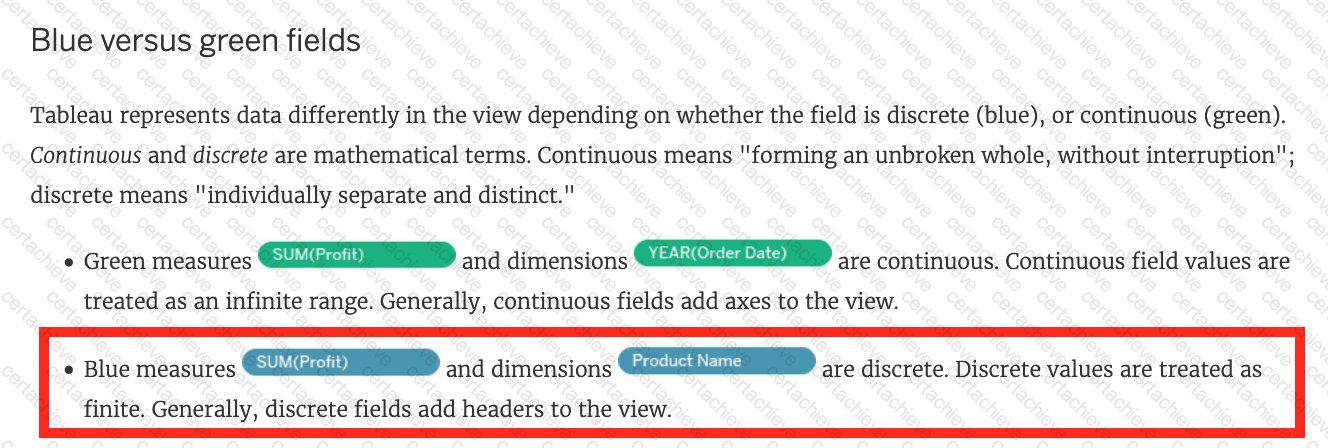
Discrete measures and discrete dimensions appear blue in Tableau. Discrete fields are those that have a finite number of distinct values, such as names, categories, or dates. Discrete fields are usually used to create headers or labels in the view. Blue fields indicate that the field is discrete. Continuous measures and continuous dimensions appear green in Tableau. Continuous fields are those that have an infinite range of possible values, such as numbers or ratios. Continuous fields are usually used to create axes or color gradients in the view. Green fields indicate that the field is continuous 1
Question 2
Tableau Desktop-Specialist
QUESTION DESCRIPTION:
Which statement accurately describes an extract when the Physical Tables option is selected?
Correct Answer & Rationale:
Answer: C
Explanation:
When the Physical Tables option is selected for an extract in Tableau, an individual table is created for each physical table in the extract. This means that the extract will include a separate table for each underlying table in your database, maintaining the database ' s structure within the extract. This can be useful when you need to preserve the original granularity of the data or when working with certain database optimizations.
Question 3
Tableau Desktop-Specialist
QUESTION DESCRIPTION:
If you see a Blue field, generally it will add _____________ to the view
Correct Answer & Rationale:
Answer: D
Explanation:
Important question!
[Reference: https://help.tableau.com/current/pro/desktop/en-us/datafields_typesandroles.htm, ]
Question 4
Tableau Desktop-Specialist
QUESTION DESCRIPTION:
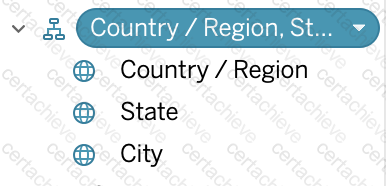
What term is used to describe the following picture?
Correct Answer & Rationale:
Answer: C
Explanation:
Explanation
When you connect to a data source, Tableau automatically separates date fields into hierarchies so you can easily break down the viz. You can also create your own custom hierarchies. For example, if you have a set of fields named Region, State, and County, you can create a hierarchy from these fields so that you can quickly drill down between levels in the viz.
[Reference: https://help.tableau.com/current/pro/desktop/en-us/qs_hierarchies.htm, , ]
Question 5
Tableau Desktop-Specialist
QUESTION DESCRIPTION:
What are two methods for renaming a field in a visualization? Choose two.
Correct Answer & Rationale:
Answer: A, B
Explanation:
In Tableau, you can rename a field directly in the Data pane by clicking and holding on the field name until it becomes editable, allowing you to type a new name. Alternatively, you can use the drop-down menu associated with the field in the Data pane and select the " Rename " option. Both methods provide a quick and easy way to change the name of a field without affecting the underlying data structure. The " Format menu " and " Replace References " option do not apply to renaming fields.
Question 6
Tableau Desktop-Specialist
QUESTION DESCRIPTION:
The calculation [Ship Date] - [Order Date] will return _______________
Correct Answer & Rationale:
Answer: B
Explanation:
Explanation
As the names suggest, if we subtract the order date from the shipping date, we simply get the number of days between these 2 dates.
We can these use this calculated field in our charts, and can use COUNT, SUM, AVG etc with them according to our need.
Question 7
Tableau Desktop-Specialist
QUESTION DESCRIPTION:
Which of the following are stored in a .tds file? Choose 3.
Correct Answer & Rationale:
Answer: A, C, E
Explanation:
If you’ve created a data connection that you might want to use with other workbooks or share with colleagues, you can export (save) the data source to a file. You might want to do this also if you’ve added joined tables, default properties, or custom fields—such as groups, sets, calculated fields, and binned fields—to the Data pane.
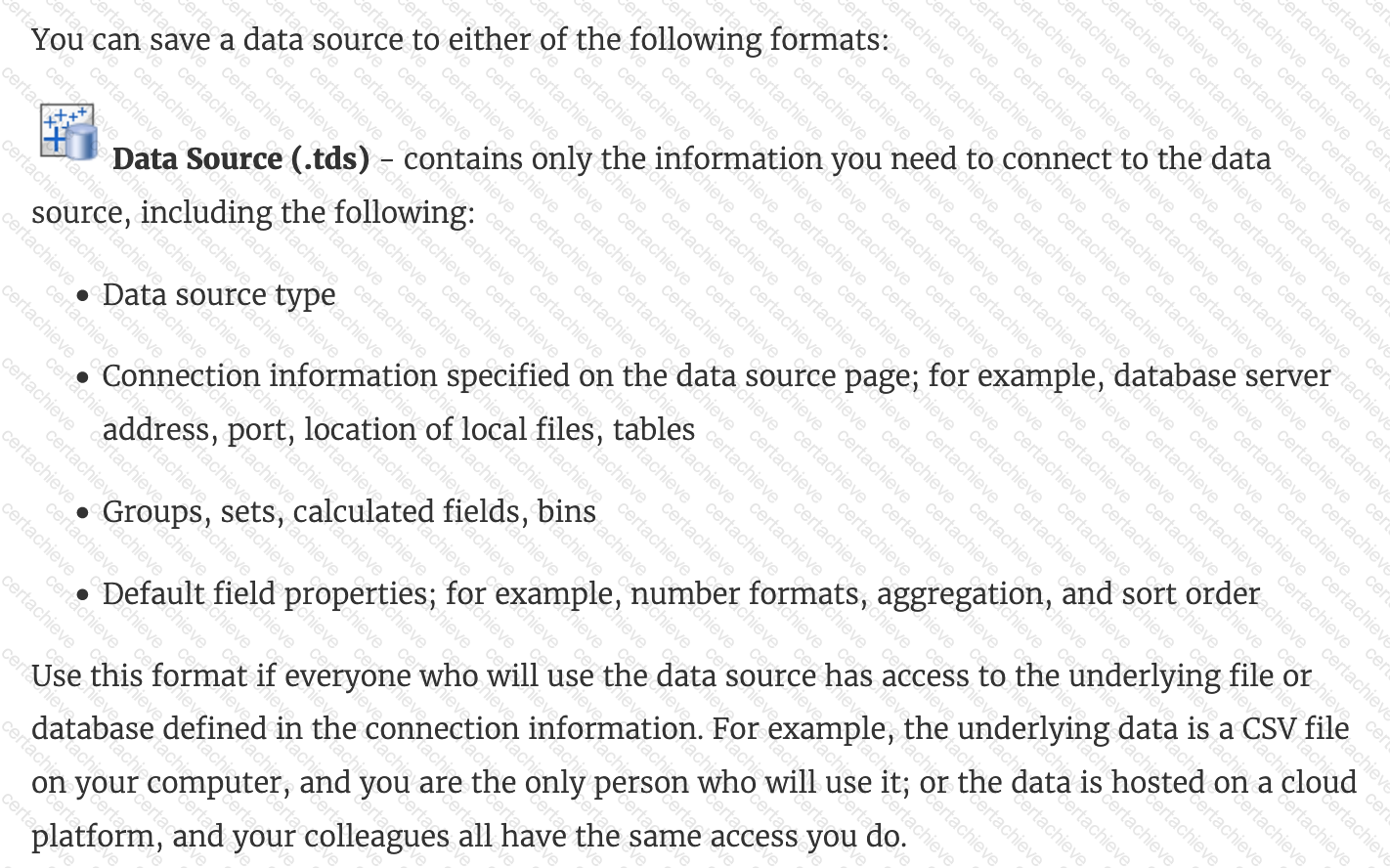
Visualisations and Data extracts are NOT saved in a .tds file!
[Reference: https://help.tableau.com/current/pro/desktop/en-us/export_connection.htm, , ]
Question 8
Tableau Desktop-Specialist
QUESTION DESCRIPTION:
True or False: Tableau can create worksheet-specific filters
Correct Answer & Rationale:
Answer: A
Explanation:
Explanation
Yes, it is possible to create worksheet-specific filters in Tableau.
When you add a filter to a worksheet, by default it applies to the current worksheet. Sometimes, however, you might want to apply the filter to other worksheets in the workbook.
Then, you can select specific worksheets to apply the filter to or apply it globally to all worksheets that use the same data source or related data sources.
[Reference: https://help.tableau.com/current/pro/desktop/en-us/filtering_global.htm, , ]
Question 9
Tableau Desktop-Specialist
QUESTION DESCRIPTION:
You have a bar chart that has a dimension on the Columns shelf and a measure on the Rows shelf.
How can you make a stacked bar chart?
Correct Answer & Rationale:
Answer: A
Explanation:
To create a stacked bar chart in Tableau, you can drag a second dimension to the Color shelf on the Marks card. This action will segment the bars already present in the chart by the new dimension, stacking the segments on top of each other within each bar. This is a common method to add additional layers of detail to a bar chart and effectively compare parts to a whole across categories.
Question 10
Tableau Desktop-Specialist
QUESTION DESCRIPTION:
________________ files are shortcuts for quickly connecting to the original data that you use often. Data source files do not contain the actual data but rather the information necessary to connect to the actual data as well as any modifications you ' ve made on top of the actual data such as changing default properties, creating calculated fields, adding groups, and so on.
Correct Answer & Rationale:
Answer: B
Explanation:
According to the official Tableau documentation:
Tableau data source files have the .tds file extension. Data source files are shortcuts for quickly connecting to the original data that you use often. Data source files do not contain the actual data but rather the information necessary to connect to the actual data as well as any modifications you ' ve made on top of the actual data such as changing default properties, creating calculated fields, adding groups, and so on. For more information, see Save Data Sources.
[Reference: https://help.tableau.com/current/pro/desktop/en-us/environ_filesandfolders.htm, , ]

Verified by Certified Instructors
This Tableau Desktop-Specialist study pack was audited and verified on September 23, 2026 by Hilary Beaumont,. We ensure every technical rationale aligns with real-world enterprise standards.
A Stepping Stone for Enhanced Career Opportunities
Your profile having Tableau Desktop Specialist certification significantly enhances your credibility and marketability in all corners of the world. The best part is that your formal recognition pays you in terms of tangible career advancement. It helps you perform your desired job roles accompanied by a substantial increase in your regular income. Beyond the resume, your expertise imparts you confidence to act as a dependable professional to solve real-world business challenges.
Your success in Tableau Desktop-Specialist certification exam makes your visible and relevant in the fast-evolving tech landscape. It proves a lifelong investment in your career that give you not only a competitive advantage over your non-certified peers but also makes you eligible for a further relevant exams in your domain.
What You Need to Ace Tableau Exam Desktop-Specialist
Achieving success in the Desktop-Specialist Tableau exam requires a blending of clear understanding of all the exam topics, practical skills, and practice of the actual format. There's no room for cramming information, memorizing facts or dependence on a few significant exam topics. It means your readiness for exam needs you develop a comprehensive grasp on the syllabus that includes theoretical as well as practical command.
Here is a comprehensive strategy layout to secure peak performance in Desktop-Specialist certification exam:
- Develop a rock-solid theoretical clarity of the exam topics
- Begin with easier and more familiar topics of the exam syllabus
- Make sure your command on the fundamental concepts
- Focus your attention to understand why that matters
- Ensure hands-on practice as the exam tests your ability to apply knowledge
- Develop a study routine managing time because it can be a major time-sink if you are slow
- Find out a comprehensive and streamlined study resource for your help
Ensuring Outstanding Results in Exam Desktop-Specialist!
In the backdrop of the above prep strategy for Desktop-Specialist Tableau exam, your primary need is to find out a comprehensive study resource. It could otherwise be a daunting task to achieve exam success. The most important factor that must be kep in mind is make sure your reliance on a one particular resource instead of depending on multiple sources. It should be an all-inclusive resource that ensures conceptual explanations, hands-on practical exercises, and realistic assessment tools.
Certachieve: A Reliable All-inclusive Study Resource
Certachieve offers multiple study tools to do thorough and rewarding Desktop-Specialist exam prep. Here's an overview of Certachieve's toolkit:
Tableau Desktop-Specialist PDF Study Guide
This premium guide contains a number of Tableau Desktop-Specialist exam questions and answers that give you a full coverage of the exam syllabus in easy language. The information provided efficiently guides the candidate's focus to the most critical topics. The supportive explanations and examples build both the knowledge and the practical confidence of the exam candidates required to confidently pass the exam. The demo of Tableau Desktop-Specialist study guide pdf free download is also available to examine the contents and quality of the study material.
Tableau Desktop-Specialist Practice Exams
Practicing the exam Desktop-Specialist questions is one of the essential requirements of your exam preparation. To help you with this important task, Certachieve introduces Tableau Desktop-Specialist Testing Engine to simulate multiple real exam-like tests. They are of enormous value for developing your grasp and understanding your strengths and weaknesses in exam preparation and make up deficiencies in time.
These comprehensive materials are engineered to streamline your preparation process, providing a direct and efficient path to mastering the exam's requirements.
Tableau Desktop-Specialist exam dumps
These realistic dumps include the most significant questions that may be the part of your upcoming exam. Learning Desktop-Specialist exam dumps can increase not only your chances of success but can also award you an outstanding score.
Top Exams & Certification Providers
New & Trending
- New Released Exams
- Related Exam
- Hot Vendor