
The Tableau Certified Data Analyst Exam (TDA-C01)
Passing Tableau Tableau Certified Data Analyst exam ensures for the successful candidate a powerful array of professional and personal benefits. The first and the foremost benefit comes with a global recognition that validates your knowledge and skills, making possible your entry into any organization of your choice.


TDA-C01 Exam Dumps
- Exam Code: TDA-C01
- Vendor: Tableau
- Certifications: Tableau Certified Data Analyst
- Exam Name: Tableau Certified Data Analyst Exam
Why CertAchieve is Better than Standard TDA-C01 Dumps
In 2026, Tableau uses variable topologies. Basic dumps will fail you.
| Quality Standard | Generic Dump Sites | CertAchieve Premium Prep |
|---|---|---|
| Technical Explanation | None (Answer Key Only) | Step-by-Step Expert Rationales |
| Syllabus Coverage | Often Outdated (v1.0) | 2026 Updated (Latest Syllabus) |
| Scenario Mastery | Blind Memorization | Conceptual Logic & Troubleshooting |
| Instructor Access | No Post-Sale Support | 24/7 Professional Help |
Customers Passed Exams
10
Success backed by proven exam prep tools
Questions Came Word for Word
92%
Real exam match rate reported by verified users
Average Score in Real Testing Centre
89%
Consistently high performance across certifications
Study Time Saved With CertAchieve
60%
Efficient prep that reduces study hours significantly
Coverage of Official Tableau TDA-C01 Exam Domains
Our curriculum is meticulously mapped to the Tableau official blueprint.
Connecting to & Preparing Data (25%)
Master the art of data ingestion, including choosing between live connections and extracts, performing joins, unions, and managing data relationships. Detailed focus on data cleaning using Tableau Prep and the Data Interpreter.
Exploring & Analyzing Data (35%)
Expert-level application of calculated fields (LOD expressions, date functions, and logical operators), advanced filtering, parameters, and table calculations to uncover deep-seated data trends.
Sharing Insights (25%)
Mastering dashboard design best practices, creating interactive stories, and utilizing tooltips and actions to build a compelling narrative that drives data-informed decisions.
Understanding Tableau Concepts (15%)
Foundational mastery of the Tableau interface, distinguishing between discrete and continuous fields, and understanding the behavioral differences between dimensions and measures.
Tableau TDA-C01 Exam Domains Q&A
Certified instructors verify every question for 100% accuracy, providing detailed, step-by-step explanations for each.
Question 1
Tableau TDA-C01
QUESTION DESCRIPTION:
You have a Tableau workbook.
You want to make the workbook available in Tableau Online.
What should you do?
Correct Answer & Rationale:
Answer: D
Explanation:
To make a workbook available in Tableau Online, you need to publish it from Tableau Desktop to Tableau Online. You can do this by selecting Publish Workbook from the Server menu, sig n ing in to your Tableau Online account, choosing a project and a name for your workbook, and clicking Publish. This will upload your workbook and its data sources to Tableau Online, where you can view, edit, and share it with others. References:
Tableau Certified Data Analyst Exam Prep Guide , page 10, section “Publishing and Scheduling Data Refreshes”
Tableau Help: Publish a Workbook
Question 2
Tableau TDA-C01
QUESTION DESCRIPTION:
You have the following dataset.
Which grouping option should you use m Tableau Prep to group al five names automatically?
Correct Answer & Rationale:
Answer: B
Explanation:
Tableau Prep ' s Grouping feature includes various methods to group similar data. The Spelling option is used when the data has small variations in spelling, such as capitalization differences or common typos. Given that the names in the dataset vary in capitalization and punctuation but are spelled correctly, the Spelling grouping option would be the most appropriate choice to a u tomatically group all five names.
Question 3
Tableau TDA-C01
QUESTION DESCRIPTION:
You have the Mowing two tables that contains data about the books in a library.
Both tables are incomplete so there are books missing from the tables.
You need to combine the tables. The solution must ensure that all the data is retained
Which type of join should you use?
Correct Answer & Rationale:
Answer: A
Explanation:
To combine the two tables that contain data about books in a library and ensure that all the data is retained, you should use a full outer join. A full outer join is a type of join that returns all rows from both tables, regardless of whether there is a match or not. If there is no match, null values are filled in for the missing fields.
To perform a full outer join, you need to do the following steps:
Connect to both tables as your data sources in Tableau. You can use either live or extract connections.
Drag one table to the canvas and drop it on top of another table. This will create a join between them based on a common field.
Click on the join icon between the tables and select Full Outer Join from the drop-down list. This will change the join type to full outer join and show all rows from both tables.
Optionally, you can add or remove join clauses by clicking on Add or Remove buttons next to each clause. You can also change or rename fields by clicking on them.
The other types of joins are not correct for this scenario. An inner join returns only the rows that have a match in both tables, which will exclude any books that are missing from either table. A left join returns all rows from the left table and only the matching rows from the right table, which will exclude any books that are only in the right table. A right join returns all rows from the right table and only the matching rows from the left table, which will exclude any books that are only in the left table. References: https://help.tableau.com/current/pro/desktop/en-us/joining_tables.htm https://help.tableau.com/current/pro/desktop/en-us/join_types.htm
When combining two datasets that are both incomplete and where it ' s important to retain all data from both sources, a full outer join is appropriate. This type of join ensures that all records from both tables are included in the combined dataset, even if there are no matching records in the other table.
Question 4
Tableau TDA-C01
QUESTION DESCRIPTION:
You have the following line chart that shows the average sales by month.
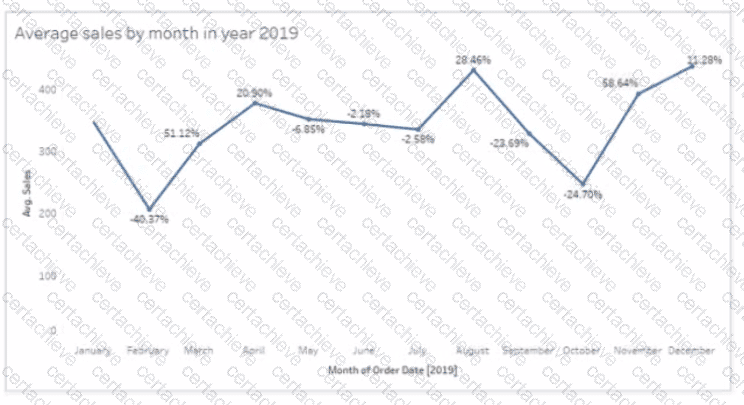
Which month had the biggest increase in swage sales compared to me previous month in 2019?
Correct Answer & Rationale:
Answer: D
Explanation:
Based on the line chart provided, each point on the line chart represents the average sales for a given month, and the percentage values indicate the change in average sales compared to the previous month. The month of November shows a significant increase from the month of October, indicated by a large upward spike on the chart and a high percentage increase.
Question 5
Tableau TDA-C01
QUESTION DESCRIPTION:
You have the following tiled dashboard that has one sheet.
You want to replace the sheet with Sheet2.
What should you do?
Correct Answer & Rationale:
Answer: D
Explanation:
In Tableau, to replace a sheet on a dashboard, you can simply drag the desired sheet (Sheet2 in this case) from the sheets list onto the dashboard area where the current sheet (Sheet3) resides. This action will replace the existing sheet with the new one. Right-clicking and adding to the dashboard adds an additional sheet rather than replacing, and the context menu options me n tioned in the other choices are not the standard methods for replacing sheets within a das h board.
Question 6
Tableau TDA-C01
QUESTION DESCRIPTION:
You plan to create a visualization that has a dual axis chart. The dual axis chart will contain a shape chart and a line chart will use the same measure named Population on the axis.
You need to configure be shapes to be much larger than the line.
What should you do?
Correct Answer & Rationale:
Answer: A
Explanation:
To configure the shapes to be much larger than the line, you need to duplicate Population and drag it to the second Marks card. This will create a dual axis chart with two measures on one axis. You can then select Shape on one Marks card and Line on another Marks card, and adjust the size of each mark independently using the Size slider or menu. References: https://help.tableau.com/current/pro/desktop/en-us/multiplemeasures_dualaxes.htm https://help.tableau.com/current/pro/desktop/en-us/marks_markproperties_size.htm
In a dual-axis chart in Tableau, if you want to have two different visual mark types (like a shape and a line) and configure them differently (such as making one larger than the other), you would need to duplicate the measure. You then drag this duplicate to the second Marks card (which represents the second axis). There, you can adjust the size of the marks (shapes, in this case) independently of the line marks on the first Marks card.
Question 7
Tableau TDA-C01
QUESTION DESCRIPTION:
You have the following data source in tableau Server.
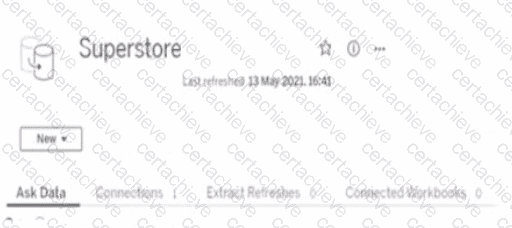
You need to ensure that the data is updated every hour.
What should you select?
Correct Answer & Rationale:
Answer: B
Explanation:
To ensure that the data is updated every hour, you need to select Extract Refreshes from the data source menu on Tableau Server. This will allow you to add a new extract refresh schedule or edit an existing one. You can specify the frequency and time of the refresh, as well as any custom options or credentials. New will create a new data source, Connected Workbooks will show you which workbooks use this data source, and Connections will show you which tables or files are connected to this data source. References: https://help.tableau.com/current/server/en-us/refresh_extracts.htm https://help.tableau.com/current/server/en-us/refresh_extracts_add.htm
To ensure that the data is updated every hour on Tableau Server, you would need to go to the " Extract Refreshes " option. Here, you can schedule the data extracts to refresh at the desired frequency, which in this case would be every hour.
Question 8
Tableau TDA-C01
QUESTION DESCRIPTION:
You publish a dashboard tut uses an attract. The extract refreshes every Monday at 10:00.
You need to ensure that the extract also refreshes on the last day of the month at 18:00.
What should you do?
Correct Answer & Rationale:
Answer: B
Explanation:
To refresh an extract on Tableau Server, you need to select the workbook, select Refresh Extracts, and then add a new extract refresh. You can specify the frequency and time of the refresh, as well as any custom options. You can have multiple extract refreshes for the same workbook with different schedules. References: https://help.tableau.com/current/server/en-us/refresh_extracts.htm https://help.tableau.com/current/server/en-us/refresh_extracts_add.htm
On Tableau Server, you can manage the scheduling of extract refreshes by selecting the specific workbook and configuring additional refresh schedules as needed. This allows for multiple refresh triggers, such as the regular Monday at 10:00 AM schedule, as well as an additional trigger for the last day of the month at 18:00.
Question 9
Tableau TDA-C01
QUESTION DESCRIPTION:
You have a database that includes field named sales, City and Region.
You have the following chart that shows the number of sales made in different cities.
You want to dynamically show the corresponding region when users hover their mouse over any of the bars.
What should you do?
Correct Answer & Rationale:
Answer: D
Explanation:
To show the corresponding region when users hover their mouse over any of the bars, you need to drag Region to Tooltip on the Marks card. This will add Region as a field in the tooltip text that appears when users hover over a mark. You can also customize the tooltip text by editing it in the Tooltip dialog box. References: https://help.tableau.com/current/pro/desktop/en-us/buildmanual_shelves.htm https://help.tableau.com/current/pro/desktop/en-us/formatting_tooltips.htm
To show additional information such as the corresponding region when hovering over a bar in Tableau, you can drag the ' Region ' field to the ' Tooltip ' shelf on the ' Marks ' card. This will ensure that when a user hovers over a bar representing a city, the tooltip will dynamically display the region associated with that city.
Question 10
Tableau TDA-C01
QUESTION DESCRIPTION:
You have a dashboard that contains confidential information about patients health. The data needs to always be up to date tor a team of healthcare workers How should you share me dashboard with the healthcare workers?
Correct Answer & Rationale:
Answer: C
Explanation:
To share a dashboard that contains confidential information about patients health and needs to always be up to date for a team of healthcare workers, you should publish it to Tableau Server. This will allow you to control who can access and interact with your dashboard, as well as schedule automatic refreshes of your data source or extract. Publishing to Tableau Public would expose your data to anyone on the internet, printing to PDF would not update your data, and exporting as a .twbx would require sending a large file that might not be compatible with other versions of Tableau. References: https://help.tableau.com/current/pro/desktop/en-us/publish_workbooks_share.htm https://help.tableau.com/current/pro/desktop/en-us/publish_workbooks_tableauserver.htm
When sharing sensitive and confidential information that needs to be kept up-to-date, such as patient health data for a team of healthcare workers, the best practice is to publish the dashboard to Tableau Server. Tableau Server is designed for secure, controlled access and can be configured to ensure that data is refreshed as needed. Publishing to Tableau Public is not secure for confidential data, printing to PDF or exporting as a .twbx does not allow for live data updates.

Verified by Certified Instructors
This Tableau TDA-C01 study pack was audited and verified on September 23, 2026 by Hilary Beaumont,. We ensure every technical rationale aligns with real-world enterprise standards.
A Stepping Stone for Enhanced Career Opportunities
Your profile having Tableau Certified Data Analyst certification significantly enhances your credibility and marketability in all corners of the world. The best part is that your formal recognition pays you in terms of tangible career advancement. It helps you perform your desired job roles accompanied by a substantial increase in your regular income. Beyond the resume, your expertise imparts you confidence to act as a dependable professional to solve real-world business challenges.
Your success in Tableau TDA-C01 certification exam makes your visible and relevant in the fast-evolving tech landscape. It proves a lifelong investment in your career that give you not only a competitive advantage over your non-certified peers but also makes you eligible for a further relevant exams in your domain.
What You Need to Ace Tableau Exam TDA-C01
Achieving success in the TDA-C01 Tableau exam requires a blending of clear understanding of all the exam topics, practical skills, and practice of the actual format. There's no room for cramming information, memorizing facts or dependence on a few significant exam topics. It means your readiness for exam needs you develop a comprehensive grasp on the syllabus that includes theoretical as well as practical command.
Here is a comprehensive strategy layout to secure peak performance in TDA-C01 certification exam:
- Develop a rock-solid theoretical clarity of the exam topics
- Begin with easier and more familiar topics of the exam syllabus
- Make sure your command on the fundamental concepts
- Focus your attention to understand why that matters
- Ensure hands-on practice as the exam tests your ability to apply knowledge
- Develop a study routine managing time because it can be a major time-sink if you are slow
- Find out a comprehensive and streamlined study resource for your help
Ensuring Outstanding Results in Exam TDA-C01!
In the backdrop of the above prep strategy for TDA-C01 Tableau exam, your primary need is to find out a comprehensive study resource. It could otherwise be a daunting task to achieve exam success. The most important factor that must be kep in mind is make sure your reliance on a one particular resource instead of depending on multiple sources. It should be an all-inclusive resource that ensures conceptual explanations, hands-on practical exercises, and realistic assessment tools.
Certachieve: A Reliable All-inclusive Study Resource
Certachieve offers multiple study tools to do thorough and rewarding TDA-C01 exam prep. Here's an overview of Certachieve's toolkit:
Tableau TDA-C01 PDF Study Guide
This premium guide contains a number of Tableau TDA-C01 exam questions and answers that give you a full coverage of the exam syllabus in easy language. The information provided efficiently guides the candidate's focus to the most critical topics. The supportive explanations and examples build both the knowledge and the practical confidence of the exam candidates required to confidently pass the exam. The demo of Tableau TDA-C01 study guide pdf free download is also available to examine the contents and quality of the study material.
Tableau TDA-C01 Practice Exams
Practicing the exam TDA-C01 questions is one of the essential requirements of your exam preparation. To help you with this important task, Certachieve introduces Tableau TDA-C01 Testing Engine to simulate multiple real exam-like tests. They are of enormous value for developing your grasp and understanding your strengths and weaknesses in exam preparation and make up deficiencies in time.
These comprehensive materials are engineered to streamline your preparation process, providing a direct and efficient path to mastering the exam's requirements.
Tableau TDA-C01 exam dumps
These realistic dumps include the most significant questions that may be the part of your upcoming exam. Learning TDA-C01 exam dumps can increase not only your chances of success but can also award you an outstanding score.
Top Exams & Certification Providers
New & Trending
- New Released Exams
- Related Exam
- Hot Vendor
Verified Performance Reports
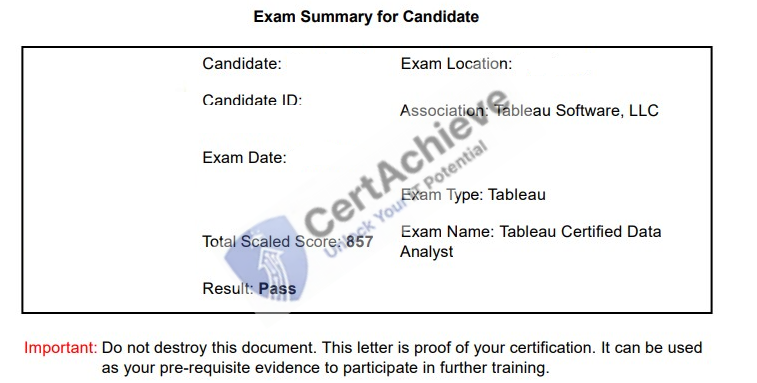
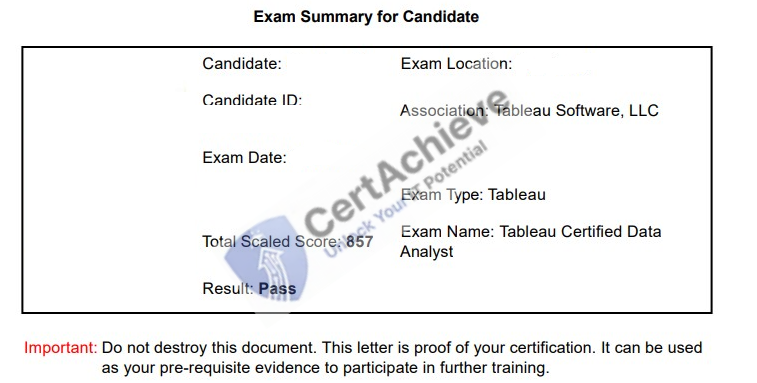
Authentic score reports from candidates who cleared the TDA-C01 exam.
Verified Case #1
Verified Case #2
×
![]()