
The Workday Pro HCM Reporting Certification Exam (Workday-Pro-HCM-Reporting)
Passing Workday Human Capital Management exam ensures for the successful candidate a powerful array of professional and personal benefits. The first and the foremost benefit comes with a global recognition that validates your knowledge and skills, making possible your entry into any organization of your choice.


Workday-Pro-HCM-Reporting Exam Dumps
- Exam Code: Workday-Pro-HCM-Reporting
- Vendor: Workday
- Certifications: Human Capital Management
- Exam Name: Workday Pro HCM Reporting Certification Exam
Why CertAchieve is Better than Standard Workday-Pro-HCM-Reporting Dumps
In 2026, Workday uses variable topologies. Basic dumps will fail you.
| Quality Standard | Generic Dump Sites | CertAchieve Premium Prep |
|---|---|---|
| Technical Explanation | None (Answer Key Only) | Step-by-Step Expert Rationales |
| Syllabus Coverage | Often Outdated (v1.0) | 2026 Updated (Latest Syllabus) |
| Scenario Mastery | Blind Memorization | Conceptual Logic & Troubleshooting |
| Instructor Access | No Post-Sale Support | 24/7 Professional Help |
Customers Passed Exams
10
Success backed by proven exam prep tools
Questions Came Word for Word
87%
Real exam match rate reported by verified users
Average Score in Real Testing Centre
91%
Consistently high performance across certifications
Study Time Saved With CertAchieve
60%
Efficient prep that reduces study hours significantly
Workday Workday-Pro-HCM-Reporting Exam Domains Q&A
Certified instructors verify every question for 100% accuracy, providing detailed, step-by-step explanations for each.
Question 1
Workday Workday-Pro-HCM-Reporting
QUESTION DESCRIPTION:
A customer was receiving a report on a weekly basis but has not received it since the new year started.
What task should you use to confirm the report frequency?
Correct Answer & Rationale:
Answer: C
Explanation:
When a report is scheduled to run at a recurring interval (daily, weekly, monthly, etc.), Workday tracks this under the Scheduled Future Processes report. This task allows administrators and report owners to view when reports are set to run, the frequency of execution, and the schedule start and end dates. If a report stopped running after the new year began, the most likely cause is that the scheduling end date expired on December 31, meaning no new jobs were generated for the new year.
From the Workday Reporting binder: “Workday provides scheduling options to run reports at set frequencies. You can confirm upcoming scheduled report runs in the Scheduled Future Processes report.” This provides visibility into whether the report is still scheduled and when it is next expected to execute.
The other answers are incorrect: View Alerts relates to system notifications, Mass Operation Management is not for reporting, and Run History shows past runs but not future scheduling. The correct option is C. Scheduled Future Processes .
Question 2
Workday Workday-Pro-HCM-Reporting
QUESTION DESCRIPTION:
You want the ability to view every summarization in the composite report by Location.
What do you do?
Correct Answer & Rationale:
Answer: A
Explanation:
Composite reports combine multiple subreports, and their summarizations depend on the fields configured in the subreports themselves. To enable consistent grouping and summarization across the entire composite report, the Location field must be included as a Detail Data field in all the subreports . This ensures that each subreport provides the Location context required for composite-level summarization.
From the Workday binder: “Composite reports aggregate results from multiple subreports. To summarize or drill consistently on a specific field, that field must exist as a Detail Data field in all subreports included in the composite.”
If Location is only included in one subreport, summarizations in the other subreports would not align, and Location-based grouping would fail. Similarly, making Location drillable only affects drill-down options, not summary-level grouping across the composite.
Thus, the correct answer is A. Include Location as a Detail Data field in all the subreports .
Question 3
Workday Workday-Pro-HCM-Reporting
QUESTION DESCRIPTION:
You have a Pivot Table visualization in your discovery board.
What type of report will Workday create if you generate a report from this visualization?
Correct Answer & Rationale:
Answer: B
Explanation:
In Workday Discovery Boards, visualizations such as pivot tables are based on summarized and grouped data. When you choose to generate a report from a Pivot Table visualization , Workday converts the visualization into a Matrix Report that includes only a table , preserving the row and column groupings and summarizations used in the pivot.
The Workday HCM Reporting documentation states:
“When generating a report from a pivot table visualization, Workday creates a matrix report that reflects the grouped and summarized structure of the pivot.”
“Charts are not included when generating reports from pivot table visualizations; the output is a table-only matrix report.”
Advanced Reports are generated from non-pivot, row-based visualizations. XpressO is not used for discovery board–generated reports. Matrix reports with charts are created only when the visualization includes a chart component, which pivot tables do not.
Therefore, the correct answer is B. Matrix Report (with only a table) .
Question 4
Workday Workday-Pro-HCM-Reporting
QUESTION DESCRIPTION:
A compensation analyst would like a report that includes an Expected Deadline field that returns a date 60 days after the Bonus Approval Date field.
Correct Answer & Rationale:
Answer: A
Explanation:
Workday calculated fields allow users to manipulate dates, numbers, and text values. To calculate a new date based on an existing date field (e.g., Bonus Approval Date), you use the Increment or Decrement Date function. This adds or subtracts a defined number of days, months, or years from the source date.
From Workday Reporting documentation:
“Increment or Decrement Date – Returns a date that is a specified number of days, months, or years before or after the value of the source date field.”
Example: If the Bonus Approval Date is 01/01/2025, adding 60 days using this function would return 03/02/2025.
Thus, the correct choice is A. Increment or Decrement Date .
Question 5
Workday Workday-Pro-HCM-Reporting
QUESTION DESCRIPTION:
Refer to the following scenario to answer the question below.
You have prepared the following matrix report for a recruiting manager.
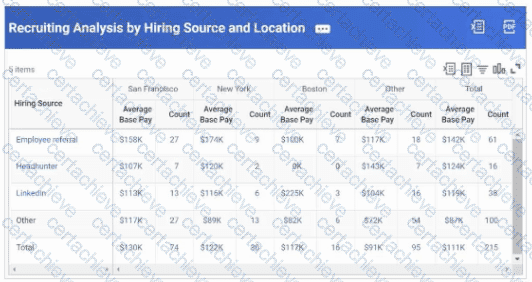
The recruiting manager would like to view the top ten hiring sources, rather than just three.
How can you adjust the report definition to address this requirement?
Correct Answer & Rationale:
Answer: B
Explanation:
In Workday matrix reports, the number of rows returned is controlled by the Maximum Number of Rows setting. By default, reports may limit output rows (for example, showing only the top 3). To display more results—such as the top 10 hiring sources—you must increase this value in the report definition.
From the Workday Reporting documentation:
“You can limit or expand the number of rows displayed in a matrix report by editing the Maximum Number of Rows field.”
“To display more than the default, update the value in the report definition.”
Therefore, the correct way to adjust this report to display the top 10 hiring sources is B. Edit the Maximum Number of Rows field .
Question 6
Workday Workday-Pro-HCM-Reporting
QUESTION DESCRIPTION:
You would like to build a composite report using worker data in which report users can select a value from the output and view the worker, worker's location, and worker's manager.
Where will you need to configure the drill down values?
Correct Answer & Rationale:
Answer: C
Explanation:
In composite reports, drill-down functionality is controlled at the column level . By configuring drillable fields on the output columns, users can select values and view related details, such as worker name, location, and manager.
From the Workday documentation: “Drill-down values in composite reports are configured on columns. Columns can be set to include drillable fields, allowing users to select a value and view related data.”
Rows determine how data is grouped, prompts filter initial results, and subreports provide the raw data but do not directly control drillable field configurations.
Therefore, the correct configuration is C. In the composite report columns .
Question 7
Workday Workday-Pro-HCM-Reporting
QUESTION DESCRIPTION:
You have created a composite report and are trying to add a matrix report as a subreport. However, when trying to configure a Data column, the matrix report is not available to select in the Sub Report Name field.
What can you check to identify the cause of this issue?
Correct Answer & Rationale:
Answer: A
Explanation:
For a matrix report to be used as a subreport in a composite report, the group-by fields in the matrix report must align with the fields enabled for filtering and grouping in the composite report. If this alignment does not exist, Workday does not allow the matrix report to appear as a valid subreport option in the Sub Report Name dropdown.
From the Workday binder: “To include a matrix report as a subreport in a composite, the group-by fields of the matrix must match the fields enabled for grouping in the composite report. If these do not match, the matrix will not appear in the Sub Report Name selection.”
Other factors such as prompt defaults or filter settings may impact usability, but they do not prevent the matrix report from being selectable. The key dependency is the field alignment between the composite and the matrix group-by fields .
Therefore, the correct answer is A. Check that every field in the composite report's set of fields that are enabled for filtering and grouping also exists as a group-by field in the matrix report .
Question 8
Workday Workday-Pro-HCM-Reporting
QUESTION DESCRIPTION:
Two people run the same report. One person can view all columns but the other person can only view some columns.
Why is the second user missing columns?
Correct Answer & Rationale:
Answer: C
Explanation:
Access to report fields in Workday is governed by security domains . If a user lacks access to the security domain that secures specific report fields, those fields will not appear in the report output for that user.
From the Workday Reporting documentation:
“A security group gets access to a security domain, which is a predefined set of related securable items. Securable items can include reports, tasks, data sources, and report fields .”
Therefore, the correct answer is C. The second user does not have access to the domain that secures the field .
Question 9
Workday Workday-Pro-HCM-Reporting
QUESTION DESCRIPTION:
You need to filter a custom report to only return data on part-time employees.
To achieve this, what comparison type should you use when creating the filter?
Correct Answer & Rationale:
Answer: C
Explanation:
When creating a custom report, filters restrict which data records are returned. Workday allows different comparison types for filters. The option “Value specified in this filter” lets you hard-code a condition (for example, Time Type = Part-Time ), so the report consistently returns only part-time employees without requiring user input.
From the Workday Reporting documentation:
“Filter – Add conditions to filter the primary business object.”
“Prompts – You can further narrow and refine your report results by having the user complete prompt fields before they run the report… or use value specified in this filter for fixed filtering.”
Therefore, the correct answer is C. Value specified in this filter .
Question 10
Workday Workday-Pro-HCM-Reporting
QUESTION DESCRIPTION:
A user needs to view additional data on the delivered Headcount By Job Profile report.
What should you recommend?
Correct Answer & Rationale:
Answer: D
Explanation:
Workday delivers many standard (delivered) reports that are available to all customers. These reports are a great starting point but are not editable directly. If the delivered report does not meet your requirements, you should copy it and then modify the copy to create a custom report . This ensures that you retain the delivered report as-is, while still tailoring the report output to your business needs.
From the Workday Module 1 and 2 Reporting sections:
“Workday delivers standard reports that are available for all customers. If necessary, you can copy many of the Workday-delivered reports to create a custom report and modify it as needed .”
“There still may not be a report that meets my specific needs though. In that case, I can either create a report from scratch or copy a delivered report and make changes .”
“Standard reports are already available in all customer tenants and span across the functional areas in Workday. Workday creates standard reports using either the report writer tool or XpressO. However, you can copy and modify reports created with report writer as needed .”
Therefore, the correct recommendation is to copy and modify the delivered Headcount By Job Profile report (Option D) instead of editing the original.

Verified by Certified Instructors
This Workday Workday-Pro-HCM-Reporting study pack was audited and verified on September 23, 2026 by John Prescott,. We ensure every technical rationale aligns with real-world enterprise standards.
A Stepping Stone for Enhanced Career Opportunities
Your profile having Human Capital Management certification significantly enhances your credibility and marketability in all corners of the world. The best part is that your formal recognition pays you in terms of tangible career advancement. It helps you perform your desired job roles accompanied by a substantial increase in your regular income. Beyond the resume, your expertise imparts you confidence to act as a dependable professional to solve real-world business challenges.
Your success in Workday Workday-Pro-HCM-Reporting certification exam makes your visible and relevant in the fast-evolving tech landscape. It proves a lifelong investment in your career that give you not only a competitive advantage over your non-certified peers but also makes you eligible for a further relevant exams in your domain.
What You Need to Ace Workday Exam Workday-Pro-HCM-Reporting
Achieving success in the Workday-Pro-HCM-Reporting Workday exam requires a blending of clear understanding of all the exam topics, practical skills, and practice of the actual format. There's no room for cramming information, memorizing facts or dependence on a few significant exam topics. It means your readiness for exam needs you develop a comprehensive grasp on the syllabus that includes theoretical as well as practical command.
Here is a comprehensive strategy layout to secure peak performance in Workday-Pro-HCM-Reporting certification exam:
- Develop a rock-solid theoretical clarity of the exam topics
- Begin with easier and more familiar topics of the exam syllabus
- Make sure your command on the fundamental concepts
- Focus your attention to understand why that matters
- Ensure hands-on practice as the exam tests your ability to apply knowledge
- Develop a study routine managing time because it can be a major time-sink if you are slow
- Find out a comprehensive and streamlined study resource for your help
Ensuring Outstanding Results in Exam Workday-Pro-HCM-Reporting!
In the backdrop of the above prep strategy for Workday-Pro-HCM-Reporting Workday exam, your primary need is to find out a comprehensive study resource. It could otherwise be a daunting task to achieve exam success. The most important factor that must be kep in mind is make sure your reliance on a one particular resource instead of depending on multiple sources. It should be an all-inclusive resource that ensures conceptual explanations, hands-on practical exercises, and realistic assessment tools.
Certachieve: A Reliable All-inclusive Study Resource
Certachieve offers multiple study tools to do thorough and rewarding Workday-Pro-HCM-Reporting exam prep. Here's an overview of Certachieve's toolkit:
Workday Workday-Pro-HCM-Reporting PDF Study Guide
This premium guide contains a number of Workday Workday-Pro-HCM-Reporting exam questions and answers that give you a full coverage of the exam syllabus in easy language. The information provided efficiently guides the candidate's focus to the most critical topics. The supportive explanations and examples build both the knowledge and the practical confidence of the exam candidates required to confidently pass the exam. The demo of Workday Workday-Pro-HCM-Reporting study guide pdf free download is also available to examine the contents and quality of the study material.
Workday Workday-Pro-HCM-Reporting Practice Exams
Practicing the exam Workday-Pro-HCM-Reporting questions is one of the essential requirements of your exam preparation. To help you with this important task, Certachieve introduces Workday Workday-Pro-HCM-Reporting Testing Engine to simulate multiple real exam-like tests. They are of enormous value for developing your grasp and understanding your strengths and weaknesses in exam preparation and make up deficiencies in time.
These comprehensive materials are engineered to streamline your preparation process, providing a direct and efficient path to mastering the exam's requirements.
Workday Workday-Pro-HCM-Reporting exam dumps
These realistic dumps include the most significant questions that may be the part of your upcoming exam. Learning Workday-Pro-HCM-Reporting exam dumps can increase not only your chances of success but can also award you an outstanding score.
Top Exams & Certification Providers
New & Trending
- New Released Exams
- Related Exam
- Hot Vendor