
The Cisco Certified Support Technician Networking Exam (100-150)
Passing Cisco CCST exam ensures for the successful candidate a powerful array of professional and personal benefits. The first and the foremost benefit comes with a global recognition that validates your knowledge and skills, making possible your entry into any organization of your choice.


100-150 Exam Dumps
- Exam Code: 100-150
- Vendor: Cisco
- Certifications: CCST
- Exam Name: Cisco Certified Support Technician Networking Exam
Why CertAchieve is Better than Standard 100-150 Dumps
In 2026, Cisco uses variable topologies. Basic dumps will fail you.
| Quality Standard | Generic Dump Sites | CertAchieve Premium Prep |
|---|---|---|
| Technical Explanation | None (Answer Key Only) | Step-by-Step Expert Rationales |
| Syllabus Coverage | Often Outdated (v1.0) | 2026 Updated (Latest Syllabus) |
| Scenario Mastery | Blind Memorization | Conceptual Logic & Troubleshooting |
| Instructor Access | No Post-Sale Support | 24/7 Professional Help |
Customers Passed Exams
10
Success backed by proven exam prep tools
Questions Came Word for Word
93%
Real exam match rate reported by verified users
Average Score in Real Testing Centre
92%
Consistently high performance across certifications
Study Time Saved With CertAchieve
60%
Efficient prep that reduces study hours significantly
Coverage of Official Cisco 100-150 Exam Domains
Our curriculum is meticulously mapped to the Cisco official blueprint.
Networking Standards and Concepts
Master the foundational models of communication. Focus on the OSI 7-Layer Model and TCP/IP stack. Understand the difference between bandwidth and throughput, and identify the primary functions of routers, switches, and access points in a modern architecture.
Addressing and Subnet Formats
Deep dive into the math of the internet. Master IPv4 and IPv6 addressing, including binary-to-decimal conversion and prefix notation. Focus on the basics of Subnetting, identifying valid host ranges, and understanding the role of Default Gateways and DNS.
Endpoints and Media Types
Mastering the physical and logical connection of devices. Focus on identifying cable types (Fiber, Copper, Twisted Pair) and their limitations. Learn to configure endpoint settings on Windows, Mac, and Linux, and understand how Wi-Fi frequencies (2.4GHz, 5GHz, 6GHz) impact connectivity.
Network Infrastructures
Focus on how networks are structured. Master the differences between LAN, WAN, and PAN. Understand basic cloud models (SaaS, PaaS, IaaS) and how virtualization and "On-Premises vs. Cloud" architectures impact daily network operations.
Diagnosing Problems
The "Junior Technician" toolkit. Master the use of command-line tools like ping, traceroute, ipconfig, and nslookup. Focus on the Cisco Troubleshooting Methodology to identify cable faults, IP conflicts, and basic configuration errors in real-time.
Network Security
Foundational protection strategies. Master the concepts of Confidentiality, Integrity, and Availability (CIA). Focus on identifying common threats (Phishing, Malware, Man-in-the-Middle), and implementing basic security controls like Firewalls, WPA3 encryption, and Multi-Factor Authentication (MFA).
Cisco 100-150 Exam Domains Q&A
Certified instructors verify every question for 100% accuracy, providing detailed, step-by-step explanations for each.
Question 1
Cisco 100-150
QUESTION DESCRIPTION:
Which address is included in the 192.168.200.0/24 network?
Correct Answer & Rationale:
Answer: B
Explanation:
• 192.168.200.0/24 Network: This subnet includes all addresses from 192.168.200.0 to 192.168.200.255. The /24 indicates a subnet mask of 255.255.255.0, which allows for 256 addresses.
• 192.168.199.13: This address is in the 192.168.199.0/24 subnet, not the 192.168.200.0/24 subnet.
• 192.168.200.13: This address is within the 192.168.200.0/24 subnet.
• 192.168.201.13: This address is in the 192.168.201.0/24 subnet, not the 192.168.200.0/24 subnet.
• 192.168.1.13: This address is in the 192.168.1.0/24 subnet, not the 192.168.200.0/24 subnet.
References:
• Subnetting Guide: Subnetting Basics
Question 2
Cisco 100-150
QUESTION DESCRIPTION:
During the data encapsulation process, which OSI layer adds a header that contains MAC addressing information and a trailer used for error checking?
Correct Answer & Rationale:
Answer: C
Explanation:
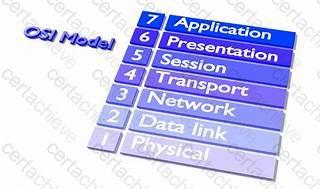 OSI model
During the data encapsulation process, the Data Link layer of the OSI model is responsible for adding a header that contains MAC addressing information and a trailer used for error checking. The header typically includes the source and destination MAC addresses, while the trailer contains a Frame Check Sequence (FCS) which is used for error detection 1 .
The Data Link layer ensures that messages are delivered to the proper device on a LAN using hardware addresses and translates messages from the Network layer into bits for the Physical layer to transmit. It also controls how data is placed onto the medium and is received from the medium through the physical hardware.
References :=
The OSI Model – The 7 Layers of Networking Explained in Plain English
OSI Model - Network Direction
Which layer adds both header and trailer to the data?
What is OSI Model | 7 Layers Explained - GeeksforGeeks
Question 3
Cisco 100-150
QUESTION DESCRIPTION:
Which protocol allows you to securely upload files to another computer on the internet?
Correct Answer & Rationale:
Answer: A
Explanation:
SFTP, or Secure File Transfer Protocol, is a protocol that allows for secure file transfer capabilities between networked hosts. It is a secure extension of the File Transfer Protocol (FTP). SFTP encrypts both commands and data, preventing passwords and sensitive information from being transmitted openly over the network. It is typically used for secure file transfers over the internet and is built on the Secure Shell (SSH) protocol1.
References :=
• What Is SFTP? (Secure File Transfer Protocol)
• How to Use SFTP to Safely Transfer Files: A Step-by-Step Guide
• Secure File Transfers: Best Practices, Protocols And Tools
The Secure File Transfer Protocol (SFTP) is a secure version of the File Transfer Protocol (FTP) that uses SSH (Secure Shell) to encrypt all commands and data. This ensures that sensitive information, such as usernames, passwords, and files being transferred, are securely transmitted over the network.
• ICMP (Internet Control Message Protocol) is used for network diagnostics and is not designed for file transfer.
• NTP (Network Time Protocol) is used to synchronize clocks between computer systems and is not related to file transfer.
• HTTP (HyperText Transfer Protocol) is used for transmitting web pages over the internet and does not inherently provide secure file transfer capabilities.
Thus, the correct protocol that allows secure uploading of files to another computer on the internet is SFTP.
References :=
• Cisco Learning Network
• SFTP Overview (Cisco)
Question 4
Cisco 100-150
QUESTION DESCRIPTION:
In the network shown in the following graphic, Switch1 is a Layer 2 switch.
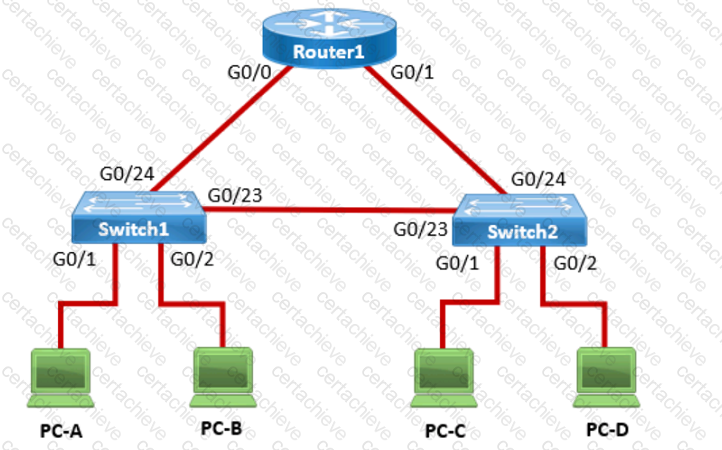
PC-A sends a frame to PC-C. Switch1 does not have a mapping entry for the MAC address of PC-C. Which action does Switch1 take?
Correct Answer & Rationale:
Answer: C
Explanation:
Understanding How Layer 2 Switches Handle Unknown MAC Addresses
Switches operate at Layer 2 (Data Link Layer) of the OSI model and maintain a MAC address table (CAM table) to forward frames efficiently.
When a switch receives a frame, it checks its MAC address table to see if it knows the destination MAC address.
If the destination MAC address is not in the table (meaning the switch does not know which port leads to PC-C), the switch follows the flooding behavior .
What Happens When Switch1 Receives a Frame from PC-A to PC-C?
Switch1 checks its MAC table :
The source MAC (PC-A) is recorded in the table on port G0/1 .
The destination MAC (PC-C) is not in the table .
Switch1 does not know where PC-C is :
It floods the frame out of all active ports except the port it was received on (G0/1) .
This means the frame is sent to:
Switch2 (via G0/23)
PC-B (via G0/2)
Switch2 receives the frame and follows the same process :
If Switch2 has PC-C ' s MAC in its table, it forwards the frame appropriately.
If not, it floods the frame again until PC-C replies.
Once PC-C responds , Switch1 and Switch2 learn its MAC address and update their tables.
Why Other Options Are Incorrect:
❌ A. Switch1 queries Switch2 for the MAC address of PC-C.
Incorrect: Switches do not query other switches directly for MAC addresses. Instead, they rely on learning MAC addresses dynamically through frame forwarding.
❌ B. Switch1 drops the frame and sends an error message back to PC-A.
Incorrect: Switches do not drop frames for unknown MAC addresses . Instead, they flood the frames out all ports except the incoming port.
❌ D. Switch1 sends an ARP request to obtain the MAC address of PC-C.
Incorrect:
ARP (Address Resolution Protocol) is only used to resolve IP addresses to MAC addresses .
Since PC-A is sending a frame (Layer 2), not an IP packet (Layer 3) , ARP is not involved here.
Conclusion
Since Switch1 does not know the destination MAC address , it floods the frame out all active ports except the port it was received on . This is the default behavior of Layer 2 switches when they encounter an unknown MAC address .
Thus, the correct answer is: ✔ C. Switch1 floods the frame out all active ports except port G0/1.
References
Cisco CCNA 200-301 Official Guide – MAC Address Table & Frame Forwarding
RFC 894 – Standard for Ethernet Frame Forwarding
Cisco Networking Essentials – Switch Flooding Behavior
Question 5
Cisco 100-150
QUESTION DESCRIPTION:
Which component of the AAA service security model provides identity verification?
Correct Answer & Rationale:
Answer: C
Explanation:
The AAA service security model consists of three components: Authentication, Authorization, and Accounting.
• Authentication: This is the process of verifying the identity of a user or device. It ensures that only legitimate users can access the network or service.
• Authorization: This determines what an authenticated user is allowed to do or access within the network.
• Auditing/Accounting: This component tracks the actions of the user, including what resources they access and what changes they make.
Thus, the correct answer is C. Authentication.
References :=
• Cisco AAA Overview
• Understanding AAA (Authentication, Authorization, and Accounting)
Question 6
Cisco 100-150
QUESTION DESCRIPTION:
Which two statements are true about the IPv4 address of the default gateway configured on a host? (Choose 2.)
Note: You will receive partial credit for each correct selection.
Correct Answer & Rationale:
Answer: B, D
Explanation:
• Statement B: " The same default gateway IPv4 address is configured on each host on the local network. " This is true because all hosts on the same local network (subnet) use the same default gateway IP address to send packets destined for other networks.
• Statement D: " The default gateway is the IPv4 address of the router interface connected to the same local network as the host. " This is true because the default gateway is the IP address of the router ' s interface that is directly connected to the local network.
• Statement A: " The IPv4 address of the default gateway must be the first host address in the subnet. " This is not necessarily true. The default gateway can be any address within the subnet range.
• Statement C: " The default gateway is the Loopback0 interface IPv4 address of the router connected to the same local network as the host. " This is not true; the default gateway is the IP address of the router ' s physical or logical interface connected to the local network.
• Statement E: " Hosts learn the default gateway IPv4 address through router advertisement messages. " This is generally true for IPv6 with Router Advertisement (RA) messages, but not typically how IPv4 hosts learn the default gateway address.
References:
• Cisco Default Gateway Configuration: Cisco Default Gateway
Question 7
Cisco 100-150
QUESTION DESCRIPTION:
You need to connect a computer ' s network adapter to a switch using a 1000BASE-T cable.
Which connector should you use?
Correct Answer & Rationale:
Answer: D
Explanation:
• 1000BASE-T Cable: This refers to Gigabit Ethernet over twisted-pair cables (Cat 5e or higher).
• Connector: RJ-45 connectors are used for Ethernet cables, including those used for 1000BASE-T.
• Coax: Used for cable TV and older Ethernet standards like 10BASE2.
• RJ-11: Used for telephone connections.
• OS2 LC: Used for fiber optic connections.
References:
• Ethernet Standards and Cables: Ethernet Cable Guide
Question 8
Cisco 100-150
QUESTION DESCRIPTION:
Which standard contains the specifications for Wi-Fi networks?
Correct Answer & Rationale:
Answer: C
Explanation:
The IEEE 802.11 standard contains the specifications for Wi-Fi networks. It is a set of media access control (MAC) and physical layer (PHY) specifications for implementing wireless local area network (WLAN) computer communication in various frequencies, including but not limited to 2.4 GHz, 5 GHz, and 6 GHz1. This standard is maintained by the Institute of Electrical and Electronics Engineers (IEEE) and is commonly referred to as Wi-Fi. The standard has evolved over time to include several amendments that improve speed, range, and reliability of wireless networks.
References :=
• The Most Common Wi-Fi Standards and Types, Explained
• 802.11 Standards Explained: 802.11ax, 802.11ac, 802.11b/g/n, 802.11a
• Wi-Fi Standards Explained - GeeksforGeeks
=========================

Verified by Certified Instructors
This Cisco 100-150 study pack was audited and verified on September 23, 2026 by Radia Davenport,. We ensure every technical rationale aligns with real-world enterprise standards.
A Stepping Stone for Enhanced Career Opportunities
Your profile having CCST certification significantly enhances your credibility and marketability in all corners of the world. The best part is that your formal recognition pays you in terms of tangible career advancement. It helps you perform your desired job roles accompanied by a substantial increase in your regular income. Beyond the resume, your expertise imparts you confidence to act as a dependable professional to solve real-world business challenges.
Your success in Cisco 100-150 certification exam makes your visible and relevant in the fast-evolving tech landscape. It proves a lifelong investment in your career that give you not only a competitive advantage over your non-certified peers but also makes you eligible for a further relevant exams in your domain.
What You Need to Ace Cisco Exam 100-150
Achieving success in the 100-150 Cisco exam requires a blending of clear understanding of all the exam topics, practical skills, and practice of the actual format. There's no room for cramming information, memorizing facts or dependence on a few significant exam topics. It means your readiness for exam needs you develop a comprehensive grasp on the syllabus that includes theoretical as well as practical command.
Here is a comprehensive strategy layout to secure peak performance in 100-150 certification exam:
- Develop a rock-solid theoretical clarity of the exam topics
- Begin with easier and more familiar topics of the exam syllabus
- Make sure your command on the fundamental concepts
- Focus your attention to understand why that matters
- Ensure hands-on practice as the exam tests your ability to apply knowledge
- Develop a study routine managing time because it can be a major time-sink if you are slow
- Find out a comprehensive and streamlined study resource for your help
Ensuring Outstanding Results in Exam 100-150!
In the backdrop of the above prep strategy for 100-150 Cisco exam, your primary need is to find out a comprehensive study resource. It could otherwise be a daunting task to achieve exam success. The most important factor that must be kep in mind is make sure your reliance on a one particular resource instead of depending on multiple sources. It should be an all-inclusive resource that ensures conceptual explanations, hands-on practical exercises, and realistic assessment tools.
Certachieve: A Reliable All-inclusive Study Resource
Certachieve offers multiple study tools to do thorough and rewarding 100-150 exam prep. Here's an overview of Certachieve's toolkit:
Cisco 100-150 PDF Study Guide
This premium guide contains a number of Cisco 100-150 exam questions and answers that give you a full coverage of the exam syllabus in easy language. The information provided efficiently guides the candidate's focus to the most critical topics. The supportive explanations and examples build both the knowledge and the practical confidence of the exam candidates required to confidently pass the exam. The demo of Cisco 100-150 study guide pdf free download is also available to examine the contents and quality of the study material.
Cisco 100-150 Practice Exams
Practicing the exam 100-150 questions is one of the essential requirements of your exam preparation. To help you with this important task, Certachieve introduces Cisco 100-150 Testing Engine to simulate multiple real exam-like tests. They are of enormous value for developing your grasp and understanding your strengths and weaknesses in exam preparation and make up deficiencies in time.
These comprehensive materials are engineered to streamline your preparation process, providing a direct and efficient path to mastering the exam's requirements.
Cisco 100-150 exam dumps
These realistic dumps include the most significant questions that may be the part of your upcoming exam. Learning 100-150 exam dumps can increase not only your chances of success but can also award you an outstanding score.
Top Exams & Certification Providers
New & Trending
- New Released Exams
- Related Exam
- Hot Vendor