
The Aruba Certified Network Security Associate Exam (HPE6-A78)
Passing HP Aruba-ACNSA exam ensures for the successful candidate a powerful array of professional and personal benefits. The first and the foremost benefit comes with a global recognition that validates your knowledge and skills, making possible your entry into any organization of your choice.


HPE6-A78 Exam Dumps
- Exam Code: HPE6-A78
- Vendor: HP
- Certifications: Aruba-ACNSA
- Exam Name: Aruba Certified Network Security Associate Exam
Why CertAchieve is Better than Standard HPE6-A78 Dumps
In 2026, HP uses variable topologies. Basic dumps will fail you.
| Quality Standard | Generic Dump Sites | CertAchieve Premium Prep |
|---|---|---|
| Technical Explanation | None (Answer Key Only) | Step-by-Step Expert Rationales |
| Syllabus Coverage | Often Outdated (v1.0) | 2026 Updated (Latest Syllabus) |
| Scenario Mastery | Blind Memorization | Conceptual Logic & Troubleshooting |
| Instructor Access | No Post-Sale Support | 24/7 Professional Help |
Customers Passed Exams
10
Success backed by proven exam prep tools
Questions Came Word for Word
95%
Real exam match rate reported by verified users
Average Score in Real Testing Centre
87%
Consistently high performance across certifications
Study Time Saved With CertAchieve
60%
Efficient prep that reduces study hours significantly
HP HPE6-A78 Exam Domains Q&A
Certified instructors verify every question for 100% accuracy, providing detailed, step-by-step explanations for each.
Question 1
HP HPE6-A78
QUESTION DESCRIPTION:
What are the roles of 802.1X authenticators and authentication servers?
Correct Answer & Rationale:
Answer: C
Explanation:
In the 802.1X network access control model, the roles of the authenticator and the authentication server are distinct yet complementary. The authenticator acts as a RADIUS client, which is a network device, like a switch or wireless access point, that directly interfaces with the client machine (supplicant). The authentication server, typically a RADIUS server, is responsible for verifying the credentials provided by the supplicant through the authenticator. This setup helps in separating the duties where the authenticator enforces authentication but does not decide on the validity of the credentials, which is the role of the authentication server.
[References:, IEEE 802.1X standard for network access control., ]
Question 2
HP HPE6-A78
QUESTION DESCRIPTION:
Refer to the exhibit.
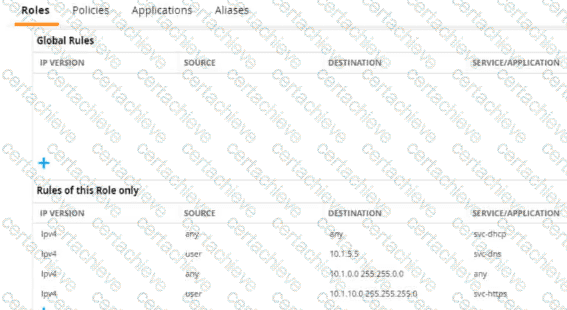
A diem is connected to an ArubaOS Mobility Controller. The exhibit snows all Tour firewall rules that apply to this diem
What correctly describes how the controller treats HTTPS packets to these two IP addresses, both of which are on the other side of the firewall
10.1 10.10
203.0.13.5
Correct Answer & Rationale:
Answer: B
Explanation:
Referring to the exhibit, the ArubaOS Mobility Controller treats HTTPS packets based on the firewall rules applied to the client. The rule that allows svc-https service for destination IP range 10.1.0.0 255.255.0.0 would permit an HTTPS packet to 10.1.10.10 since this IP address falls within the specified range. There are no rules shown that would allow traffic to the IP address 203.0.13.5; hence, the packet to this address would be dropped.
[References:, ArubaOS firewall configuration guides detailing how firewall rules are interpreted and applied to traffic., Network security textbooks explaining firewall rule processing and packet filtering based on source and destination IP addresses., ]
Question 3
HP HPE6-A78
QUESTION DESCRIPTION:
An MC has a WLAN that enforces WPA3-Enterprise with authentication to HPE Aruba Networking ClearPass Policy Manager (CPPM). The WLAN ' s default role is set to guest. A Mobility Controller (MC) has these roles configured on it:
authenticated
denyall
guest
general-access
guest-logon
logon
stateful-dot1x
switch-logon
voice A client authenticates. CPPM returns an Access-Accept with an Aruba-User-Role VSA set to general_access. What role does the client receive?
Correct Answer & Rationale:
Answer: C
Explanation:
In an AOS-8 Mobility Controller (MC) environment, a WLAN is configured with WPA3-Enterprise security, using HPE Aruba Networking ClearPass Policy Manager (CPPM) for authentication. The WLAN’s default role is set to " guest, " which would be applied if no specific role is assigned after authentication. The MC has several roles configured, including " general-access " (note the underscore in the question: " general_access " ).
The client successfully authenticates, and CPPM sends an Access-Accept message with an Aruba-User-Role Vendor-Specific Attribute (VSA) set to " general_access. " In AOS-8, the Aruba-User-Role VSA is used to assign a specific role to the client, overriding the default role configured on the WLAN. The role specified in the VSA must match a role that exists on the MC. Since " general-access " (or " general_access " as written in the question) is listed among the roles configured on the MC, the MC will apply this role to the client.
The underscore in " general_access " in the VSA versus the hyphen in " general-access " in the MC’s role list is likely a typographical inconsistency in the question. In practice, AOS-8 role names are case-insensitive and typically use hyphens, not underscores, but for the purpose of this question, we assume " general_access " matches " general-access " as the intended role.
Option A , " guest, " is incorrect because the guest role is the default 802.1X role for the WLAN, but it is overridden by the Aruba-User-Role VSA specifying " general_access. "
Option B , " logon, " is incorrect because the logon role is typically applied during the authentication process (e.g., to allow access to DNS or RADIUS servers), not after successful authentication when a specific role is assigned.
Option C , " general-access, " is correct because the MC applies the role specified in the Aruba-User-Role VSA ( " general_access " ), which matches the " general-access " role configured on the MC.
Option D , " authenticated, " is incorrect because the " authenticated " role is not specified in the VSA, and there is no indication that it is the default role for successful authentication in this scenario.
The HPE Aruba Networking AOS-8 8.11 User Guide states:
" When a client authenticates successfully via 802.1X, the Mobility Controller checks for an Aruba-User-Role VSA in the RADIUS Access-Accept message. If the VSA is present and the specified role exists on the controller, the controller assigns that role to the client, overriding the default 802.1X role configured for the WLAN. For example, if the VSA specifies ‘general-access’ and this role is configured on the controller, the client will be assigned the ‘general-access’ role. " (Page 305, Role Assignment Section)
Additionally, the HPE Aruba Networking ClearPass Policy Manager 6.11 User Guide notes:
" The Aruba-User-Role VSA allows ClearPass to assign a specific role to a client on an Aruba Mobility Controller. The role name sent in the VSA must match a role configured on the controller, and the controller will apply this role to the client session, ignoring the default role for the WLAN. " (Page 289, RADIUS Enforcement Section)
[References:, HPE Aruba Networking AOS-8 8.11 User Guide, Role Assignment Section, Page 305., HPE Aruba Networking ClearPass Policy Manager 6.11 User Guide, RADIUS Enforcement Section, Page 289.===========]
Question 4
HP HPE6-A78
QUESTION DESCRIPTION:
What is a guideline for deploying Aruba ClearPass Device Insight?
Correct Answer & Rationale:
Answer: D
Explanation:
For deploying Aruba ClearPass Device Insight effectively, especially in environments with multiple sites, it is recommended to deploy a pair of Device Insight Collectors at the headquarters or the central data center. This deployment strategy helps in centralizing the data collection and analysis, which simplifies management and enhances performance by reducing the data load on the WAN links connecting different sites. Centralizing the collectors at a major site or data center allows for better scalability and reliability of the network management system. This configuration also aids in achieving a more consistent and comprehensive monitoring and analysis of the devices across the network, ensuring that the security and management policies are uniformly applied. This recommendation is based on best practices for network architecture design, particularly those discussed in Aruba’s deployment guides and network management strategies.
Question 5
HP HPE6-A78
QUESTION DESCRIPTION:
You have a network with AOS-CX switches for which HPE Aruba Networking ClearPass Policy Manager (CPPM) acts as the TACACS+ server. When an admin authenticates, CPPM sends a response with:
Aruba-Priv-Admin-User = 1
TACACS+ privilege level = 15 What happens to the user?
Correct Answer & Rationale:
Answer: C
Explanation:
HPE Aruba Networking AOS-CX switches support TACACS+ for administrative authentication, where ClearPass Policy Manager (CPPM) can act as the TACACS+ server. When an admin authenticates, CPPM sends a TACACS+ response that includes attributes such as the TACACS+ privilege level and vendor-specific attributes (VSAs) like Aruba-Priv-Admin-User.
In this scenario, CPPM sends:
TACACS+ privilege level = 15 : In TACACS+, privilege level 15 is the highest level and typically grants full administrative access (equivalent to a superuser or administrator role).
Aruba-Priv-Admin-User = 1 : This Aruba-specific VSA indicates that the user should be granted the highest level of administrative access on the switch.
On AOS-CX switches, the privilege level 15 maps to the administrator role, which provides full read-write access to all switch functions. The Aruba-Priv-Admin-User = 1 attribute reinforces this by explicitly assigning the admin role, ensuring the user has unrestricted access.
Option A, " The user receives auditors access, " is incorrect because auditors typically have read-only access, which corresponds to a lower privilege level (e.g., 1 or 3) on AOS-CX switches.
Option B, " The user receives no access, " is incorrect because the authentication was successful, and CPPM sent a response granting access with privilege level 15.
Option D, " The user receives operators access, " is incorrect because operators typically have a lower privilege level (e.g., 5 or 7), which provides limited access compared to an administrator.
The HPE Aruba Networking AOS-CX 10.12 Security Guide states:
" When using TACACS+ for administrative authentication, the switch interprets the privilege level returned by the TACACS+ server. A privilege level of 15 maps to the administrator role, granting full read-write access to all switch functions. The Aruba-Priv-Admin-User VSA, when set to 1, explicitly assigns the admin role, ensuring the user has unrestricted access. " (Page 189, TACACS+ Authentication Section)
Additionally, the HPE Aruba Networking ClearPass Policy Manager 6.11 User Guide notes:
" ClearPass can send the Aruba-Priv-Admin-User VSA in a TACACS+ response to specify the administrative role on Aruba devices. A value of 1 indicates the admin role, which provides full administrative privileges. " (Page 312, TACACS+ Enforcement Section)
[References:, HPE Aruba Networking AOS-CX 10.12 Security Guide, TACACS+ Authentication Section, Page 189., HPE Aruba Networking ClearPass Policy Manager 6.11 User Guide, TACACS+ Enforcement Section, Page 312., ]
Question 6
HP HPE6-A78
QUESTION DESCRIPTION:
What is a guideline for managing local certificates on AOS-CX switches?
Correct Answer & Rationale:
Answer: C
Explanation:
AOS-CX switches use certificates for various purposes, such as securing HTTPS access to the switch’s web interface, authenticating the switch as a RadSec client, or securing other communications. Managing local certificates on AOS-CX switches involves ensuring that the switch trusts the certificate authority (CA) that issued the certificate, which is critical for proper operation.
Option C , " Before installing the local certificate, create a trust anchor (TA) profile with the root CA certificate for the certificate that you will install, " is correct. A trust anchor (TA) profile on AOS-CX switches contains the root CA certificate (or intermediate CA certificate) that issued the local certificate. This TA profile allows the switch to validate the certificate chain when the local certificate is installed. For example, if you install a CA-signed certificate for the HTTPS server, the switch needs the root CA certificate in a TA profile to trust the certificate. This is a standard guideline for certificate management on AOS-CX switches to ensure secure and proper operation.
Option A , " Understand that the switch must use the same certificate for all usages, such as its HTTPS server and RadSec client, " is incorrect. AOS-CX switches support using different certificates for different purposes. For example, you can have one certificate for the HTTPS server and another for RadSec client authentication, as long as each certificate is associated with the appropriate service and trusted by the switch.
Option B , " Create a self-signed certificate online on the switch because AOS-CX switches do not support CA-signed certificates, " is incorrect. AOS-CX switches fully support CA-signed certificates, and using CA-signed certificates is recommended for production environments to ensure trust and security. Self-signed certificates can be used for testing but are not a guideline for general certificate management.
Option D , " Install an Online Certificate Status Protocol (OCSP) certificate to simplify the process of enrolling and re-enrolling for certificates, " is incorrect. OCSP is a protocol used to check the revocation status of certificates, not to simplify certificate enrollment. AOS-CX switches support OCSP for certificate validation, but installing an " OCSP certificate " is not a concept in certificate management, and it’s not a guideline for managing local certificates.
The HPE Aruba Networking AOS-CX 10.12 Security Guide states:
" Before installing a CA-signed local certificate on the switch, you must create a trust anchor (TA) profile that includes the root CA certificate (or intermediate CA certificate) that issued the local certificate. This ensures that the switch can validate the certificate chain. For example, to install a CA-signed certificate for the HTTPS server, use the command crypto pki ta-profile < profile-name > to create the TA profile, and then import the root CA certificate into the profile using crypto pki import ta-profile < profile-name > . Then, install the local certificate using crypto pki import local-certificate < certificate-name > and associate it with the HTTPS server. " (Page 201, Certificate Management Section)
Additionally, the guide notes:
" AOS-CX switches support both self-signed and CA-signed certificates. For production environments, it is recommended to use CA-signed certificates and ensure that the appropriate trust anchor profiles are configured to validate the certificate chain. " (Page 202, Best Practices Section)
[References:, HPE Aruba Networking AOS-CX 10.12 Security Guide, Certificate Management Section, Page 201., HPE Aruba Networking AOS-CX 10.12 Security Guide, Best Practices Section, Page 202.===========]
Question 7
HP HPE6-A78
QUESTION DESCRIPTION:
What is a guideline for creating certificate signing requests (CSRs) and deploying server Certificates on ArubaOS Mobility Controllers (MCs)?
Correct Answer & Rationale:
Answer: C
Explanation:
Creating the Certificate Signing Request (CSR) and the public/private keypair offline is recommended when deploying server certificates on multiple ArubaOS Mobility Controllers (MCs). This method enhances security by minimizing the exposure of private keys. By creating and handling these components offline, administrators can maintain better control over the keys and ensure their security before deploying them across multiple devices. This approach also simplifies the management of certificates on multiple controllers, as the same certificate can be installed more securely and efficiently.
[References:, ArubaOS documentation on CSR creation and certificate management., ]
Question 8
HP HPE6-A78
QUESTION DESCRIPTION:
What correctly describes the Pairwise Master Key (PMK) in thee specified wireless security protocol?
Correct Answer & Rationale:
Answer: A
Explanation:
In WPA3-Enterprise, the Pairwise Master Key (PMK) is indeed unique for each session and is derived using a process called Simultaneous Authentication of Equals (SAE). SAE is a new handshake protocol available in WPA3 that provides better security than the Pre-Shared Key (PSK) used in WPA2. This handshake process strengthens user privacy in open networks and provides forward secrecy. The information on SAE and its use in generating a unique PMK can be found in the Wi-Fi Alliance ' s WPA3 specifications and related technical documentation.
Question 9
HP HPE6-A78
QUESTION DESCRIPTION:
What is one method for HPE Aruba Networking ClearPass Policy Manager (CPPM) to use DHCP to classify an endpoint?
Correct Answer & Rationale:
Answer: A
Explanation:
HPE Aruba Networking ClearPass Policy Manager (CPPM) uses device profiling to classify endpoints, and one of its passive profiling methods involves analyzing DHCP traffic. DHCP fingerprinting is a technique where ClearPass examines the DHCP packets sent by a client, particularly the DHCP Discover packet, to identify the device’s operating system or type based on specific attributes.
Option A, " It can determine information such as the endpoint OS from the order of options listed in Option 55 of a DHCP Discover packet, " is correct. DHCP Option 55 (Parameter Request List) is a field in the DHCP Discover packet where the client specifies the list of DHCP options it requests from the server. The order and combination of these options are often unique to specific operating systems or device types (e.g., Windows, Linux, macOS, or IoT devices). ClearPass maintains a database of DHCP fingerprints and matches the Option 55 data against this database to classify the endpoint.
Option B, " It can respond to a client’s DHCP Discover with different DHCP Offers and then analyze the responses, " is incorrect because ClearPass does not act as a DHCP server or send DHCP Offers. It passively snoops DHCP traffic rather than actively responding to DHCP requests.
Option C, " It can snoop DHCP traffic to register the clients’ IP addresses, " is partially correct in that ClearPass does snoop DHCP traffic, but the purpose is not just to register IP addresses for HTTP probing. While ClearPass can use IP addresses for active probing (e.g., HTTP or SNMP), the question specifically asks about using DHCP to classify, which is done via fingerprinting, not IP registration.
Option D, " It can alter the DHCP Offer to insert itself as a proxy gateway, " is incorrect because ClearPass does not modify DHCP packets or act as a proxy gateway. This is not a function of ClearPass in the context of DHCP-based profiling.
The HPE Aruba Networking ClearPass Policy Manager 6.11 User Guide states:
" ClearPass can profile devices using DHCP fingerprinting, a passive profiling method. When a device sends a DHCP Discover packet, ClearPass examines the packet’s attributes, including the order of options in DHCP Option 55 (Parameter Request List). The combination and order of these options are often unique to specific operating systems or device types. ClearPass matches these attributes against its DHCP fingerprint database to classify the device (e.g., identifying a device as a Windows 10 laptop or an Android phone). " (Page 247, DHCP Fingerprinting Section)
Additionally, the ClearPass Device Insight Data Sheet notes:
" DHCP fingerprinting allows ClearPass to passively collect device information without interfering with network traffic. By analyzing DHCP Option 55, ClearPass can accurately determine the device’s operating system and type, enabling precise policy enforcement. " (Page 3)
[References:, HPE Aruba Networking ClearPass Policy Manager 6.11 User Guide, DHCP Fingerprinting Section, Page 247., ClearPass Device Insight Data Sheet, Page 3.===========]
Question 10
HP HPE6-A78
QUESTION DESCRIPTION:
You are checking the Security Dashboard in the Web UI for your AOS solution and see that Wireless Intrusion Prevention (WIP) has discovered a rogue radio operating in ad hoc mode with open security. What correctly describes a threat that the radio could pose?
Correct Answer & Rationale:
Answer: B
Explanation:
The AOS Security Dashboard in an AOS-8 solution (Mobility Controllers or Mobility Master) provides visibility into wireless threats detected by the Wireless Intrusion Prevention (WIP) system. The scenario describes a rogue radio operating in ad hoc mode with open security. Ad hoc mode in 802.11 allows devices to communicate directly with each other without an access point (AP), forming a peer-to-peer network. Open security means no encryption or authentication is required to connect.
Ad Hoc Mode Threat : An ad hoc network created by a rogue device can pose significant risks, especially if a corporate client connects to it. Since ad hoc mode allows direct device-to-device communication, a client that joins the ad hoc network might inadvertently bridge the corporate LAN to the rogue network, especially if the client is also connected to the corporate network (e.g., via a wired connection or another wireless interface).
Option B , " It could open a backdoor into the corporate LAN for unauthorized users, " is correct. If a corporate client connects to the rogue ad hoc network (e.g., due to a misconfiguration or auto-connect setting), the client might bridge the ad hoc network to the corporate LAN, allowing unauthorized users on the ad hoc network to access corporate resources. This is a common threat with ad hoc networks, as they bypass the security controls of the corporate AP infrastructure.
Option A , " It could be attempting to conceal itself from detection by changing its BSSID and SSID frequently, " is incorrect. While changing BSSID and SSID can be a tactic to evade detection, this is not a typical characteristic of ad hoc networks and is not implied by the scenario. Ad hoc networks are generally visible to WIP unless explicitly hidden.
Option C , " It is running in a non-standard 802.11 mode and could effectively jam the wireless signal, " is incorrect. Ad hoc mode is a standard 802.11 mode, not a non-standard one. While a rogue device could potentially jam the wireless signal, this is not a direct threat posed by ad hoc mode with open security.
Option D , " It is flooding the air with many wireless frames in a likely attempt at a DoS attack, " is incorrect. There is no indication in the scenario that the rogue radio is flooding the air with frames. While ad hoc networks can be used in DoS attacks, the primary threat in this context is the potential for unauthorized access to the corporate LAN.
The HPE Aruba Networking AOS-8 8.11 User Guide states:
" A rogue radio operating in ad hoc mode with open security poses a significant threat, as it can open a backdoor into the corporate LAN. If a corporate client connects to the ad hoc network, it may bridge the ad hoc network to the corporate LAN, allowing unauthorized users to access corporate resources. This is particularly dangerous if the client is also connected to the corporate network via another interface. " (Page 422, Wireless Threats Section)
Additionally, the HPE Aruba Networking Security Guide notes:
" Ad hoc networks detected by WIP are a concern because they can act as a backdoor into the corporate LAN. A client that joins an ad hoc network with open security may inadvertently allow unauthorized users to access the corporate network, bypassing the security controls of authorized APs. " (Page 73, Ad Hoc Network Threats Section)
[References:, HPE Aruba Networking AOS-8 8.11 User Guide, Wireless Threats Section, Page 422., HPE Aruba Networking Security Guide, Ad Hoc Network Threats Section, Page 73.===========]

Verified by Certified Instructors
This HP HPE6-A78 study pack was audited and verified on September 23, 2026 by Bruce Kensington,. We ensure every technical rationale aligns with real-world enterprise standards.
A Stepping Stone for Enhanced Career Opportunities
Your profile having Aruba-ACNSA certification significantly enhances your credibility and marketability in all corners of the world. The best part is that your formal recognition pays you in terms of tangible career advancement. It helps you perform your desired job roles accompanied by a substantial increase in your regular income. Beyond the resume, your expertise imparts you confidence to act as a dependable professional to solve real-world business challenges.
Your success in HP HPE6-A78 certification exam makes your visible and relevant in the fast-evolving tech landscape. It proves a lifelong investment in your career that give you not only a competitive advantage over your non-certified peers but also makes you eligible for a further relevant exams in your domain.
What You Need to Ace HP Exam HPE6-A78
Achieving success in the HPE6-A78 HP exam requires a blending of clear understanding of all the exam topics, practical skills, and practice of the actual format. There's no room for cramming information, memorizing facts or dependence on a few significant exam topics. It means your readiness for exam needs you develop a comprehensive grasp on the syllabus that includes theoretical as well as practical command.
Here is a comprehensive strategy layout to secure peak performance in HPE6-A78 certification exam:
- Develop a rock-solid theoretical clarity of the exam topics
- Begin with easier and more familiar topics of the exam syllabus
- Make sure your command on the fundamental concepts
- Focus your attention to understand why that matters
- Ensure hands-on practice as the exam tests your ability to apply knowledge
- Develop a study routine managing time because it can be a major time-sink if you are slow
- Find out a comprehensive and streamlined study resource for your help
Ensuring Outstanding Results in Exam HPE6-A78!
In the backdrop of the above prep strategy for HPE6-A78 HP exam, your primary need is to find out a comprehensive study resource. It could otherwise be a daunting task to achieve exam success. The most important factor that must be kep in mind is make sure your reliance on a one particular resource instead of depending on multiple sources. It should be an all-inclusive resource that ensures conceptual explanations, hands-on practical exercises, and realistic assessment tools.
Certachieve: A Reliable All-inclusive Study Resource
Certachieve offers multiple study tools to do thorough and rewarding HPE6-A78 exam prep. Here's an overview of Certachieve's toolkit:
HP HPE6-A78 PDF Study Guide
This premium guide contains a number of HP HPE6-A78 exam questions and answers that give you a full coverage of the exam syllabus in easy language. The information provided efficiently guides the candidate's focus to the most critical topics. The supportive explanations and examples build both the knowledge and the practical confidence of the exam candidates required to confidently pass the exam. The demo of HP HPE6-A78 study guide pdf free download is also available to examine the contents and quality of the study material.
HP HPE6-A78 Practice Exams
Practicing the exam HPE6-A78 questions is one of the essential requirements of your exam preparation. To help you with this important task, Certachieve introduces HP HPE6-A78 Testing Engine to simulate multiple real exam-like tests. They are of enormous value for developing your grasp and understanding your strengths and weaknesses in exam preparation and make up deficiencies in time.
These comprehensive materials are engineered to streamline your preparation process, providing a direct and efficient path to mastering the exam's requirements.
HP HPE6-A78 exam dumps
These realistic dumps include the most significant questions that may be the part of your upcoming exam. Learning HPE6-A78 exam dumps can increase not only your chances of success but can also award you an outstanding score.
Top Exams & Certification Providers
New & Trending
- New Released Exams
- Related Exam
- Hot Vendor