
The AI Business Professional (AB-730)
Passing Microsoft Microsoft Certified: AI Business Professional exam ensures for the successful candidate a powerful array of professional and personal benefits. The first and the foremost benefit comes with a global recognition that validates your knowledge and skills, making possible your entry into any organization of your choice.

AB-730 Exam Dumps
- Exam Code: AB-730
- Vendor: Microsoft
- Certifications: Microsoft Certified: AI Business Professional
- Exam Name: AI Business Professional
Why CertAchieve is Better than Standard AB-730 Dumps
In 2026, Microsoft uses variable topologies. Basic dumps will fail you.
| Quality Standard | Generic Dump Sites | CertAchieve Premium Prep |
|---|---|---|
| Technical Explanation | None (Answer Key Only) | Step-by-Step Expert Rationales |
| Syllabus Coverage | Often Outdated (v1.0) | 2026 Updated (Latest Syllabus) |
| Scenario Mastery | Blind Memorization | Conceptual Logic & Troubleshooting |
| Instructor Access | No Post-Sale Support | 24/7 Professional Help |
Customers Passed Exams
10
Success backed by proven exam prep tools
Questions Came Word for Word
94%
Real exam match rate reported by verified users
Average Score in Real Testing Centre
90%
Consistently high performance across certifications
Study Time Saved With CertAchieve
60%
Efficient prep that reduces study hours significantly
Coverage of Official Microsoft AB-730 Exam Domains
Our curriculum is meticulously mapped to the Microsoft official blueprint.
Understand Generative AI Fundamentals (30%)
The foundational pillar. Master how Microsoft 365 Copilot utilizes organizational data via Microsoft Graph. Understand the difference between chat and agent experiences, and identify critical Responsible AI risks like prompt injection and over-reliance.
Manage Prompts and Conversations by Using (40%)
The "Strategy" core. Deep dive into effective prompt engineering: providing context, clear objectives, and referencing specific resources. Focus on managing and sharing Copilot agents and organizing AI-driven conversations to maintain business alignment.
Draft and Analyze Business Content by Using AI (30%)
Putting AI to work. Focus on generating "first-draft" documents, summarizing long email threads in Outlook, and transforming data into visual presentations in PowerPoint. Master the use of Copilot Pages for real-time collaboration and data movement between M365 apps.
Microsoft AB-730 Exam Domains Q&A
Certified instructors verify every question for 100% accuracy, providing detailed, step-by-step explanations for each.
Question 1
Microsoft AB-730
QUESTION DESCRIPTION:
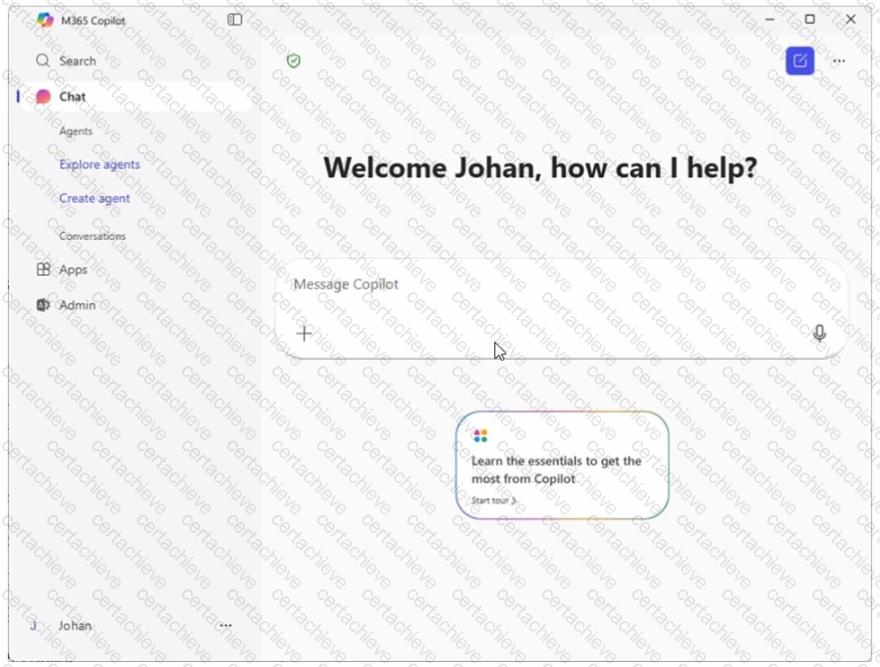
You sign in to the Microsoft 365 Copilot app by using your work account as shown in the exhibit.
A colleague tells you that when they open the Microsoft 365 Copilot app, they have access to the Researcher agent. You need to access the Researcher agent.
What should you do?
Correct Answer & Rationale:
Answer: B
Explanation:
In Microsoft 365 Copilot, agents such as Researcher are accessed through the Agents experience within the Copilot app. If the user interface does not immediately display a specific agent, the correct action is to browse or search the available agents catalog. The exhibit shows the left navigation pane with an Explore agents option.
According to Microsoft AI Business Professional guidance, built-in and custom agents can be discovered and enabled through the Explore agents section. If the user already has the appropriate Copilot license and is signed in with their work account, there is no need to switch accounts or request another license.
Signing in through a browser does not change feature availability, and using a personal account would remove access to organizational features. Therefore, to access the Researcher agent, you should select Explore agents and search for Researcher.
==================================================
Question 2
Microsoft AB-730
QUESTION DESCRIPTION:
A colleague from another company shares a link to a prompt.
When you select the link, you receive the following response: " Prompt not found. Sorry, it looks like the prompt is no longer available. "
What is a possible cause of the response?
Correct Answer & Rationale:
Answer: E
Explanation:
Microsoft 365 Copilot operates within the security, compliance, and identity boundaries of a Microsoft 365 tenant. Shared prompts, prompt links, and Copilot artifacts are governed by organizational access controls and tenant isolation. If a prompt is created and shared from outside your organization, cross-tenant access may not be supported depending on the sharing configuration and administrative policies.
When a user attempts to open a prompt that resides in another organization’s tenant without proper cross-tenant sharing permissions, Copilot cannot locate or validate the resource within the user’s own environment. As a result, the system displays a “Prompt not found” message.
Option B would typically result in an access or permissions error rather than the prompt being unavailable entirely. Sensitivity labels and scheduled prompts do not inherently cause a “not found” error. Therefore, the most likely cause is that the prompt exists outside your organization’s tenant boundary and is not accessible to you.
==================================================
Question 3
Microsoft AB-730
QUESTION DESCRIPTION:
You run a saved prompt and receive the following response:
" You asked for a summary of File.docx. However, the file appears to be either empty, corrupted, or in a format that I cannot process. "
What is a possible cause of the response?
Correct Answer & Rationale:
Answer: D
Explanation:
When Microsoft 365 Copilot cannot access a referenced file, it may return a message indicating that the file is empty, corrupted, or cannot be processed. In many cases, this message appears when the user does not have sufficient permissions to open the file in SharePoint, OneDrive, or another Microsoft 365 location.
Copilot operates within the Microsoft Graph security boundary and strictly respects user permissions. If a saved prompt references File.docx but the user no longer has access to it—due to permission changes, file relocation, or removal—Copilot cannot retrieve the content for grounding. As a result, it cannot analyze or summarize the file and returns a processing-related error.
Not scheduling the prompt is unrelated to file processing. Running from a web or desktop app does not affect file readability. Using a different agent does not typically cause a file-format processing error.
Therefore, the most likely cause is that you do not have access to the file.
Question 4
Microsoft AB-730
QUESTION DESCRIPTION:
You use Microsoft 365 Copilot to create a proposal in Microsoft Word based on a document in a Microsoft SharePoint library.
You need to ensure that the information cited in the proposal is accurate.
What is the best approach to achieve the goal? More than one answer choice may achieve the goal. Select the BEST answer.
Correct Answer & Rationale:
Answer: A
Explanation:
To ensure cited information is accurate, Microsoft’s AI guidance emphasizes human verification of AI-generated outputs, especially when the content will be used in formal business documents. Even when Copilot grounds responses in SharePoint files, it can still misinterpret text, summarize imprecisely, or attribute a statement to the wrong section of a source. The most reliable way to confirm accuracy is to check each citation against the original SharePoint document and validate that the claim is supported exactly as written.
Option A is the best answer because manual verification is the definitive control for accuracy and accountability. Option B may help by asking Copilot to re-check or restate where information came from, but it is still an AI-generated confirmation and does not replace direct source validation. Options C and D can improve consistency and reuse of standards or references, but they do not guarantee citation correctness; they still depend on model interpretation.
Therefore, the best approach is to manually verify the citations in the generated proposal content.
Question 5
Microsoft AB-730
QUESTION DESCRIPTION:
You create and share a Microsoft 365 Copilot agent named Agent1 that contains three suggested prompts. A user named Ben Smith installs Agent1. You add a new suggested prompt to Agent1. You need to ensure that Ben Smith sees the new suggested prompt. What should you do?
Correct Answer & Rationale:
Answer: C
Explanation:
Microsoft 365 Copilot agents dynamically reflect updates such as new suggested prompts. When an agent is updated, users who already have the agent installed do not need to reinstall or have the agent reshared. Instead, the updated configuration becomes available when the agent is used again.
Suggested prompts are surfaced when a user interacts with the agent. Therefore, once Ben Smith issues any prompt to Agent1, the agent session refreshes and displays the latest suggested prompts, including the newly added one.
Stopping and resharing the agent (Option A) or reinstalling it (Option B) is unnecessary overhead. Option D refers to a non-standard command and is not part of Microsoft Copilot functionality.
Thus, the correct action is simply to have the user interact with the agent again.
==================================================
Question 6
Microsoft AB-730
QUESTION DESCRIPTION:
You are using Microsoft 365 Copilot to plan a trip and have asked Copilot to remember several details about the trip.
You cancel the trip plans.
You need to ensure that Copilot forgets the details.
What should you do?
Correct Answer & Rationale:
Answer: C
Explanation:
Microsoft 365 Copilot includes a memory capability that allows it to retain user-provided preferences or details across interactions when explicitly instructed to remember them. These stored details are referred to as memories and are separate from standard conversation history.
If you previously asked Copilot to remember specific trip-related details, those details are stored as structured memory items. Simply deleting the conversation does not necessarily remove stored memory entries. Likewise, deleting activity history through the My Account portal removes conversation records but does not directly manage structured Copilot memories. Custom instructions define persistent behavioral preferences and are unrelated to trip-specific stored data.
To ensure Copilot no longer retains those trip details, you must delete the stored memories directly within Copilot. Microsoft documentation explains that users can view and manage saved memories and remove them individually to control what Copilot retains.
Therefore, the correct action to ensure Copilot forgets the trip details is to delete the memories.
Question 7
Microsoft AB-730
QUESTION DESCRIPTION:
You have an open Microsoft 365 Copilot conversation.
You need to chat with an agent named Agent1 during the conversation.
What should you enter to call Agent1?
Correct Answer & Rationale:
Answer: D
Explanation:
In Microsoft 365 experiences, the standard way to invoke or reference people and specific resources in-context is by using the @mention pattern. Microsoft 365 Copilot extends this familiar interaction model to agents: when you want to switch to, invoke, or direct a question to a specific agent from within an existing Copilot conversation, you use @ followed by the agent’s name. This makes the agent selection explicit and reduces ambiguity about which assistant or capability you want to use for the next turn.
The other syntaxes listed are commonly associated with different systems: square brackets are not used for agent invocation, hashtags are typically used for topics/tags, and slash commands are used in some chat applications for command execution—but they are not the standard method for calling a Copilot agent in Microsoft 365 Copilot Chat.
Therefore, to chat with an agent named Agent1 during an open Copilot conversation, you should enter @Agent1 .
Question 8
Microsoft AB-730
QUESTION DESCRIPTION:
You create a Microsoft Teams meeting that will only allow the use of Copilot during the meeting. The meeting will NOT be transcribed.
Which statement accurately describes how Copilot can be used during the meeting?
Correct Answer & Rationale:
Answer: C
Explanation:
When transcription is not enabled , Microsoft 365 Copilot in Teams cannot access a full historical record of the meeting conversation. Copilot relies on transcript data to provide complete summaries and recaps. Without transcription, Copilot can still assist during the meeting , but only from the point at which it is activated.
Copilot does not automatically activate at the start of the meeting; a user must explicitly invoke it. Once activated, Copilot processes the live conversation stream and can generate summaries, key points, or insights from that moment forward only . It cannot reconstruct earlier discussion because no transcript exists for prior content.
Options B and D are incorrect because they assume automatic activation and full-meeting recap capability, which require transcription. Option A is incorrect because Copilot summarizes the meeting content, not just the speech of the activating user.
Therefore, the correct answer is C .
==================================================
Question 9
Microsoft AB-730
QUESTION DESCRIPTION:
You need to improve prompt-grounding during a Microsoft 365 Copilot conversation.
What is the best approach to achieve the goal? More than one answer choice may achieve the goal. Select the BEST answer.
Correct Answer & Rationale:
Answer: D
Explanation:
Prompt-grounding means ensuring Copilot’s response is based on authoritative, relevant source material rather than inferred or generalized information. Microsoft guidance for Copilot emphasizes that the most effective way to ground responses is to explicitly point Copilot to the content you want it to use—such as specific SharePoint documents, OneDrive files, emails, meeting notes, or other Microsoft 365 resources the user has permission to access.
Option D is therefore the best answer because referencing specific files anchors Copilot’s reasoning to the exact material that should be used for facts, terminology, and details. This reduces hallucinations (fabrication) and improves accuracy and traceability, especially when Copilot can provide citations back to the referenced sources.
Option B (desired output format) improves structure and readability but does not, by itself, ground content. Option A can sometimes improve clarity, but shorter prompts do not guarantee grounding. Option C may help comprehension in some cases, but it is not a grounding strategy and can be counterproductive if the source material is technical.
Therefore, the best approach to improve prompt-grounding is to reference specific files .
Question 10
Microsoft AB-730
QUESTION DESCRIPTION:
You sign in to the Microsoft 365 Copilot app by using your work account as shown in the following exhibit
A colleague tells you that when they open the Microsoft 365 Copilot app, they have access to the Researcher agent. You need to access to the Researcher agent.
What should you do?
Correct Answer & Rationale:
Answer: B
Explanation:
In Microsoft 365 Copilot, agents such as Researcher are accessed through the Agents experience within the Copilot app. If the user interface does not immediately display a specific agent, the correct action is to browse or search the available agents catalog. The exhibit shows the left navigation pane with an Explore agents option.
According to Microsoft AI Business Professional guidance, built-in and custom agents can be discovered and enabled through the Explore agents section. If the user already has the appropriate Copilot license and is signed in with their work account, there is no need to switch accounts or request another license.
Signing in through a browser does not change feature availability, and using a personal account would remove access to organizational features. Therefore, to access the Researcher agent, you should select Explore agents and search for Researcher.

Verified by Certified Instructors
This Microsoft AB-730 study pack was audited and verified on November 7, 2026 by Vint Halloway,. We ensure every technical rationale aligns with real-world enterprise standards.
A Stepping Stone for Enhanced Career Opportunities
Your profile having Microsoft Certified: AI Business Professional certification significantly enhances your credibility and marketability in all corners of the world. The best part is that your formal recognition pays you in terms of tangible career advancement. It helps you perform your desired job roles accompanied by a substantial increase in your regular income. Beyond the resume, your expertise imparts you confidence to act as a dependable professional to solve real-world business challenges.
Your success in Microsoft AB-730 certification exam makes your visible and relevant in the fast-evolving tech landscape. It proves a lifelong investment in your career that give you not only a competitive advantage over your non-certified peers but also makes you eligible for a further relevant exams in your domain.
What You Need to Ace Microsoft Exam AB-730
Achieving success in the AB-730 Microsoft exam requires a blending of clear understanding of all the exam topics, practical skills, and practice of the actual format. There's no room for cramming information, memorizing facts or dependence on a few significant exam topics. It means your readiness for exam needs you develop a comprehensive grasp on the syllabus that includes theoretical as well as practical command.
Here is a comprehensive strategy layout to secure peak performance in AB-730 certification exam:
- Develop a rock-solid theoretical clarity of the exam topics
- Begin with easier and more familiar topics of the exam syllabus
- Make sure your command on the fundamental concepts
- Focus your attention to understand why that matters
- Ensure hands-on practice as the exam tests your ability to apply knowledge
- Develop a study routine managing time because it can be a major time-sink if you are slow
- Find out a comprehensive and streamlined study resource for your help
Ensuring Outstanding Results in Exam AB-730!
In the backdrop of the above prep strategy for AB-730 Microsoft exam, your primary need is to find out a comprehensive study resource. It could otherwise be a daunting task to achieve exam success. The most important factor that must be kep in mind is make sure your reliance on a one particular resource instead of depending on multiple sources. It should be an all-inclusive resource that ensures conceptual explanations, hands-on practical exercises, and realistic assessment tools.
Certachieve: A Reliable All-inclusive Study Resource
Certachieve offers multiple study tools to do thorough and rewarding AB-730 exam prep. Here's an overview of Certachieve's toolkit:
Microsoft AB-730 PDF Study Guide
This premium guide contains a number of Microsoft AB-730 exam questions and answers that give you a full coverage of the exam syllabus in easy language. The information provided efficiently guides the candidate's focus to the most critical topics. The supportive explanations and examples build both the knowledge and the practical confidence of the exam candidates required to confidently pass the exam. The demo of Microsoft AB-730 study guide pdf free download is also available to examine the contents and quality of the study material.
Microsoft AB-730 Practice Exams
Practicing the exam AB-730 questions is one of the essential requirements of your exam preparation. To help you with this important task, Certachieve introduces Microsoft AB-730 Testing Engine to simulate multiple real exam-like tests. They are of enormous value for developing your grasp and understanding your strengths and weaknesses in exam preparation and make up deficiencies in time.
These comprehensive materials are engineered to streamline your preparation process, providing a direct and efficient path to mastering the exam's requirements.
Microsoft AB-730 exam dumps
These realistic dumps include the most significant questions that may be the part of your upcoming exam. Learning AB-730 exam dumps can increase not only your chances of success but can also award you an outstanding score.
The AB-730 Exam Dumps provided realistic Practice Questions with detailed explanations that improved my understanding of Microsoft business applications and cloud solutions. The testing engine was very user-friendly.
Daniel Murphy
May 29, 2026
Top Exams & Certification Providers
New & Trending
- New Released Exams
- Related Exam
- Hot Vendor
Verified Performance Reports
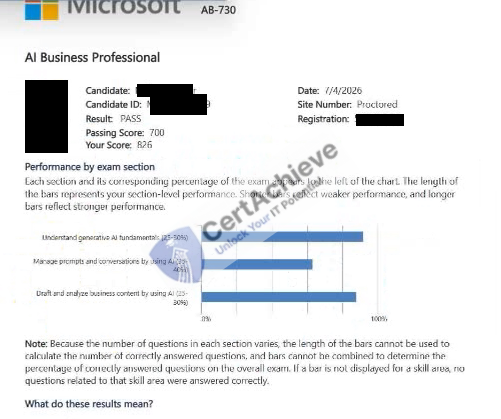
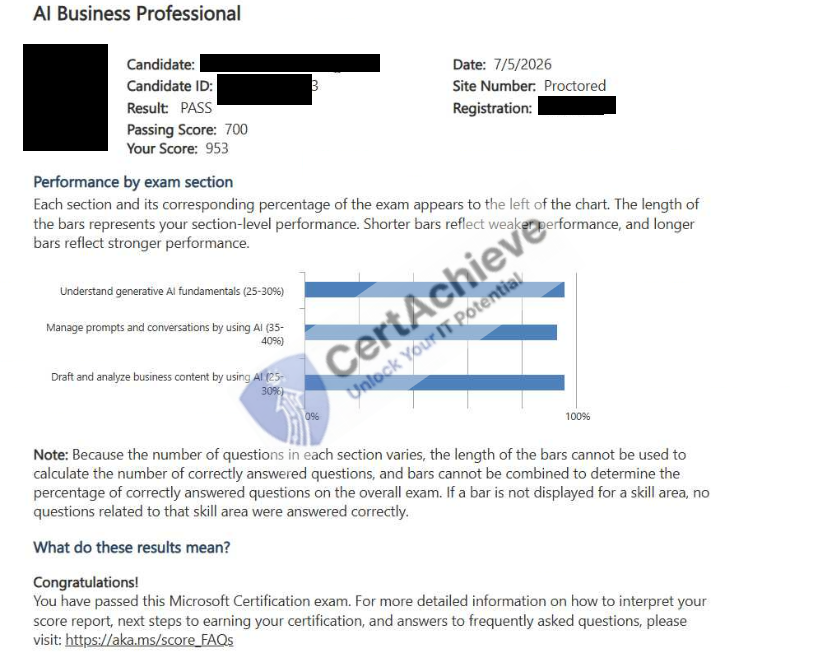
Authentic score reports from candidates who cleared the AB-730 exam.
Verified Case #1
Verified Case #2
×
![]()