
The Microsoft Azure Administrator (AZ-104)
Passing Microsoft Azure Administrator Associate exam ensures for the successful candidate a powerful array of professional and personal benefits. The first and the foremost benefit comes with a global recognition that validates your knowledge and skills, making possible your entry into any organization of your choice.


AZ-104 Exam Dumps
- Exam Code: AZ-104
- Vendor: Microsoft
- Certifications: Azure Administrator Associate
- Exam Name: Microsoft Azure Administrator
Why CertAchieve is Better than Standard AZ-104 Dumps
In 2026, Microsoft uses variable topologies. Basic dumps will fail you.
| Quality Standard | Generic Dump Sites | CertAchieve Premium Prep |
|---|---|---|
| Technical Explanation | None (Answer Key Only) | Step-by-Step Expert Rationales |
| Syllabus Coverage | Often Outdated (v1.0) | 2026 Updated (Latest Syllabus) |
| Scenario Mastery | Blind Memorization | Conceptual Logic & Troubleshooting |
| Instructor Access | No Post-Sale Support | 24/7 Professional Help |
Customers Passed Exams
10
Success backed by proven exam prep tools
Questions Came Word for Word
93%
Real exam match rate reported by verified users
Average Score in Real Testing Centre
87%
Consistently high performance across certifications
Study Time Saved With CertAchieve
60%
Efficient prep that reduces study hours significantly
Coverage of Official Microsoft AZ-104 Exam Domains
Our curriculum is meticulously mapped to the Microsoft official blueprint.
Manage Azure Identities and Governance (25%)
Microsoft Entra ID (formerly Azure Active Directory). Focus on managing users, groups, and licenses, implementing Administrative Units, and configuring Azure RBAC. Master governance via Azure Policy, Resource Locks, and Management Groups.
Implement and Manage Storage (20%)
Deep dive into Storage Accounts: redundancy (LRS, GRS, ZRS), encryption, and networking. Master Azure Blob Storage lifecycle management, access tiers (Hot, Cool, Archive), and securing data with SAS and private endpoints.
Deploy and Manage Azure Compute Resources (25%)
Master Virtual Machines, Scale Sets (VMSS), and Availability Zones. Focus on container solutions like Azure Container Instances (ACI) and Azure Container Apps, plus managing App Service plans for web application hosting.
Implement and Manage Virtual Networking (20%)
The most technical domain. Master VNet peering, Network Security Groups (NSGs), and Application Security Groups (ASGs). Focus on name resolution via Azure DNS, implementing Azure Bastion, and configuring Load Balancers.
Monitor and Maintain Azure Resources (15%)
Master observability with Azure Monitor. Focus on metrics, logs (KQL), and alert rules. Implement business continuity through Azure Backup, Recovery Services Vaults, and Site Recovery (ASR).
Microsoft AZ-104 Exam Domains Q&A
Certified instructors verify every question for 100% accuracy, providing detailed, step-by-step explanations for each.
Question 1
Microsoft AZ-104
QUESTION DESCRIPTION:
You have an Azure subscription that has the public IPv4 addresses shown in the following table.
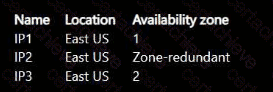
You need to create a virtual machine named VM1 that has the following settings:
• Region: East US
• Availability options: Availability zone
• Availability zone: Zone 1
Which public IPv4 addresses can you assign to VM1?
Correct Answer & Rationale:
Answer: B
Explanation:
VM1 will be deployed to East US, Availability Zone 1 . A public IPv4 address assigned to a zonal virtual machine must be compatible with the VM’s region and zone configuration. Microsoft defines a zonal public IP address as one that is tied to a specific availability zone, while a zone-redundant public IP address is created across multiple zones in the same region and can survive a single zone failure.
Therefore, IP1 can be assigned because it is in East US and pinned to Zone 1 , matching VM1. IP2 can also be assigned because it is zone-redundant in East US and is not restricted to a single different zone. IP3 cannot be assigned because it is tied to Zone 2 , while VM1 is explicitly deployed to Zone 1 . The region alone is not sufficient; the zone placement must also be compatible. This maps to AZ-104 Configure and manage virtual networking , specifically public IP addresses, availability zones, and VM network configuration.
Question 2
Microsoft AZ-104
QUESTION DESCRIPTION:
You have a Microsoft Entra tenant named contoso.com.
You collaborate with an external partner named fabrikam.com.
You plan to invite users in fabrikam.com to the contoso.com tenant.
You need to ensure that invitations can be sent only to fabrikam.com users.
What should you do in the Microsoft Entra admin center?
Correct Answer & Rationale:
Answer: C
Explanation:
Microsoft Entra ID provides External collaboration settings to control which external domains users can invite as guests. To restrict invitations so that only users from fabrikam.com can be invited, you must configure Collaboration restrictions.
Within the External collaboration settings, administrators can:
Allow invitations only to users from specific domains
Block invitations to all other external domains
Microsoft Entra documentation specifies that Collaboration restrictions are the control used to define allowed or blocked external domains for B2B guest invitations.
The other options do not meet the requirement:
Guest user access restrictions control what guests can do after they are invited.
Cross-tenant access – Tenant restrictions control inbound/outbound access behavior, not invitation eligibility.
Microsoft cloud settings apply to cloud instances, not domain-based invitations.
Final Verified Answer:
✅ C. From External collaboration settings, configure the Collaboration restrictions settings.
Question 3
Microsoft AZ-104
QUESTION DESCRIPTION:
Note: This question is part of a series of questions that present the same scenario. Each question in the series contains a unique solution that might meet the stated goals. Some question sets might have more than one correct solution, while others might not have a correct solution.
After you answer a question in this section, you will NOT be able to return to it. As a result, these questions will not appear in the review screen.
You have an Azure virtual machine named VM1. VM1 was deployed by using a custom Azure Resource Manager template named ARM1.json.
You receive a notification that VM1 will be affected by maintenance.
You need to move VM1 to a different host immediately.
Solution: From the Redeploy blade, you click Redeploy.
Does this meet the goal?
Correct Answer & Rationale:
Answer: A
Explanation:
When Azure schedules maintenance for a virtual machine, you can proactively move it to a new physical host by performing a self-service redeploy.
The Redeploy feature in the Azure portal allows you to:
Move the VM to a new host node.
Keep the same network interface, disks, and configuration.
Resolve underlying host-level or platform issues proactively.
This action satisfies the requirement to move VM1 to a different host immediately and minimizes downtime.
This is explicitly documented in the Microsoft Learn - Redeploy Windows virtual machine to new Azure node guide.
✅ Final Verified Answer: A. Yes
Question 4
Microsoft AZ-104
QUESTION DESCRIPTION:
You have an Azure subscription that contains two virtual machines named VM1 and VM2
You create an Azure load balancer.
You plan to create a load balancing rule that will load balance HTTPS traffic between VM1 and VM2.
Which two additional load balance resources should you create before you can create the load balancing rule? Each correct answer presents part of the solution
MOTL Each correct selection 5 worth one point.
Correct Answer & Rationale:
Answer: A, C
Explanation:
To create a load balancing rule that will load balance HTTPS traffic between VM1 and VM2, you need to create two additional load balance resources: a frontend IP address and a health probe.
A frontend IP address is the IP address that the clients use to access the load balancer. It can be either public or private, depending on the type of load balancer. A frontend IP address is required for any load balancing rule1.
A health probe is used to monitor the health and availability of the backend instances. It can be either TCP, HTTP, or HTTPS, depending on the protocol of the load balancing rule. A health probe is required for any load balancing rule1.
A backend pool is a group of backend instances that receive the traffic from the load balancer. You already have a backend pool that contains VM1 and VM2, so you don’t need to create another one.
An inbound NAT rule is used to forward traffic from a specific port on the frontend IP address to a specific port on a backend instance. It’s not required for a load balancing rule, but it can be used to access individual instances for troubleshooting or maintenance purposes1.
A virtual network is a logical isolation of Azure resources within a region. It’s not a load balance resource, but it’s required for creating an internal load balancer or connecting virtual machines to a load balancer2.
Question 5
Microsoft AZ-104
QUESTION DESCRIPTION:
You have 15 Azure subscriptions.
You have a Microsoft Entra tenant that contains a security group named Group1.
You plan to purchase additional Azure subscriptions.
You need to ensure that Group1 can manage role assignments for the existing subscriptions and the planned subscriptions. The solution must meet the following requirements:
• Use the principle of least privilege.
• Minimize administrative effort
What should you do?
Correct Answer & Rationale:
Answer: C
Explanation:
The requirement is for Group1 to manage role assignments (Azure RBAC) across existing subscriptions and future subscriptions, while applying least privilege and minimizing ongoing administration. In Azure RBAC, the permission to create, update, and delete role assignments is governed by management-plane actions under Microsoft.Authorization/roleAssignments. Microsoft’s Azure Administrator documentation identifies two common roles that can manage access: Owner and User Access Administrator. Of these, User Access Administrator is the least-privileged role intended specifically to manage user access without granting full resource management permissions like Owner does.
To minimize administrative effort for both current and newly purchased subscriptions, you should assign the role at the highest scope that will automatically cover all subscriptions through inheritance. The root management group is the top of the management group hierarchy; all management groups and subscriptions roll up to it. Assigning User Access Administrator to Group1 at the root management group ensures Group1 can manage role assignments across the entire hierarchy, including subscriptions added later, without repeatedly applying role assignments per subscription or per management group. This meets both requirements: least privilege (User Access Administrator instead of Owner) and minimal administrative effort (one assignment at the root scope).
Question 6
Microsoft AZ-104
QUESTION DESCRIPTION:
Your on-premises network contains an SMB share named Share1.
You have an Azure subscription that contains the following resources:
A web app named webapp1
A virtual network named VNET1
You need to ensure that webapp1 can connect to Share1.
What should you deploy?
Correct Answer & Rationale:
Answer: C
Explanation:
To enable a web app hosted in Azure App Service to connect securely to an on-premises SMB share (Share1), you must create hybrid network connectivity between your Azure environment and your on-premises network.
According to the Microsoft Azure Administrator Study Guide and Microsoft Learn documentation, Azure Web Apps running in an App Service Plan cannot directly access on-premises file shares over the public internet for security reasons. You must extend your on-premises network to Azure through a Virtual Network (VNet) and then integrate the web app with that network.
The Virtual Network Gateway is the component that enables this hybrid connectivity. It establishes a Site-to-Site VPN or ExpressRoute connection between the Azure VNet and the on-premises network, allowing the web app (after VNet integration) to access internal resources such as SMB shares, SQL Servers, or file servers.
Once the VPN gateway is configured and the web app is integrated with the VNet (Regional VNet Integration), the web app can securely access Share1 over the private network channel.
Official Microsoft Documentation Extract (Summary):
“To access on-premises resources from Azure App Service, configure VNet Integration and establish a Site-to-Site VPN or ExpressRoute connection using a Virtual Network Gateway. This allows Azure resources to securely communicate with on-premises systems such as SMB file shares or databases.”
(Source: Microsoft Learn — Connect an App Service app to an on-premises network using Azure VPN Gateway.)
Question 7
Microsoft AZ-104
QUESTION DESCRIPTION:
You have an Azure subscription.
You plan to deploy the Azure container instances shown in the following table.
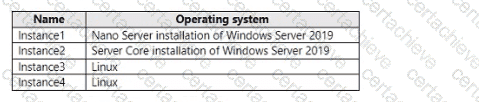
Which instances can you deploy to a container group?
Correct Answer & Rationale:
Answer: C
Explanation:
https://learn.microsoft.com/en-us/azure/container-instances/container-instances-container-groups Multi-container groups currently support only Linux containers. For Windows containers, Azure Container Instances only supports deployment of a single container instance. While we are working to bring all features to Windows containers, you can find current platform differences in the service
Question 8
Microsoft AZ-104
QUESTION DESCRIPTION:
You have an Azure virtual machine named VM1. VM1 was deployed by using a custom Azure Resource Manager template named ARMIjson.
You receive a notification that VM1 will be affected by maintenance.
You need to move VM1 to a different host immediately.
Solution: From the resource group blade, move VM1 to another subscription.
Does this meet the goal?
Correct Answer & Rationale:
Answer: B
Explanation:
According to the Microsoft Azure Administrator (AZ-104) official documentation and study guides, when a virtual machine (VM) in Azure is scheduled for maintenance, you can proactively move the VM to another host to minimize downtime. This process is called a self-service maintenance move.
When Azure schedules maintenance events that could affect the underlying host hardware, customers have the option to move their virtual machines within the same region and subscription to a healthy host by using either the Azure portal, PowerShell, or the Azure CLI. The operation that performs this action is called Redeploy or Maintenance Redeploy.
In this scenario, the proposed action — moving the VM to another subscription from the resource group blade — does not satisfy the requirement. Moving a VM between subscriptions involves deallocation and redeployment, which does not guarantee that the VM will move to a new host to avoid maintenance. In fact, the VM will remain unavailable during the move process and may need to be reconfigured.
The correct solution to move a VM to another host immediately is to perform a self-service maintenance operation or redeploy the VM. This can be done by selecting the VM in the Azure portal, navigating to Help + support → Maintenance, and choosing “Move to a different host”, or by using the Redeploy button under the VM settings.
Thus, moving the VM to another subscription does not meet the maintenance mitigation goal.
Question 9
Microsoft AZ-104
QUESTION DESCRIPTION:
You have an Azure subscription mat contains a virtual machine named VM1 and an Azure function named App1. You need to create an alert rule that will run App1 if VM1 stops. What should you create for the alert rule?
Correct Answer & Rationale:
Answer: B
Explanation:
https://learn.microsoft.com/en-us/azure/azure-monitor/alerts/alerts-create-new-alert-rule
You create an alert rule by combining:
- The resources to be monitored.
- The signal or telemetry from the resource.
- Conditions.
Then you define these elements for the resulting alert actions by using:
- Alert processing rules
- Action groups
Question 10
Microsoft AZ-104
QUESTION DESCRIPTION:
You have an Azure Resource Manager that is used to deploy an Azure virtual machine.
Template1 contains the following text:
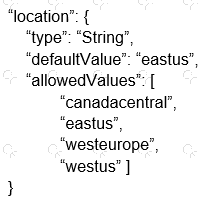
The variables section in Template1 contains the following text:
" location " : " westeurope "
The resources section in Template1 contains the following text:
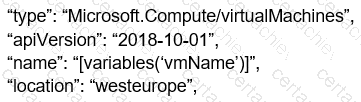
You need to deploy the virtual machine to the West US location by using Template1.
What should you do?
Correct Answer & Rationale:
Answer: A
Explanation:
You can change the location in resources. Parameters used to define the value of some variables to be able to use in different places in the template resources. Resources are used only for complicated expressions. In any case, RM will only deploy from resources. In case the value is not mentioned directly, then it will check parameters if it is specified in the resources. Based on this question, the value of location is defined directly in resources. so you change the resources location value.
Use location parameter. To allow flexibility when deploying your template, use a parameter to specify the location for resources. Set the default value of the parameter to resourceGroup().location.
[Reference:, https://docs.microsoft.com/en-us/azure/azure-resource-manager/templates/resource-location?tabs=azure-powershell, https://docs.microsoft.com/en-us/azure/azure-resource-manager/templates/template-syntax#resources, , , , , ]

Verified by Certified Instructors
This Microsoft AZ-104 study pack was audited and verified on September 23, 2026 by Gene Whitlock,. We ensure every technical rationale aligns with real-world enterprise standards.
A Stepping Stone for Enhanced Career Opportunities
Your profile having Azure Administrator Associate certification significantly enhances your credibility and marketability in all corners of the world. The best part is that your formal recognition pays you in terms of tangible career advancement. It helps you perform your desired job roles accompanied by a substantial increase in your regular income. Beyond the resume, your expertise imparts you confidence to act as a dependable professional to solve real-world business challenges.
Your success in Microsoft AZ-104 certification exam makes your visible and relevant in the fast-evolving tech landscape. It proves a lifelong investment in your career that give you not only a competitive advantage over your non-certified peers but also makes you eligible for a further relevant exams in your domain.
What You Need to Ace Microsoft Exam AZ-104
Achieving success in the AZ-104 Microsoft exam requires a blending of clear understanding of all the exam topics, practical skills, and practice of the actual format. There's no room for cramming information, memorizing facts or dependence on a few significant exam topics. It means your readiness for exam needs you develop a comprehensive grasp on the syllabus that includes theoretical as well as practical command.
Here is a comprehensive strategy layout to secure peak performance in AZ-104 certification exam:
- Develop a rock-solid theoretical clarity of the exam topics
- Begin with easier and more familiar topics of the exam syllabus
- Make sure your command on the fundamental concepts
- Focus your attention to understand why that matters
- Ensure hands-on practice as the exam tests your ability to apply knowledge
- Develop a study routine managing time because it can be a major time-sink if you are slow
- Find out a comprehensive and streamlined study resource for your help
Ensuring Outstanding Results in Exam AZ-104!
In the backdrop of the above prep strategy for AZ-104 Microsoft exam, your primary need is to find out a comprehensive study resource. It could otherwise be a daunting task to achieve exam success. The most important factor that must be kep in mind is make sure your reliance on a one particular resource instead of depending on multiple sources. It should be an all-inclusive resource that ensures conceptual explanations, hands-on practical exercises, and realistic assessment tools.
Certachieve: A Reliable All-inclusive Study Resource
Certachieve offers multiple study tools to do thorough and rewarding AZ-104 exam prep. Here's an overview of Certachieve's toolkit:
Microsoft AZ-104 PDF Study Guide
This premium guide contains a number of Microsoft AZ-104 exam questions and answers that give you a full coverage of the exam syllabus in easy language. The information provided efficiently guides the candidate's focus to the most critical topics. The supportive explanations and examples build both the knowledge and the practical confidence of the exam candidates required to confidently pass the exam. The demo of Microsoft AZ-104 study guide pdf free download is also available to examine the contents and quality of the study material.
Microsoft AZ-104 Practice Exams
Practicing the exam AZ-104 questions is one of the essential requirements of your exam preparation. To help you with this important task, Certachieve introduces Microsoft AZ-104 Testing Engine to simulate multiple real exam-like tests. They are of enormous value for developing your grasp and understanding your strengths and weaknesses in exam preparation and make up deficiencies in time.
These comprehensive materials are engineered to streamline your preparation process, providing a direct and efficient path to mastering the exam's requirements.
Microsoft AZ-104 exam dumps
These realistic dumps include the most significant questions that may be the part of your upcoming exam. Learning AZ-104 exam dumps can increase not only your chances of success but can also award you an outstanding score.
CertAchieve offered updated AZ-104 Practice Questions that explained Azure administration, networking, monitoring, and identity management concepts clearly. The Real Questions were very useful for exam readiness.
Joseph Foster
Jun 5, 2026
Top Exams & Certification Providers
New & Trending
- New Released Exams
- Related Exam
- Hot Vendor
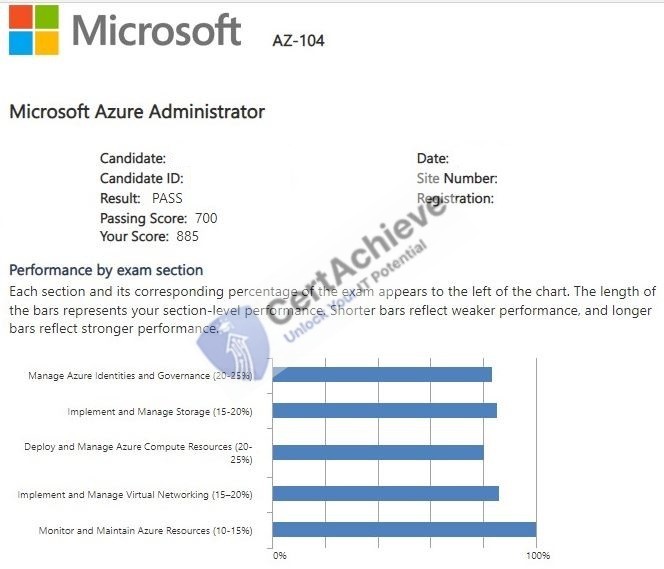
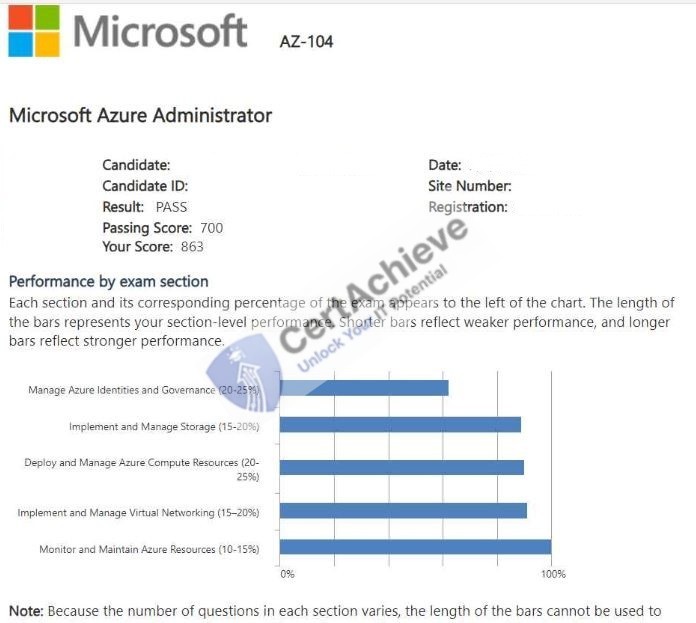
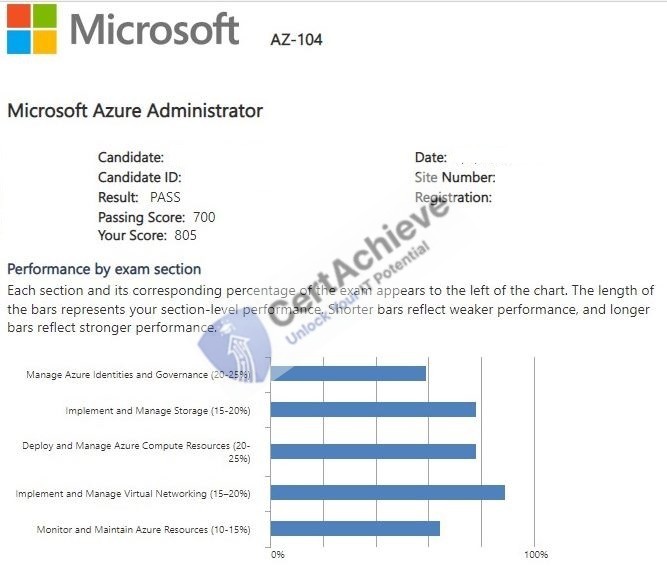
Verified Performance Reports
Authentic score reports from candidates who cleared the AZ-104 exam.
Verified Case #1
Verified Case #2
Verified Case #3
×
![]()