
The Fortinet NSE 5 - FortiAnalyzer 7.6 Analyst (FCP_FAZ_AN-7.6)
Passing Fortinet Fortinet Certified Professional Security Operations exam ensures for the successful candidate a powerful array of professional and personal benefits. The first and the foremost benefit comes with a global recognition that validates your knowledge and skills, making possible your entry into any organization of your choice.


FCP_FAZ_AN-7.6 Exam Dumps
- Exam Code: FCP_FAZ_AN-7.6
- Vendor: Fortinet
- Certifications: Fortinet Certified Professional Security Operations
- Exam Name: Fortinet NSE 5 - FortiAnalyzer 7.6 Analyst
Why CertAchieve is Better than Standard FCP_FAZ_AN-7.6 Dumps
In 2026, Fortinet uses variable topologies. Basic dumps will fail you.
| Quality Standard | Generic Dump Sites | CertAchieve Premium Prep |
|---|---|---|
| Technical Explanation | None (Answer Key Only) | Step-by-Step Expert Rationales |
| Syllabus Coverage | Often Outdated (v1.0) | 2026 Updated (Latest Syllabus) |
| Scenario Mastery | Blind Memorization | Conceptual Logic & Troubleshooting |
| Instructor Access | No Post-Sale Support | 24/7 Professional Help |
Customers Passed Exams
10
Success backed by proven exam prep tools
Questions Came Word for Word
94%
Real exam match rate reported by verified users
Average Score in Real Testing Centre
91%
Consistently high performance across certifications
Study Time Saved With CertAchieve
60%
Efficient prep that reduces study hours significantly
Coverage of Official Fortinet FCP_FAZ_AN-7.6 Exam Domains
Our curriculum is meticulously mapped to the Fortinet official blueprint.
SOC Operations & FortiAnalyzer Concepts
The "Operational" foundation. Master the role of FortiAnalyzer within the SOC. Focus on administrative tasks that impact analysis, including ADOMs (Administrative Domains), disk quotas, and log storage policies. Understand the different operation modes (Analyzer vs. Collector) and how they influence the speed and depth of security investigations in 2026.
Logs and Data Analysis
The "Detective" core. Master the Log View interface to perform deep-dive forensics. Focus on using filters, managing Log Arrays, and understanding the metadata associated with different Fortinet devices. Learn to identify traffic patterns, security events, and "Shadow IT" indicators that suggest a breach or policy violation.Events and Incident Management
The "Action" layer. Master the transition from logs to actionable Incidents. Focus on configuring Event Handlers to trigger alerts based on specific security criteria. In 2026, this domain emphasizes the use of Incidents to track the lifecycle of a threat and utilizing Playbooks to automate initial response actions, reducing "Mean Time to Resolution" (MTTR).
Reports & Data Visualization
The "Storytelling" layer. Master the generation of professional security reports. Focus on customizing Charts and Datasets using SQL queries. Learn to use Macros to automate data population and design dashboards that provide real-time visibility into the organization’s security posture for both technical teams and executive leadership.
Threat Intelligence & FortiGuard Integration
The "Intelligence" domain. Master the integration of FortiGuard services to enrich local logs with global threat data. Focus on identifying Indicators of Compromise (IOCs) and utilizing the Threat Hunter dashboard to proactively search for advanced persistent threats (APTs). Understand how to correlate external intelligence with internal logs to stay ahead of zero-day exploits.
Fortinet FCP_FAZ_AN-7.6 Exam Domains Q&A
Certified instructors verify every question for 100% accuracy, providing detailed, step-by-step explanations for each.
Question 1
Fortinet FCP_FAZ_AN-7.6
QUESTION DESCRIPTION:
(When there are no matching parsers for a device log, what does FortiAnalyzer do? (Choose one answer)
Correct Answer & Rationale:
Answer: C
Explanation:
Exact Extract: Study Guide p.39-p.41: logs are saved first, and parsers are needed to normalize raw logs into standardized fields.
Technical Deep Dive: The correct answer is C. FortiAnalyzer does not discard a log simply because a matching parser is unavailable. The received log is still saved in the FortiAnalyzer log workflow. However, normalization requires a parser that can extract fields and map them into FortiAnalyzer’s common schema. Without that parser, the log remains stored but not normalized. Option A is too destructive. Option B assumes a generic parser is automatically applied. Option D confuses storage/archive state with parser availability.
Question 2
Fortinet FCP_FAZ_AN-7.6
QUESTION DESCRIPTION:
What happens when the indicator of compromise (IOC) engine on FortiAnalyzer finds web logs that match blacklisted IP addresses?
Correct Answer & Rationale:
Answer: B
Explanation:
Exact Extract: Study Guide p.130-p.132: blacklisted IP or DGA matches produce an Infected verdict and appear under Compromised Hosts.
Technical Deep Dive: The correct answer is B. When IOC analysis finds web logs matching blacklisted IP addresses or domain-generation algorithm patterns, FortiAnalyzer treats that as a real breach and creates/updates an infected compromised-host entry for the endpoint. Option A describes suspicious-list behavior, where FortiAnalyzer flags the host for further analysis. Option C is wrong because blacklisted matches are classified as Infected, not merely Suspicious. Option D overstates the automatic endpoint response; quarantine is a separate response action, not the IOC engine classification itself.
Question 3
Fortinet FCP_FAZ_AN-7.6
QUESTION DESCRIPTION:
Refer to the exhibits.
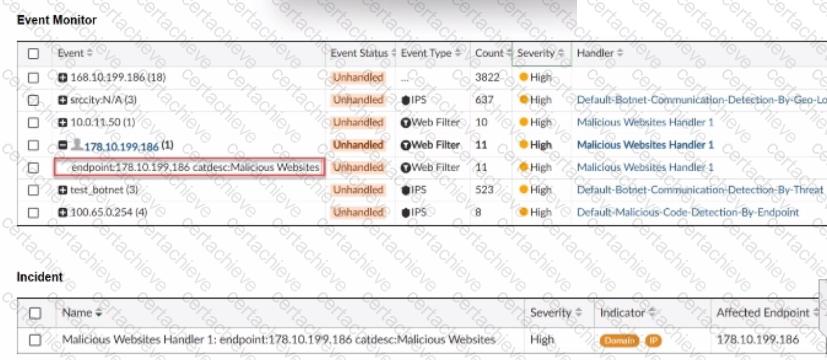
The event shown in the exhibit has been escalated to an incident.
Which SOC role is responsible for handling the escalated incident?
Correct Answer & Rationale:
Answer: D
Explanation:
Exact Extract: Study Guide p.9: Tier 2 Incident Responder investigates escalated alerts in more depth for response.
Technical Deep Dive: The correct answer is D. When an event is escalated into an incident, the SOC role responsible for deeper handling and response is the incident responder. Tier 1 security analysts handle monitoring and triage. Threat hunters proactively search for complex or hidden threats rather than owning every escalated incident. SOC engineers maintain tools such as SIEM/SOAR platforms but are not the primary incident-handling role. The guide’s SOC role model places escalated response work with the Incident Responder.
Question 4
Fortinet FCP_FAZ_AN-7.6
QUESTION DESCRIPTION:
Exhibit.

Which statement about the event displayed is correct?
Correct Answer & Rationale:
Answer: C
Explanation:
Exact Extract: Study Guide p.82: " Unhandled " indicates the security event risk is considered open.
Technical Deep Dive: The displayed event is best interpreted as open/unhandled, so the correct answer is C. In FortiAnalyzer, event status is not just a label; it tells the analyst whether the risk still requires action. A risk source being isolated would map to Contained, while traffic being blocked or dropped maps to Mitigated. An incident being created from an event is a separate workflow action and cannot be concluded from the event status alone unless the exhibit explicitly shows the incident linkage.
Question 5
Fortinet FCP_FAZ_AN-7.6
QUESTION DESCRIPTION:
Exhibit.
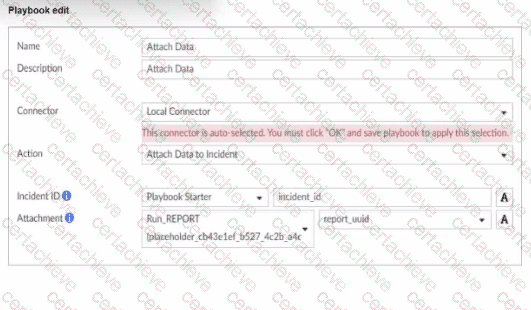
What is the analyst trying to create?
Correct Answer & Rationale:
Answer: B
Explanation:
Exact Extract: Study Guide p.211: output variables use the output from a preceding task as input to the current task.
Technical Deep Dive: The correct answer is B. The exhibit shows the analyst referencing output from an earlier task, such as a generated report identifier, so a later task can attach that result to an incident. That is an output variable. A trigger variable would pull values from the event or incident that started the playbook. The analyst is not creating the report object itself, nor creating a SOC report definition; the report task has already produced data, and the current task is consuming that output dynamically.
Question 6
Fortinet FCP_FAZ_AN-7.6
QUESTION DESCRIPTION:
Which two statements about exporting and importing playbooks are true? (Choose two.)
Correct Answer & Rationale:
Answer: A, C
Explanation:
Exact Extract: Study Guide p.217-p.218: exported playbooks preserve enabled/disabled status, and name conflicts are handled on import.
Technical Deep Dive: The correct answers are A and C. A playbook imported into another ADOM or FortiAnalyzer retains the enabled or disabled status it had when exported, which is why automatic playbooks should be exported disabled. If an imported playbook name already exists, FortiAnalyzer creates a new name with a timestamp to avoid conflicts, so importing with the same name is allowed. Option B is wrong because connectors can be included in the export. Option D is wrong because multiple playbooks can be exported at once.
Question 7
Fortinet FCP_FAZ_AN-7.6
QUESTION DESCRIPTION:
Refer to the exhibit.

What can you conclude about the output?
Correct Answer & Rationale:
Answer: C
Explanation:
Exact Extract: Study Guide p.139: one compressed log message can contain multiple logs; message/log rate differences should be interpreted carefully.
Technical Deep Dive: The correct answer is C. If the exhibit shows message rate higher than log rate, that is not the normal relationship highlighted in the guide. FortiAnalyzer explains the normal case where one log message can contain multiple logs, making log rate higher than message rate. Options A and B cannot be concluded without indexing-completion or log-type breakdown information. Option D is wrong because these fortilogd rate outputs are not ADOM-specific unless a specific ADOM-scoped command is used.
Question 8
Fortinet FCP_FAZ_AN-7.6
QUESTION DESCRIPTION:
Which statement about the FortiSIEM management extension is correct?
Correct Answer & Rationale:
Answer: D
Explanation:
Exact Extract: Official Fortinet FortiSIEM MEA guidance: after enabling the Collector MEA, it must be registered to a licensed FortiSIEM Supervisor.
Technical Deep Dive: The correct answer is D. FortiSIEM MEA on FortiAnalyzer functions as a FortiSIEM collector component and must register to a FortiSIEM Supervisor for operation. Option A describes FortiSOAR-style incident lifecycle management more than FortiSIEM MEA. Option B is wrong because the management extension runs on FortiAnalyzer rather than as a dedicated VM for the MEA itself. Option C is inaccurate because Fortinet documents CPU/RAM caps for MEAs, not a 50% disk-space cap as the defining requirement.
Question 9
Fortinet FCP_FAZ_AN-7.6
QUESTION DESCRIPTION:
Refer to the exhibit.
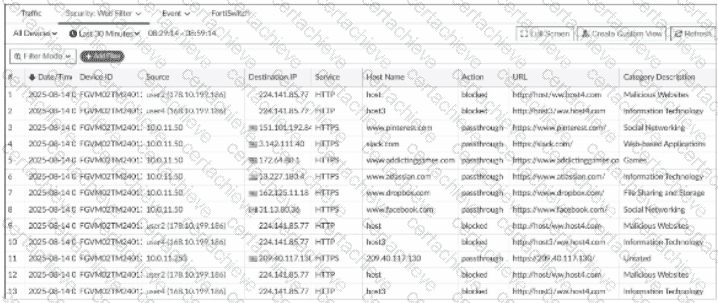
What conclusion can you draw from the exhibit?
Correct Answer & Rationale:
Answer: B
Explanation:
Exact Extract: Study Guide p.57-p.58: filtered Log View examples can show web filter category/action details, including allowed or blocked website categories.
Technical Deep Dive: The correct answer is B. The exhibit indicates social networking web activity is being allowed, not blocked. If the logs were application control logs, the log type/subtype would point to application control rather than web filtering. If unrated websites were blocked, the category/action fields would show that specific category and enforcement action. A custom view cannot be concluded unless the GUI explicitly displays a saved custom view name or custom view indicator.
Question 10
Fortinet FCP_FAZ_AN-7.6
QUESTION DESCRIPTION:
Which statement about sending notifications with incident updates is true?
Correct Answer & Rationale:
Answer: A
Explanation:
Exact Extract: Study Guide p.107: more than one Fabric connector can be configured, with the same or different notification settings.
Technical Deep Dive: The correct answer is A. FortiAnalyzer can send incident status-change notifications through external platform connectors, and each connector can have its own settings. That flexibility lets a SOC notify Teams, ticketing, or other platforms differently depending on the connector and activity type. Option B is wrong because the guide permits multiple connectors. Option C confuses report output profiles with incident notifications. Option D is too narrow because notifications are not limited only to created or deleted incidents.

Verified by Certified Instructors
This Fortinet FCP_FAZ_AN-7.6 study pack was audited and verified on September 23, 2026 by Bruce Kensington,. We ensure every technical rationale aligns with real-world enterprise standards.
A Stepping Stone for Enhanced Career Opportunities
Your profile having Fortinet Certified Professional Security Operations certification significantly enhances your credibility and marketability in all corners of the world. The best part is that your formal recognition pays you in terms of tangible career advancement. It helps you perform your desired job roles accompanied by a substantial increase in your regular income. Beyond the resume, your expertise imparts you confidence to act as a dependable professional to solve real-world business challenges.
Your success in Fortinet FCP_FAZ_AN-7.6 certification exam makes your visible and relevant in the fast-evolving tech landscape. It proves a lifelong investment in your career that give you not only a competitive advantage over your non-certified peers but also makes you eligible for a further relevant exams in your domain.
What You Need to Ace Fortinet Exam FCP_FAZ_AN-7.6
Achieving success in the FCP_FAZ_AN-7.6 Fortinet exam requires a blending of clear understanding of all the exam topics, practical skills, and practice of the actual format. There's no room for cramming information, memorizing facts or dependence on a few significant exam topics. It means your readiness for exam needs you develop a comprehensive grasp on the syllabus that includes theoretical as well as practical command.
Here is a comprehensive strategy layout to secure peak performance in FCP_FAZ_AN-7.6 certification exam:
- Develop a rock-solid theoretical clarity of the exam topics
- Begin with easier and more familiar topics of the exam syllabus
- Make sure your command on the fundamental concepts
- Focus your attention to understand why that matters
- Ensure hands-on practice as the exam tests your ability to apply knowledge
- Develop a study routine managing time because it can be a major time-sink if you are slow
- Find out a comprehensive and streamlined study resource for your help
Ensuring Outstanding Results in Exam FCP_FAZ_AN-7.6!
In the backdrop of the above prep strategy for FCP_FAZ_AN-7.6 Fortinet exam, your primary need is to find out a comprehensive study resource. It could otherwise be a daunting task to achieve exam success. The most important factor that must be kep in mind is make sure your reliance on a one particular resource instead of depending on multiple sources. It should be an all-inclusive resource that ensures conceptual explanations, hands-on practical exercises, and realistic assessment tools.
Certachieve: A Reliable All-inclusive Study Resource
Certachieve offers multiple study tools to do thorough and rewarding FCP_FAZ_AN-7.6 exam prep. Here's an overview of Certachieve's toolkit:
Fortinet FCP_FAZ_AN-7.6 PDF Study Guide
This premium guide contains a number of Fortinet FCP_FAZ_AN-7.6 exam questions and answers that give you a full coverage of the exam syllabus in easy language. The information provided efficiently guides the candidate's focus to the most critical topics. The supportive explanations and examples build both the knowledge and the practical confidence of the exam candidates required to confidently pass the exam. The demo of Fortinet FCP_FAZ_AN-7.6 study guide pdf free download is also available to examine the contents and quality of the study material.
Fortinet FCP_FAZ_AN-7.6 Practice Exams
Practicing the exam FCP_FAZ_AN-7.6 questions is one of the essential requirements of your exam preparation. To help you with this important task, Certachieve introduces Fortinet FCP_FAZ_AN-7.6 Testing Engine to simulate multiple real exam-like tests. They are of enormous value for developing your grasp and understanding your strengths and weaknesses in exam preparation and make up deficiencies in time.
These comprehensive materials are engineered to streamline your preparation process, providing a direct and efficient path to mastering the exam's requirements.
Fortinet FCP_FAZ_AN-7.6 exam dumps
These realistic dumps include the most significant questions that may be the part of your upcoming exam. Learning FCP_FAZ_AN-7.6 exam dumps can increase not only your chances of success but can also award you an outstanding score.
Top Exams & Certification Providers
New & Trending
- New Released Exams
- Related Exam
- Hot Vendor